

- Who We Are
- Who We Help

FinTech
Healthcare
-
- What We Do
Microsoft Azure Solutions
Maintenance
Strategy
Project Rescue
MVP Development
Project Types
-
- How We Work
- Resources
- Careers


Last year, a VP of Engineering called me after his offshore developer pushed AWS keys to GitHub. This happened at 2 AM. The keys stayed public for six hours before anyone noticed. That mistake cost $15,000 in cloud bills and three weeks fixing the damage. The real problem was not the money. It was trust. His board started asking if working with offshore teams was even safe.
I have worked on projects where new developers started writing code on their first day. I have also seen teams wait a month just to get basic access working. The difference was not the people. It was the process. When you bring offshore developers onto your team, you need clear rules for access, isolated workspaces, automatic security checks, protected data, and clean exits.
Technical Onboarding Workflow
Getting a new offshore developer started the right way matters more than anything else. If you are setting things up by hand each time, you are wasting time and creating security holes.
The best approach uses zero-trust principles. This means you trust nothing and verify everything. Every step would run automatically. And every permission would have clear limits and expiration dates. These are what you need:
-
Set up identity first
Use your identity and access management system to create accounts. Tools like Azure AD or Okta give out login details that only work for the specific project. No sharing passwords. No sending API keys through chat. No SSH keys that last forever.
-
Check their device
Before any code touches their laptop, verify the device is safe. It needs disk encryption, current security patches, antivirus software, and company device management. If the device fails these checks, access should be denied automatically.
-
Give minimum access only
Match their role to what they can see and touch. A frontend developer does not need database access. A tester does not need a production console. When someone joins your payments team, they get the payments code and test environment permissions. Nothing extra.
-
Use expiring credentials
Issue access that expires after eight hours. Every morning, they log in fresh. If they leave the project, their access stops on its own. No cleanup tickets.
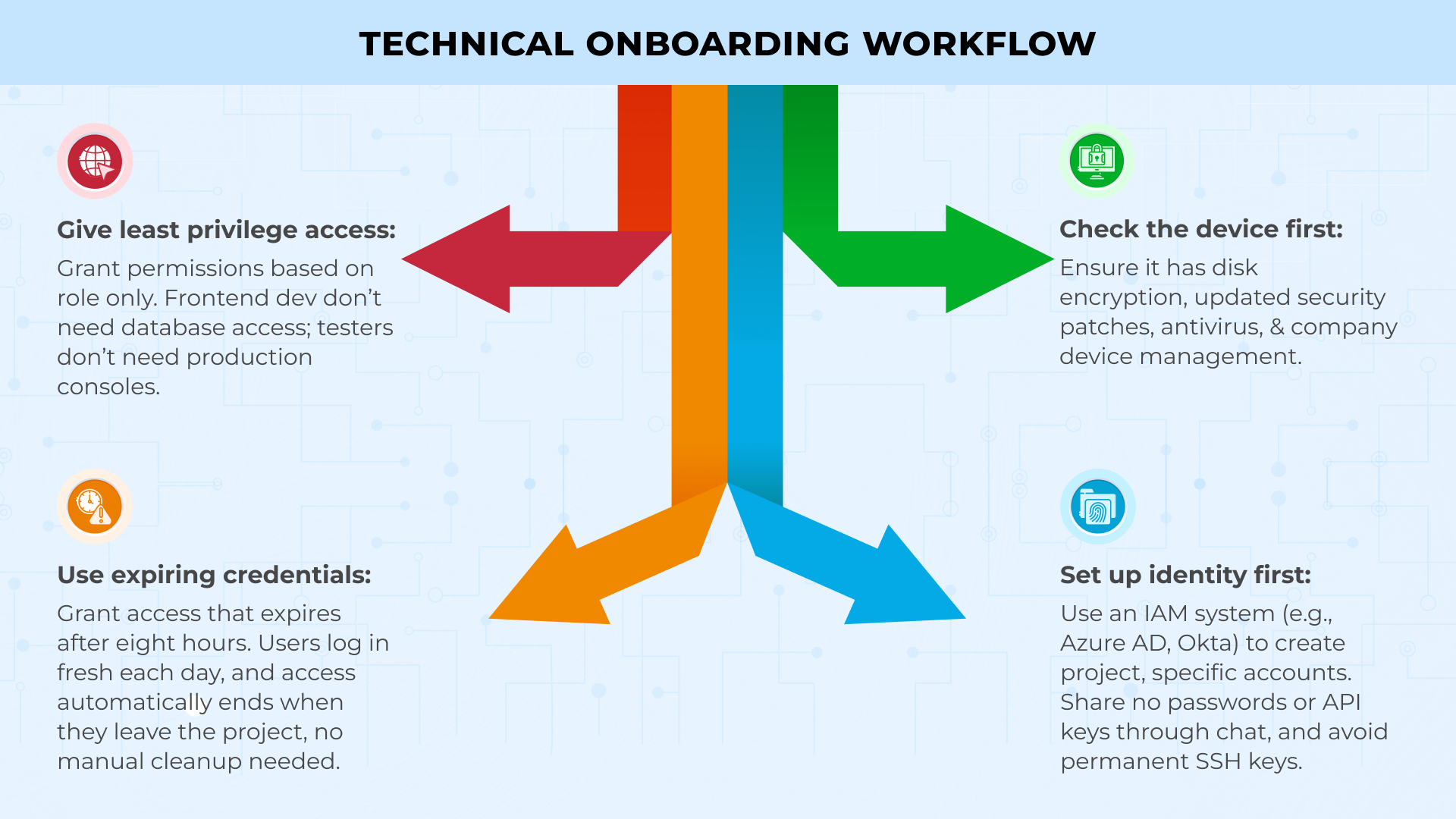
This workflow can turn three weeks of waiting into 30 minutes of automated setup.
Development Environment Setup
Developers working on personal laptops is where secrets escape. Move them to isolated workspaces instead.
Use containerized environments to fix this. Set up GitHub Codespaces or Gitpod to create fresh workspaces from your code in about two minutes. Load each workspace with your base setup, all tools, code checkers, and security scanners.Here is how to set this up:
Configure your container environments:
-
Make workspaces temporary
Set them to delete after one hour of sitting idle. This keeps source code off personal computers and secrets inside your systems.
-
Load tools automatically
Pre-install dependencies, linters, and security scanners in every workspace. Developers open it, write code, commit changes, and close it. No local setup needed.
-
Control access through the cloud
Developers should only work in browsers or thin clients. They should never download your full codebase locally.
Build network layers next. Split access into three zones. Route public tools like Jira and Slack over the regular internet. Put software development and testing behind a protected network that checks IP addresses. Lock production behind a secure gateway that only opens during approved windows with temporary certificates.
Link network permissions to team groups in your IAM system. When you move someone from the frontend to the backend, their access updates automatically. No support tickets. No waiting.
The goal is simple. Make the safe path also the fast path. When spinning up a secure workspace takes two minutes and copying files to a desktop takes ten, people choose the secure option.
Code Quality & Security Pipelines
Catch security problems before code hits your main branch. Build checks into your development flow so they run on every push without anyone having to remember. Start with pre-commit hooks on developer machines. Install these to catch secrets, large files, and basic conflicts before anything leaves their workspace. This is your first line of defence.
Set up your CI/CD pipeline with four automated gates:
-
Run code security scanners:
Configure tools like SonarQube or Checkmarx to find unsafe patterns, SQL injection risks, and cross-site scripting holes in every commit.
-
Check dependencies for vulnerabilities:
Use automated scanners to flag third-party libraries with known CVEs. Block builds that use libraries with critical security issues.
-
Verify license compatibility:
Set up scanners to catch GPL or other incompatible licenses before they get into your proprietary code.
-
Scan container images:
Check that base images are current and patched. Reject any images with high-severity vulnerabilities.
Configure each gate to post results directly on the pull request. If any check fails, stop the entire build. No bypass option. No exceptions.
Build a dashboard that shows four numbers in real time. Test coverage percentage, critical findings count, average build time, and how long branches stay open. Make this visible to every team. Green will mean merge. Red will mean fix first.
Research shows 95% of data breaches happen because of human mistakes. And automated pipeline checks catch these mistakes before they cause problems.
Data Protection & Staff Augmentation
Different types of data need different levels of protection. You have to sort your data first, then apply the right controls to each type.
Use three categories:
-
Public data:
Moves freely without restrictions. Marketing content, public documentation, open-source code.
-
Confidential data:
Business plans, proprietary code, and customer lists need encryption at rest and in transit. Limit access to employees who need it for their work.
-
Regulated data:
Stays locked in monitored areas with detailed logs. Patient health records, payment card numbers, and social security numbers.
IBlock offshore developers from accessing real customer data during development. Give them synthetic data instead. Generate fake names, addresses, and IDs that look real but contain zero actual customer information. Or use data masking tools that replace sensitive fields while keeping the data structure intact. A healthcare app keeps real diagnosis codes and dates but swaps in fake patient names and medical record numbers.
Push endpoint controls through MDM when contractors join. Turn on disk encryption, add screen watermarks to sensitive pages, and activate cloud access policies that block copying to personal drives. Block screenshots on confidential documents. If someone tries to exfiltrate data, the system blocks them at the device level.
The numbers tell the story. Average data breach costs hit $4.88 million in 2024. Every piece of unprotected data is a potential million-dollar problem.
Communication with Clients
Clear communication keeps offshore projects running smoothly. Always set up your communication tools and schedules before work starts.Configure your communication tools first:
-
Run daily standups over encrypted video:
keep them to fifteen minutes. Each person should share what they finished yesterday, what they are working on today, and what is blocking them. Record every call and store recording in systems you own. Never in contractor accounts.
-
Schedule weekly security reviews:
Use shared documents that timestamp every edit. Cover threat models, new vulnerabilities, and upcoming security work in each review.
-
Hold monthly demos from your repositories:
Pull code from your systems only. And never from copies sitting on contractor servers.
Control all project communications:
Create Slack or Teams workspaces under your company account. Give offshore team members guest access that you control. When projects end, revoke their access and keep all message history.
Always post metrics where everyone can see them. Build success rates, test coverage, and security scan results. When a security gate blocks a merge, the reason displays automatically. No one needs to ask why.
This transparency makes offshore teams feel like real partners, not vendors.
Compliance
Build compliance into your process from day one, not as paperwork you add later. Map controls to frameworks before audits. SOC 2 needs access reviews and encryption. ISO 27001 adds risk assessments. GDPR requires data agreements and breach procedures. PCI DSS covers payment data with network segmentation.
Create a simple matrix. Rows show security controls. Columns show compliance frameworks. Mark which requirements each control satisfies. Store this in version-controlled documents.
Write controls in plain language. Say “Credentials expire after 8 hours”, not “time-bound access provisioning protocols.”
Your systems already create evidence. IAM logs track access. Pipelines record scans. Monitoring shows data queries. Always collect these in one place.
Stats back this up. 50% of businesses faced a security breach in the past year. Having controls documented before breaches happen shows auditors you take security seriously.
Case Study Scenario
Look at how Parakeet handled this. They needed PCI Level 1 compliance for their B2B payments platform to work with Visa, Mastercard, and American Express.
They brought in specialized DevOps partners and hit full compliance in 6 weeks. Three times faster than doing it alone. The team used containerized workloads on Amazon EKS with automated pipelines. Nothing reached production without approval and testing.
AWS security services handled intrusion detection, encryption, monitoring, and attack prevention as one coordinated system.
The results were: Production launch in under 3 months. Avoided hiring two cloud engineers, saving $200,000 yearly. Cut cloud costs by 53% on dev and test environments. PCI compliance opened the Xero partnership and expanded their customer base.
Security governance speeds delivery when built in from the start.
Conclusion
Build security into your staff augmentation process from the start. Do not add it later as an afterthought.
Set up three foundations first. Use identity and access management for all logins and permissions. Deploy containerized environments for development work. Install automated security checks in your build pipeline.
These three steps stop most security problems before they happen.
Add monitoring tools next. Set up clear communication channels. Create clean offboarding workflows that revoke access automatically when contracts end.
At Telliant Systems, we help teams implement these processes across healthcare, finance, and enterprise software. Technical controls and governance rules work together so offshore development becomes your advantage.
When it’s done right, secure offshore teams move faster than traditional hiring because safety is built into speed.
Every great product starts as an idea, but not every idea becomes a great product. The difference? Product strategy.
Without a clear strategy, even brilliant concepts fail to reach the market as effective Minimum Viable Products (MVPs). They get killed in development, run out of resources, or launch without finding product-market fit. But when you align your MVP with a solid strategy from day one, you create a foundation for sustainable growth, attract real customers (not just users), and build something designed to scale.
This article breaks down how to move beyond just “building fast” to building strategically. In today’s competitive software landscape, product managers, tech founders, and engineering leaders need a clear framework for transforming vision into impact through high-value MVPs that are built to last.
Why Strategic Misalignment Kills MVPs Before They Scale
Many MVPs fail, not because the execution was poor but because of poor product strategy. Teams build features quickly because they don’t validate the core problem or view MVP as a “half-baked product” interpretation, instead of a learning experiment to test and move quickly. As a result, time is wasted, budgets are exceeded, and products that don’t resonate with the market are developed.
A sound MVP development strategy makes decisions based on pursuing what customers want (customer insights), what can be built (technical feasibility), and how it will be scaled (long-term scalability) successfully. Implement a market validation approach, product goals, and task roadmap; not trying to incorporate everything at once reduces misalignment and risk of scaling.
Telliant’s 3-Stage Lifecycle: Strategy, Build, and Design
At Telliant, product strategy is built on a three-stage Strategy, Build, and Design lifecycle.
-
Strategy: Validating Market Problems with Data
The first key step is to validate that the problem is worth solving! This shouldn’t only rely on intuition; leveraging analytics, customer interviews, and a lean product development approach (like the Lean Canvas) helps validate that the opportunity exists, and data surrounding things like customer acquisition cost, churn estimates, and market size give decision makers an objective basis to move forward.
-
Build: Choosing Scalable Architecture from Day One
An MVP should be lightweight and disposable, but architecture decisions made at this stage are not easily disposable; they often influence the product’s longevity. While serverless options can provide a cost-efficient option for generating early traction, containerized microservices allow for the flexible scaling of a product. Either way, ensuring you build on the right architecture and stay lean means you are adequately future-proofed.
-
Design: UX as a Strategic Lever
Great products win on experience. Using tools like Figma and shared component libraries organized based on your development stack means that UX design becomes a strategic lever rather than an afterthought. Simplified design systems help accelerate iteration and make UX more consistent between different releases in the product roadmap.
Defining MVP Scope with Product Strategy & Technical Insight
One of the significant challenges with product management is scoping. Without some guardrails around the MVP, the risk of feature creep and delay increases significantly.
-
Prioritization Frameworks
MoSCoW (Must-have, Should-have, Could-have, Won’t-have) and Kano provide guidelines for an MVP scope decision.
-
Architecture Tradeoffs
Serverless may have low upfront costs, and server hosting may provide the most control. The right choice is based on product scope expectations and regulatory requirements.
-
Security Considerations
Security cannot be a consideration after the fact. By embedding OWASP Top 10 practices into the MVP, you can ensure that the product is safe to test, iterate, and scale without exposing critical weaknesses.
Hypothesis Testing with Real Users
An MVP is a hypothesis in code form. To validate that hypothesis, you need to have testing infrastructure baked in.
-
A/B Testing
Technology enabling product teams to test different variations in real-time, like Optimizely or LaunchDarkly, gives product teams the ability to quickly test and measure results.
-
Telemetry & Usage Tracking
Learning tools like Mixpanel or Segment allow product leaders to analyze behavior, find adoption patterns, or change features based on usage. This Agile MVP process creates a feedback loop that turns your assumptions into data.
DevOps for MVP: Building for Iteration
Quick feedback requires quick delivery. Modern DevOps pipelines from day one is a key enabler of MVP success.
-
CI/CD Pipelines
Continuous integration and deployment allow new features and fixes to move quickly from development to staging and live.
-
Automated Deployments
Infrastructure as code allows teams to instantiate staging environments on the fly, removing the friction associated with experimentation and iteration.
This makes development a continuous flow process, unlike episodic high-risk releases.
Product Strategy for Scaling Beyond MVP
Once the MVP shows utility to users, the next component is scaling. The use of technology is forever a series of trade-offs, balancing technical debt with product performance and utilization of resources.
-
Caching and Auto-Scaling
Adding caching layers and auto-scaling capabilities as you scale will ensure that performance is maintained with real user demands.
-
Database Partitioning
partitioning data ensures performance through more manageable transactions. Partitioning also increases reliability as transaction volume increases.
-
Monitoring
Proper remedial course planning through monitoring ensures you avoid bottlenecks and guarantees a consistent user experience.
Scaling is neither an act nor an event; it is an ongoing factor of production that changes with product adoption.
Case Example: From MVP to SaaS at Scale
Imagine a SaaS platform that has grown from a lightweight MVP focused on a specific customer problem. Using a phase-linked architecture, the team only included the absolute minimum if validated by telemetry, and the MVP lean, and agile process had iterative cycles of only one week.
After nine months, what began as an MVP has matured into a modern SaaS at scale. It accomplished these key elements of a successful product:
- Discrete services added through a modular architecture without rework.
- Fast experimentation through continuous delivery pipelines.
- Caching and sharding approaches were used early, allowing them to scale without downtime.
This example shows how disciplined use of an MVP can significantly decrease the time needed from concept to impact. Still, it can also focus on the scalability aspect of building the MVP.
Final Thoughts
The path from idea to impact is not solely defined by speed. It’s the outcome of building with strategy and discipline. Creating a well-defined product strategy to MVP based on customer validation, lean product development, and technical foresight is incredibly important. This will enable the MVP to be valuable and a foundation and framework upon which to build for sustained growth in the future. For organizations focused on building products that matter, alignment between vision, execution, and scale is critical. By applying a structured framework and embracing agile principles throughout the process, businesses can make the leap from idea to high-value, high-impact MVPs.
A few years ago, I worked with a mid-size healthcare provider. Their billing team spent close to 40 hours every week just copying data between systems. It was tiring, frustrating, and full of small errors that kept slowing things down. What changed everything? One small shift, we helped them introduce a simple software bot that handled it in under 4 hours. This is the kind of change robotic process automation (RPA) brings to businesses.
Let’s explore how it works, what makes it powerful, and how you can use it in your own operations.
What is Robotic Process Automation (RPA)?
Think about all the small things your team does every day. Opening emails, copying data, filling out spreadsheets, and updating systems. Most of these tasks follow clear steps. Now imagine software doing that work for you, exactly the way a person would, just faster, and without taking breaks. That’s what robotic process automation means.
With RPA tools, you train software bots to follow rules and repeat tasks. These bots click, type, and move data just like your employees, but they do it around the clock. What’s even better? They don’t need major changes to your systems. RPA simply sits on top of your current software and works with it.
Unlike traditional automation, which often requires backend integration via APIs, RPA operates at the user interface (UI) level. Bots replicate user actions within applications — navigating systems, entering data, extracting files, using predefined rule sets. This makes RPA a faster and more flexible automation method, especially when integrating with legacy systems that lack APIs.
This is not some futuristic tech. Businesses are using RPA implementation today to reduce pressure on staff, speed up daily work, and save costs.
So, why is this such a big deal?
Because today’s businesses move fast. If your internal processes are slow, everything else falls behind. Business process automation with RPA helps you remove delays, increase accuracy, and give your teams more time to focus on solving real problems.
Key Benefits of RPA in Business Operations
Let’s stay with the healthcare billing example. Before RPA, it took five team members to finish one week of billing work. After RPA, they got that done in one day. That’s just one story. But RPA does more than save time.
- It helps teams stay accurate. People make mistakes when they’re tired or overloaded. Bots don’t.
- It also lets your team focus on work that really matters. No one wants to spend their day copying numbers from one file to another.
- And as your company grows, RPA grows with you. You don’t need to hire five new people to handle five times the work. Your bots can take care of that increased volume.
- Most importantly, it builds trust. When things are done right, on time, and without errors, your customers notice.
From a strategic angle, RPA also improves operational resilience by minimizing dependency on human labour for mission-critical processes. It enables faster process cycle times, supports compliance through audit trails, and integrates well with broader DevOps pipelines through orchestration tools.
Real-World Use Cases of RPA
Let’s look at two examples where RPA made a big difference.
Healthcare
Before RPA arrived, five team members at HSE needed almost a full week to process intake and eligibility cases. Then they switched on a UiPath robot called “Bertie.” Now Bertie clears the same pile in about one hour. Kevin Kelly sums it up: “Bertie can work 24 hours a day, processing as many cases in one hour as we could previously in five days.” These results come when RPA tools like UiPath are properly configured and aligned with existing workflows, letting teams automate at scale without replacing core systems.
Finance
Canon USA turned to UiPath for invoice processing, handling around 4,500 invoices each month. They reached roughly 90 % automation and saved about 6,000 hours a year in manual effort, while improving invoice accuracy and speed. By choosing the right RPA tools, Canon cut the time spent on repetitive reconciliation tasks and strengthened end-to-end reporting efficiency. These examples show that RPA isn’t just about convenience, it drives measurable outcomes, fewer denials, faster audits, and real cost savings through business process automation.
Step-By-Step Process for Implementing RPA
So, how do you actually get started with RPA? Here’s the approach that’s worked for us and many others.
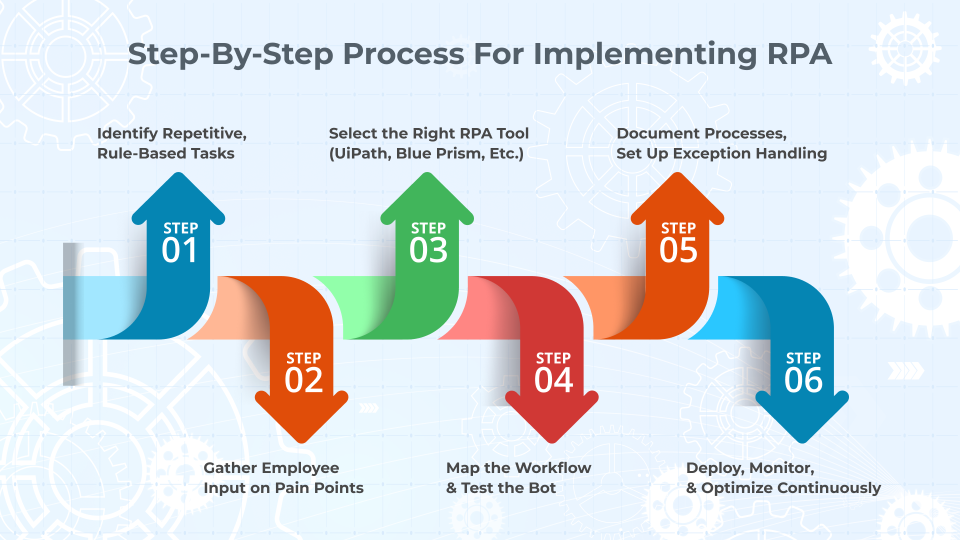
- STEP 1: You look closely at your day-to-day operations. What processes repeat the same steps every time? Do they involve moving data between systems? These are your best places to begin.
- STEP 2: Talk with the people who do the work. Ask them which tasks they find most boring or time-consuming. Their answers will help you prioritize.
- STEP 3: Choose the right tool. There are many RPA tools out there. Some are good for large teams. Others are better for smaller companies. Pick one that fits your budget and works with your current systems. Some of the most widely used tools include UiPath, Automation Anywhere, Blue Prism, and Power Automate. These platforms offer drag-and-drop workflows, development studios, and bot orchestrators.
- STEP 4: Once the tool is ready, map out the exact steps the bot should follow. Be clear and detailed. Then test the bot in a safe space. Watch how it handles different situations. Fix anything that doesn’t work.
- STEP 5: At this stage, process documentation and bot exception handling are key. Build in decision branches, timeouts, retries, and logs. Ensure bots gracefully handle errors and report failures with minimal disruption.
- STEP 6: When it’s ready, go live. Let it run and do its job. But keep watching it. Set up simple checks to make sure it stays on track.As time passes, look for new areas to automate. You don’t need to stop with one bot. Once you start, more ideas will come.
Top RPA Implementation Hurdles, And How Tech Teams Solve Them
No change is perfect. RPA is powerful, but there are a few things that can get in the way.
Sometimes companies try to automate the wrong tasks. Not every process is a good fit. If the steps change often or if the work needs human judgment, bots can struggle.
At other times, older systems may not integrate well with RPA. If your software is very old or not built for automation, you might need extra tools to help it work.
Bot performance can also suffer from inconsistent UI layouts, latency issues, or session timeouts in legacy systems. In such cases, consider building hybrid solutions with API connectors, or supplement with low-code platforms.
And sometimes, teams worry about losing control. They wonder, “What if the bot fails?” That’s fair. That’s why testing and monitoring are so important.
There’s also the human side. Employees may fear that bots are here to replace them. That’s not the goal. RPA helps your people by removing the dull work, not their jobs. Make sure your team knows this from the start.
RPA should be positioned as a productivity booster, not a replacement strategy. Offering upskilling or bot co-pilot programs helps reduce internal resistance.
Planning, communication, and the right tools make a big difference here.
According to Gartner, by 2024, organizations that use automation effectively will lower operational costs by 30% (source).
Conclusion
The value of robotic process automation isn’t just in doing things faster. It’s in doing things better — with fewer mistakes, lower costs, and stronger results.
When you use RPA the right way, you free up time, improve accuracy, and make your operations smoother. You don’t have to change everything overnight. You just need to start with one good process and build from there.
At Telliant Systems, we know what it takes to make automation work. Our teams have helped businesses across healthcare, finance, tech, and more use RPA to solve real problems. We combine technical knowledge with real-world business understanding. That’s what makes the difference.
If you’re ready to take the first step toward smarter operations, we’re here to help.
The way we build software has changed dramatically since we first started doing it – and continues to change at breakneck speed. These days, Continuous Integration and Continuous Deployment (CI/CD) are no longer just buzzwords: they’re widely agreed-upon best practices that most companies use to release better software quickly and securely.
In this article, we’ll talk about CI and CD: what they are, why you need them, and how you can efficiently work these concepts into your own development cycles.
CI/CD Explained
CI/CD is the umbrella term for a set of procedures that help development teams build and deploy software.
Continuous Integration (CI)
The practice of automatically integrating code changes from multiple developers into a shared repository. Ideally, every change should trigger automated builds and tests. This allows your team to catch bugs early (before they end up in production).
Continuous Delivery/Deployment (CD)
Once code has been integrated, it can be automatically deployed to production. Code changes pass through automated tests and can be deployed at any time. This allows you to always have a production-ready build that’s been rigorously tested.
Technical Benefits of Continuous Integration and Continuous Deployment
The benefits of using continuous integration and continuous deployment are undeniable. They reduce integration problems, allow for faster feedback loops, and improve code quality and test coverage. Code gets integrated, tested, and deployed faster and more securely, with fewer merge conflicts and less need to roll back changes.
Not only do your deployments become more reliable, but scaling and parallelizing becomes easier. CI pipelines can run multiple tests and builds in parallel, letting your team handle large repos or multiple microservices efficiently.
Finally, monitoring and metrics give you better visibility into build/test pass rates, deploy times, and failure causes, all of which help your team optimize over time.
Top CI CD Implementation Best Practices
There is no “right way” to implement CI or CD, and there are a number of different tools to choose from to help you do it. Ultimately, deciding on the way you want to use CI/CD will depend on you and your team. That being said, there are some tried-and-tested tools that many teams find valuable.
| Tools | Jenkins | GitHub Actions | GitLab CI/CD |
|---|---|---|---|
| Pros |
Extremely flexible, many plugins, well-tested. |
Built into GitHub. Easy to set up, good documentation, and supports a wide range of automation. |
Fully integrated with GitLab. Intuitive UI, built-in container registry. |
| Cons |
Requires setup and maintenance. You need to host it yourself (and keep it secure). |
Workflows can get complex. |
Tied to GitLab, and you may need to self-host for scale. |
| Good for |
Larger teams with complex pipelines or hybrid cloud setups. |
Teams already using GitHub that want fast setup. |
Teams already using GitLab and looking for a unified DevOps experience. |
-
CircleCI – easy to use, strong Docker support
-
Travis CI – popular with open source
-
Azure DevOps / AWS CodePipeline – the best choice if you’re already using those ecosystems
Other honorable mentions
Security and Compliance in CI/CD
Security should be something you take into consideration from the planning stage of development and should be baked into the software development process. Fortunately, CI and CD make it easy to automate security concerns. Secure pipeline configurations and role-based access and credential management are key to making your CI tools watertight.
Automating Security
Static Code Analysis (SAST), dependency scanning, IaC (Infrastructure as Code) setups, and secret detection are all processes that your CI tool can do to make your code more secure. You can also automate compliance checks for things like HIPAA and GDPR.
Tools like the OWASP (Open Worldwide Application Security Project) Dependency Check, TruffleHog, Checkov or GitGuardian plug into your CI configuration to scan each commit automatically.
Real-World Outcomes: Continuous Integration and Continuous Deployment
Let’s take a look at two real-world companies who transformed their development with continuous integration and continuous deployment (CI/CD).
Netflix
When the company experienced a significant outage in 2008, it led to a comprehensive migration to the cloud and reimagined deployment strategy. They developed and then open-sourced Spinnaker for continuous delivery, which allows easy deployment across multiple cloud platforms. They also began using Jenkins for automated testing and deployment, and Chaos Monkey to automate intentional disruption of services in production and test the reliability and recoverability of their services.
Etsy
Etsy was one of the first companies to embrace CI/CD, making it a key part of their company culture by 2009. They developed in-house development tools like Deployinator to assist in automated deployment and also used Jenkins to run automated test suites. They also adopted the use of feature flags and toggles to test and monitor portions of their system.
Conclusion
The software landscape is moving faster than ever — and users expect better experiences, delivered continuously. CI/CD isn’t just a nice-to-have anymore; it’s the foundation of how modern teams ship secure, stable software at speed. From startups to global platforms like Netflix and Etsy, the companies that adopt CI/CD early are the ones that iterate faster, break less, and stay ahead.
Today’s rapidly developing digital landscape requires enterprises to tackle complex problems quickly and at scale. Modern software delivery requires accelerated delivery, consistency, security, flexibility and resilience to meet the needs of savvy users.
DevOps solutions support multi-cloud environments by providing automated pipelines to manage fragmented systems and containerization and gateways to manage communication between those systems. DevOps can also be optimized to improve observability and monitoring, scale security, and empower your teams to work autonomously and cross-functionally.
What is Multi-Cloud?
Multi-cloud refers to the practice of building software that relies on two or more cloud platforms. Headless architecture, microservices architecture, and software that relies on various APIs to complete discreet tasks can all be examples of multi-cloud architecture.
The DevOps-Multi-Cloud Intersection: Opportunities and Risks
This approach provides enterprise teams with many opportunities for growth, flexibility, and rapid iteration – however, as with any software architecting solution, it also comes with some challenges.
Benefits
-
Accelerated Deployment Across Clouds
DevOps automation like Continuous Integration or Continuous Development means tests run faster and deployment is easier and more secure.
-
Standardization
DevOps best practices allow you to standardize communication across platforms or use gateway services to manage communication between modules.
-
Automated Security and Compliance
DevSecOps (automated security checks) mean your application is at lower risk for exposing an attack surface and also keeps you compliant with constantly changing regulations.
-
Scalability
DevOps enables auto-scaling across clouds using scripts and tools like Datadog or Prometheus.
Risks
-
Increased Complexity
There is a steep learning curve for teams who aren’t familiar with multiple cloud platforms, or with the DevOps toolchain. Training time and onboarding can be slow.
-
Fragmented Security
When not handled properly, security can quickly become an issue for multi-cloud platforms, as attack surface increases and potential entry points are exposed.
-
Deployment Drift
Without a cohesive deployment plan, good documentation, and version control, environments in different clouds can drift apart and become uncommunicative.
Best Practices for Optimizing DevOps for Multi-Cloud Environment
Overall, it’s important to maintain a unified approach to DevOps and multi-cloud environment. Fostering good communication between teams and at all product levels will help ensure that things don’t fragment and break down.
Careful alignment of tools, processes, and governance will help handle the complexity of working across multiple cloud platforms. Use Infrastructure as Code, automated testing, CI/CD, and standardized tools as much as possible.
-
Unify Your CI/CD Pipelines
Streamline multi-cloud deployments with a single CI/CD pipeline for consistent and simplified delivery. Tools like Jenkins, GitHub Actions, GitLab CI/CD, and ArgoCD (for Kubernetes) help automate workflows. Maintain a centralized, version-controlled repository for both infrastructure and application code to support collaboration and code sharing across teams and environments.
-
Embrace Containerization for Multi-Cloud Success
Containers like Docker, managed by orchestrators such as Kubernetes, ensure consistent application performance across cloud environments by abstracting platform differences. To support adoption, train developers in best practices, create a container playbook with clear policies on usage and security, and set up a secure, role-based container repository accessible to developers, QA, and admins.
-
Automate for Consistency, Security, and Resilience
Use Infrastructure as Code (IaC) to automate resource provisioning across clouds, ensuring consistency and reducing errors. Automate security policies, compliance checks, and disaster recovery processes to enhance protection and minimize downtime. Predefined, code-based blueprints allow seamless deployment of workloads across environments—eliminating manual effort and enabling teams to focus on higher-value tasks.
-
Strengthen Observability Across Clouds
Ensure full visibility into your multi-cloud environment by unifying monitoring, logging, and performance metrics. Centralized dashboards help technical, and business teams track application health, detect issues quickly, and manage costs effectively. A well-integrated control plane enhances orchestration, automation, and overall system transparency.
-
Enhance Multi-Cloud Operations with AI & ML
AI and machine learning boost observability by detecting anomalies, automating incident response, and providing predictive insights. These technologies help identify issues early, optimize resource usage, and strengthen security by forecasting risks and infrastructure needs across your cloud environments.
Some Popular Tools for Optimizing Multi-Cloud DevOps
When it comes to tools, there are hundreds to choose from that will help automate and optimize your app across cloud platforms. It can be difficult to choose, so here is a breakdown of some of the most popular options, and how they are used by enterprise teams.
Infrastructure as Code (IaC)


CI/CD deployment pipeline


Security centralization


Automated testing


Logging and observability


Policy compliance


Containerization and orchestration


Conclusion
Whether you are implementing or optimizing DevOps solutions for your platforms, having a trusted software partner can help. Telliant’s teams have over a decade of experience in custom software development, and our experts in DevOps strategy and cloud architecture can help you streamline operations, enhance agility, and reduce complexity.
Get in touch today and let us know how we can help.
FinTech is a rapidly evolving market sector with significant growth between 2010 and 2021, experiencing the highest investment activity of over $230 billion. Companies like Stripe led the way in creating this explosive market, where cutting-edge software solutions are required to stay competitive.
FinTech businesses and financial institutions demand seamless, secure, and efficient digital solutions. In this article, we’ll explore four essential FinTech software components, their importance, and the benefits they provide to both financial service providers and software companies.
The Top 4 FinTech Software Needs
FinTech companies must leverage advanced software solutions to maintain a competitive advantage amid evolving industry standards and a dynamic financial landscape. In this article, we’ll explore four essential software requirements that help FinTech firms stay current and sustainable.
1. Build for the Future with Scalable Technology
Relying on outdated or legacy systems is no longer possible in today’s rapidly changing landscape. Advanced software solutions, such as AI-driven data analytics, cloud-native architecture, and seamless API integrations, are now core aspects of FinTech software.
Scalable tech future-proofs your platform and is critical for businesses hoping to support rapid growth and provide robust security.Some of the most important scalable solutions for FinTech companies include the following
Moving to Cloud Computing Options for Robust Security, High Availability and Compliance
Moving financial technology software to the cloud is crucial for future-proofing and competitiveness. Cloud platforms provide on-demand scalability, allowing fintech companies to manage fluctuating user activity, rapidly deploy new features, and expand globally without the overhead of physical infrastructure, which reduces capital and maintenance costs.
The most significant stat is that modern cloud providers offer robust security, high availability, and compliance frameworks specifically designed for financial services companies in mind, helping companies meet regulations like SOC 2, PCI DSS, and GDPR. This enables fintech firms to prioritize customer value creation over infrastructure management, making cloud migration a strategic long-term investment.
Platforms like AWS, Google Cloud and Azure provide scalable infrastructure for fintech companies. These serverless solutions reduce operational overhead by automatically scaling resources based on demand. Many businesses opt for a hybrid solution that combines their existing private services with public cloud-based solutions.
Blockchain & Distributed Ledger Technology (DLT) to Provide Secure, Transparent, Tamper-Proof Framework
Blockchain and Distributed Ledger Technology (DLT) are key to future-proof financial technology by offering a secure, transparent, and tamper-proof framework that reduces reliance on centralized systems. This decentralized trust is doubly important to enhance regulatory compliance, build stakeholder confidence, and enable near real-time transaction settlement by minimizing intermediaries, thereby reducing costs and delays.
Interoperability is the biggest winner from the scalability perspective, with DLT providing a modular and interoperable infrastructure that supports high transaction volumes through techniques like sharding and optimized consensus mechanisms. This makes it easier for fintech systems to expand into new markets, integrate new services, and handle increased demand efficiently, fostering innovation and long-term growth.
The blockchain enables financial institutions to utilize smart contracts to automate financial transactions with increased transparency. Decentralized Finance (DeFi) solutions support peer-to-peer lending and trading, while Layer 2 solutions (i.e. Lightning Network and Rollups) can help improve transaction speeds.
Artificial Intelligence & Machine Learning
Artificial Intelligence (AI) and Machine Learning (ML) future-proof financial technology by creating smarter, faster, and more adaptive systems. They enable real-time data analysis for improved decision-making in areas like fraud detection and credit scoring. At the same time, AI-driven automation reduces costs and helps institutions anticipate market and regulatory changes through predictive analytics.
Scalability is the top focus for AI and ML, allowing fintech applications to grow intelligently with continuously learning models that adapt as the user base expands, without requiring core system rewrites. Cloud-based AI tools further enhance this by offering flexible computing resources, enabling personalized customer experience and efficient deployment of advanced models globally.
Artificial intelligence (AI) is becoming increasingly prevalent in all areas of software product development, and fintech is no exception. AI can analyze transaction patterns to prevent fraud, optimize and automate financial trading, and provide scalable customer service solutions through chatbots and virtual assistants.
API-First Architecture Ensures Applications are Agile, Extensible, and Prepared for the Future
API-First Architecture future-proofs and scales financial applications by creating modular, flexible systems. By designing APIs as core building blocks, fintech apps can seamlessly integrate with internal and external services, facilitating rapid development, easy updates, and smooth integration with third-party platforms without disrupting the entire system.
This approach enables scalability as new services can be added or scaled independently using microservices, and supports consistent omnichannel delivery. By decoupling services and promoting interoperability, API-first architecture ensures financial technology applications remain agile and adaptable to future technological and regulatory demands.
Building a microservice or API-first architecture allows fintech firms to scale individual components independently. Open banking APIs facilitates seamless integration between banks and fintech applications, while embedded finance systems allow services such as payments, lending, and insurance to be provided within non-financial platforms.
Big Data & Analytics Make User Experiences More Personalized at Scale
Big Data and Analytics are vital for scaling and future-proofing financial applications by providing real-time insights for smarter decisions and personalized user experiences. Financial institutions leverage big data platforms and advanced analytics to process vast amounts of data, uncover trends, detect anomalies, and optimize operations efficiently as the business grows.
Scalability is achieved through big data architectures like Hadoop and Spark, which support distributed processing and horizontal scaling to handle increasing data volumes without performance issues. to ensure that software maintains a competitive edge with highly adaptable capabilities, financial applications should have a data-driven foundation, enhanced by predictive analytics and machine learning, enables proactive risk management, fraud detection, and dynamic pricing.
Cybersecurity & Identity Verification to Adapt to Evolving Threats and Cover Regulatory Hurdles
Cybersecurity and Identity Verification (IDV) are essential for future-proofing financial applications by adapting to evolving threats like AI-powered fraud and quantum computing, while ensuring continuous regulatory compliance and building customer trust. They enable seamless innovation in areas like open banking by providing a secure foundation.
A robust security infrastructure is crucial, allowing fintech applications to grow without compromising user experience. Cybersecurity and IDV also drive scalability by automating and streamlining processes like customer onboarding, reducing operational costs, and mitigating fraud at scale through real-time detection.
Cybersecurity measures like zero-trust architecture can compromise applications and users. Multi-Factor Authentication (MFA) ensures strict security controls and enhances login security. Additional measures, such as biometric authentication, are becoming more prevalent, utilizing fingerprint, facial, or behavioral biometrics for enhanced verification.
Scalable Payment Infrastructure
Scalable payment infrastructure future-proofs financial apps by enabling them to handle increased transaction volumes and diverse payment methods without performance issues. Its modular, cloud-based design allows for independent component scaling and the rapid integration of new services, ensuring agility in response to market changes and new technologies. This foundation optimizes efficiency and customer satisfaction, supporting long-term growth.
Systems like RTP (real-time payments), UPI (unified payments interface) and FedNow enable faster transactions, while services like Ripple and SWIFT improve international security. Crypto payment solutions are also being utilized to enable global payments with stablecoins and cryptocurrencies.

2. Optimize Digital Infrastructure for Scalable Growth
Accelerating client onboarding with automation, enhancing user experience with real-time data insights,and leveraging AI-driven decision-making is critical for fintech companies hoping to optimize for the future.
Scalable and secure data management is paramount. Services like Kafka and Apache Flink are key to allow better real-time data processing to secure real-time transactions and detect fraud. In addition, edge-computing solutions, such as CDNs (content delivery networks), enable fintech companies to deploy closer to users, thereby reducing latency and enhancing the user experience.
In this day and time, data encryption is incredibly important where user privacy is continually threatened, and companies must ensure compliance with constantly changing regulations.
- Innovate Proactively
To stay ahead in this rapidly evolving sector, companies must anticipate trends and continually adapt. But innovation must always be customer driven. Balancing intelligent automation with hyper-personalized financial services will ensure sustained growth and industry leadership.
Some of the ways FinTech companies can be proactively innovative while maintaining hyper focus on their customers are
- Adopt a future-ready technology stack
- Invest in emerging trends early
- Build an agile and experiment-driven culture
- Strengthening ecosystem collaboration
- Prioritize customer-centric projects
3. Automate Regulatory Compliance & Reporting
As compliance regulations, such as GDPR, PSD2, SEC, and CFPB, become increasingly complex, financial institutions must manage compliance efficiently. Relying on manual processes creates risks, inefficiencies, and potential fines. Automating these tasks not only frees up time and resources but also ensures accuracy.
Non-compliance penalties can be severe: up to 4% of annual revenue, in the case of a GDPR penalty. Manual processes increase the risk that human error will put a business out of compliance – even reporting errors can carry hefty fines.
Regulatory Technology (RegTech) helps fintech companies automate compliance, reduce risk, and improve overall efficiency. Companies like ThetaRay, AxiomSL, Regnology, and Chainalysis integrate seamlessly into your platform to manage regulation and ensure compliance.
4. Unlocking Growth in FinTech
The FinTech sector’s rapid growth, exemplified by companies like Stripe, demands cutting-edge software for competitiveness. This article highlights key components for future-proofing and scaling financial applications: Cloud Computing for on-demand scalability and robust security, Blockchain & DLT for secure, transparent, and efficient transactions, AI & ML for intelligent automation, real-time insights, and personalized experiences, and API-First Architecture for modular, agile, and easily integrable systems. Additionally, Big Data & Analytics provide crucial insights for smarter decisions, Cybersecurity & IDV adapt to evolving threats and ensure compliance, and Scalable Payment Infrastructure handles increasing transaction volumes. Optimizing digital infrastructure with real-time data processing and proactive innovation, coupled with automated regulatory compliance (RegTech), are paramount for sustained growth, resilience, and leadership in this dynamic market.
Be proactive, not reactive when it comes to growth in the fintech space. Anticipate trends rather than just following them. Leverage AI, blockchain, and cloud-native infrastructure to stay scalable, stay laser-focused on your customer base, and foster a culture of experimentation and data-driven innovation within your teams. The future of fintech belongs to those who embrace digital transformation.
Modern users expect sleek, responsive interfaces. They expect snappy performance and beautifully intuitive design. UX designs also need to be accessible to users with disabilities, and these days, they should utilize exciting new advancements like AI and VR to surprise and delight.
In this article, we’ll examine some of the innovations driving UX and UI design, and how your company can leverage these to build platforms that not only delight users but also capture their attention and turn them into passionate advocates and loyal users of your product.
Hidden Cost of Outdated UX Design
A poorly designed UI/UX comes with significant hidden costs that can impact both revenue and efficiency.
- Lost Revenue – A frustrating user experience increases bounce rates, reduces conversions, and lowers customer retention, ultimately harming sales and brand reputation.
- Decreased Employee Productivity – Slow, inefficient software frustrates employees, affecting their performance and overall job satisfaction.
- Higher Support Costs – Poorly designed systems make it difficult for users to resolve issues independently, leading to increased reliance on customer support and higher operational costs.

Key Trends And Innovations In Modern UI UX Design
Below are the key trends and fundamentals in modern UI UX design that helps drive engagement, elevate user experience and improve functionality of your digital platforms. Integrating these strategies into your products is essential for achieving a visually appealing and user-friendly design.
-
AI-Driven UX Design & Personalization
AI-driven UX and personalization are transforming user experiences by making digital interactions more intelligent and user-focused. AI can tailor content to a specific user and even personalize elements like page layout and available features to match their needs.
AI-driven chatbots and content generation provide users with improved customer service experience, while AI-driven tools like Figma, Sketch, and Adobe Sensei allow designers and developers to quickly build and iterate upon designs, roll out A/B and feature testing, track and analyze user behavior, and more.
-
Minimalist and Functional Design
Frills and cluttered user interfaces are a thing of the past. Design these days leans toward the functional, with spare, minimalist pages providing the user only exactly what is needed (or wanted, to push a user in a specific direction.) By putting only what is needed on the page, you can provide your user with a clear CTA, rather than overwhelming them with a lot of information.
Neumorphism & Glassmorphism
Part of the trend toward minimal and functional design is an embracing of neumorphism (new skewmorphism) and glassmorphism. Applications that leverage these concepts tend to push clear, simple interfaces, enhanced by a few subtle design tricks.
Neumorphism focuses on flat design with soft 3D effects on key features. Glassmorphism utilizes “transparency” and “blur” effects to create a frosted glass appearance, providing depth and enhancing the visual hierarchy on a page.
-
Microinteractions and Motion UI
Animations might feel like an afterthought or “nice to have” but actually, micro animations can vastly improve retention by enhancing the user experience and making the UI clearer. Hover states, active states for buttons, scroll effects, and loading indicators don’t just look pretty on the page. They inform the user about what is happening and guide them through the application flow.
Motion UI frameworks (i.e. frameworks that facilitate animations and improve user interactions) are becoming prevalent as companies realize the importance of animations. Frameworks like GSAP, Lottie, and Tailwind allow a team to maintain a consistent design palette across animations, organize across platforms, and quickly scale animations when needed.
-
Cross-Platform Design & Responsive Interfaces
Progressive web apps (PWAs) combine the best of websites and mobile applications by providing enriched, app-like experiences right in the browser. PWAs can function cross-platform, unlike mobile apps, which are bound to a particular OS. This allows developers to build responsive interfaces for all users, without needing specialized language skills like Swift or Kotlin.
Frameworks like React Native are also enabling devs to build responsive, cross-platform interfaces. Often. PWAs and cross-platform applications work in tandem to provide a seamless experience from browser to app. Companies like Patreon leverage this functionality brilliantly.
-
Augmented Reality (AR) & Mixed Reality (MR) Interfaces
Augmented Reality (AR) is revolutionizing UX/UI by blending digital and physical experiences, making interactions more immersive, engaging, and intuitive. Virtual “try-ons” allow users to preview clothing digitally before purchasing, while 3D product visualizations allow shoppers to preview how furniture and other items will look in their homes.
In the healthcare sector, AR-based UI enhances surgical training with real-time, 3D anatomy overlays. Surgeons use AR-assisted glasses for real-time imaging during procedures, and AR also helps patients to better understand their treatment plans and diagnoses through interactive experiences.
Mixed Reality
Spatial computing shifts the UI from 2D screens to immersive 3D environments. Users can interact with digital content through gestures, voice, and eye tracking. Applications like Apple Vision Pro and Meta Quest are already allowing users to do “futuristic” things, such as gesture-based navigation and floating UI elements.
The full extent of design possibilities opened up by AR and MR technologies is yet to be discovered!
The Benefits of Smartly-Designed UX Design
A smartly designed UI UX enhances usability, accessibility, and engagement, leading to not only delighted users, but repeat customers and passionate brand advocates. By incorporating adaptive layouts, motion UI, and AI-driven personalization, modern interfaces create seamless interactions that cater to diverse user needs.
Ultimately, a well-crafted UI doesn’t just make your app look better—it boosts productivity, improves retention, and creates a lasting impact by making technology effortless and engaging.
AI is rewiring the way medicine is practiced. It isn’t just another tool in the healthcare toolbox—it’s a game-changer. No longer restricted to just automating routine tasks, AI is now helping doctors utilize complex data, anticipate risk, and fine-tune treatment plans with razor-sharp precision.
AI decision support can transform oceans of medical data into clear, actionable insights in real-time. As healthcare hurtles toward a future of hyper-personalization and predictive care, integrating AI into your healthcare platform isn’t just an upgrade—it’s the key to life-saving interventions.
The Need for AI Decision Support in Healthcare and HealthTech Companies
AI-powered decision support is becoming essential in healthcare and health tech companies due to the growing complexity of medical data, increasing demand for personalized care, and the need to improve efficiency while reducing costs. AI helps healthcare providers, insurers, and technology companies make faster, more informed, and accurate decisions, ultimately leading to better patient outcomes and optimized healthcare operations.
Latest Trends in AI Decision Support
AI-driven decision support systems (DSS) are pushing the boundaries of what’s possible in data analytics, natural language processing, and predictive care. Here are some of the emerging trends coming in 2025.
Real-Time Data Analytics And Integration
AI-driven systems like Google’s DeepMind can help doctors detect things like acute kidney injury up to 48 hours faster than traditional methods. By integrating electronic health records, data drawn from wearable devices, and imaging data, AI decision support system can deliver insights that support rapid decision-making vital to emergency services.
Natural Language Processing in Clinical Decision-Making
AI can analyze physician notes, research papers, patient histories and quickly extract meaningful data without human input. IBM Watson Health leverages NLP to suggest treatment options for cancer patients based on the latest research and clinical guidelines drawn from vast amounts of medical literature.
AI in Predictive and Preventative Care
Machine Learning models can quickly analyze and correlate patient history, genetics, lifestyle factors, and real-time biometric data to help manage or detect diseases like diabetes and cardiovascular disorders.
Personalized Medicine
Precision medicine tailored toward individual patients is becoming the norm. Genomic sequencing can tailor cancer treatments to a patient based on that patient’s unique molecular profile.
Data Analysis
AI’s data analysis benefits contribute to overall better health in the community, as insights into individual patients can be aggregated and applied to larger populations. This can be used to bring medicine to underserved communities and improve the lives of even those who don’t get regular checkups.
Challenges and Things to Think About
While it’s clear that AI-driven DSS is a net positive and a game-changer for the healthcare industry, many complications and sensitive topics require careful consideration as we move forward.
Data Privacy
Data privacy is always of paramount concern in any AI-based system—and nowhere is this truer than in healthcare. Patient records are extremely sensitive and valuable, and healthcare institutions are often the target of cyber-attacks.
It’s not just bad actors seeking to abuse patient data. Healthcare facilities must ensure that they comply with all state, federal, and international data privacy laws, such as HIPAA, GDPR, and CCPA. How can AI maintain compliance while handling sensitive medical data? Techniques like federated learning and differential privacy can be utilized, and ensuring patient consent is key when using any patient data.
Integrations with Existing Systems
Legacy systems may not be equipped to handle or keep up with AI-based systems. Much of healthcare runs on fragmented, outdated legacy systems that were never meant to interoperate with AI. How do we make legacy systems interoperable with AI-based DSS?
Adopting FHIR-based APIs to create standardized data exchange formats is one solution. Transitioning from on-premise data storage to cloud-based solutions can also help mitigate these issues
A Future Outlook: What’s next for AI in Healthcare?
AI is poised to reshape the future of healthcare. Medicine will become more personalized, predictive analytics will see widespread adoption, remote monitoring and telehealth will become mainstream, and drug discovery and enhancement will rapidly accelerate.
Additionally, AI will support clinical decision-making, making care faster and more accurate. Hopefully, ethical bias will be reduced as long as the AI healthcare community is committed to creating bias-free algorithms. And finally, access to healthcare will increase as education, diagnosis, and treatment are brought to rural and underserved areas.
AI Investment Trends & Challenges in Healthcare and HealthTech
The healthcare AI market is booming, with global AI investments expected to exceed $188 billion by 2030. HealthTech companies, startups, and major healthcare players are rapidly adopting AI to improve clinical outcomes, operational efficiency, and patient engagement. However, AI adoption in healthcare faces unique regulatory, ethical, and technological challenges that companies must navigate.
There is a surge in AI-powered diagnostics and clinical Decision Support. Investors are pouring billions into AI-driven medical imaging, diagnostics, and decision-support tools. Startups developing AI-driven clinical decision support systems (CDSS) are securing major funding.
Example
Aidoc (AI-based radiology diagnostics) raised $110M in 2022 to expand its AI decision support tools.
An explosion in AI for Personalized & Predictive Medicine is happening now. AI-powered genomics, biomarker discovery, and personalized treatment plans are attracting heavy investment. Investors are betting on AI’s ability to predict disease risks and recommend preventative interventions.
Example
Tempus (AI-powered precision oncology) raised $275M in 2023, pushing its valuation to $8.1 billion.
A Rise in AI-powered remote Monitoring & Virtual Health Assistants is inevitable, and Investors are backing AI-powered chatbots, virtual nurses, and digital health assistants. AI-driven wearables & IoT-based remote patient monitoring (RPM) solutions are securing funding. AI is enhancing hospital-at-home models, reducing the burden on hospitals and clinics.
Example
Biofourmis, a leader in AI-powered remote patient monitoring, raised $300M in 2022, hitting unicorn status.
AI operational efficiency is a direct result of healthcare automation. AI-driven automation in claims processing, hospital workflow optimization, and revenue cycle management are gaining investor interest. HealthTech startups focused on AI-driven medical coding, billing fraud detection, and predictive analytics are seeing high growth.
Example
Olive AI (AI for hospital automation) raised $400M to scale its AI-driven healthcare automation solutions.
Why Choosing the Right Partner is Crucial for Your DSS Integrations
Integrating AI Decision support system (DSS) is no longer a luxury in today’s rapidly evolving marketplace. Partnering with a trusted integration partner can greatly improve your outcomes by ensuring regulatory compliance and seamless integration with existing systems. The right partner can also provide post-implementation support and even facilitate user adoption and engagement.
Schedule a meeting to explore how the right healthcare software development partner can support your digital transformation journey.
Improved software and specialized technology advancements have fueled the digitization of the healthcare industry and brought it online, improving care delivery. Patient portals are enhanced with full access to a patient’s digital records, and faster processing times have increased patient satisfaction and improved workflows for thousands of employees.
Unfortunately, healthcare workflow processes are not without challenges. Bottlenecks are often created by fragmented data, administrative burdens, and inefficiencies caused by outdated technology. Sometimes, the very integrations hospitals use to improve their employees’ lives make things worse.
There is a growing demand for seamless healthcare technology integrations—strategic healthcare integrations that enhance product value, user adoption, and market differentiation.
The Power of FHIR, HL7, and TEFCA in Seamless Healthcare Interoperability
FHIR (Fast Healthcare Interoperability Resources), HL7 (Health Level Seven), and TEFCA (Trusted Exchange Framework and Common Agreement) play critical roles to improving interoperability, standardization, and secure data exchange for healthcare technology systems.

Why FHIR?
FHIR is the modern standard for exchanging Electronic Health Information. FHIR was developed by a group of medical and technology experts. HL7 is a non-profit organization that has a mission to create the best standards for exchanging electronic health information to facilitate seamless health data exchange.
The Tech Facts about FHIR
FHIR uses RESTful APIs and JSON, which are universal protocols and data standards employed across multiple industries on the web. Thus, developing new endpoints is quick and easy.
How Does it Improve Scalability and Flexibility?
FHIR breaks down healthcare data into modular components (resources) that can be easily shared and combined. This flexibility is also what makes it so scalable.
How does it improve Real-time Access?
Data created in many shapes and forms can be retrieved using simple HTTP methods (GET, POST, PUT, DELETE), making integration faster and more efficient.
Adoption Rate
FHIR has been widely adopted because it is simple to implement and use. Most software developers—and all developers working on the web—understand REST.
The Establishment of TEFCA (Trusted Exchange Framework and Common Agreement)
Despite the obvious advances in healthcare technology, Interoperability continues to elude healthcare organizations in the United States and remains a challenge. This is mainly because siloed information, inconsistent standards, and fragmented patient records lead to frustration and hinder information sharing across organizations.
The TEFCA was established to promote nationwide interoperability and create a unified EHI exchange network. Reducing the complexity and cohesion of maintaining patient data allows for a more connected healthcare ecosystem where data can flow securely and efficiently across disparate systems.
Success Stories for Using FHIR and HL7 in the Mayo Clinic and Cleveland Clinic
Mayo Clinic: Streamlining Data Exchange with FHIR for Real-Time Decision-Making. The Mayo Clinic was an early adopter of FHIR. Some ways the clinic has leveraged the new standard include:
- FHIR-based API endpoints allow patient-centric data sharing and improve patient’s access to their medical records more easily.
- SMART on FHIR apps give clinicians the ability to use third-party apps that interact with patient data in real time.
- Healthcare integration of real-time clinical data into AI research models can improve analytics and innovation throughout the healthcare ecosystem.
- Collaboration with external healthcare institutions has the potential to improve cross-institutional data sharing, improving patient outcomes.
- Integrating remote monitoring devices into the Clinic’s EHR (Electronic Health Record) system is showing vast improvements in telemedicine outcomes.
In addition to their existing implementations, the Mayo Clinic’s use of FHIR continues to evolve as the standard develops and new healthcare challenges arise.
Cleveland Clinic: Automating Prior Authorizations with HL7 and FHIR
The Cleveland Clinic is often the most prominent champion for improvements in healthcare interoperability and has made strides in using FHIR to improve the standard of patient care.
- SMART apps and FHIR API endpoints enable seamless data sharing between hospital and patient devices, especially with automated prior authorization requirements.
- Integration of HL7’s FHIR accelerator CodeX simplifies prior authorization challenges.
- Automated data retrieval used with prior authorization reduces the time it takes to process prior authorizations.
- Using FHIR and HL7 for prior authorization Improves patient care and allows caregivers more time to spend with patients.
- Electronic prior authorization has the potential to reduce administrative costs and burdens.
What Are the Key Healthcare Integrations and Benefits?
Smooth healthcare integrations between an organization’s varied healthcare platforms and systems are crucial for patient care. They allow organizations to exchange and access patient data efficiently across applications and devices.
Health Information Exchange (HIE) Integrations
The HIE enhances market reach through cross-provider data sharing, ensures compliance with regulatory frameworks (TEFCA, ONC), and improves healthtech software usability. This leads to better care coordination, fewer duplicate tests and procedures, and greater cost efficiency.
Electronic Health Record (EHR) Integrations
EHR integrations increase product stickiness by embedding workflows into clinician environments. This helps reduce provider burnout by automating data entry and retrieval and supports AI-driven clinical insights for decision-making.
Revenue Cycle Management and Billing and Systems Integrations
RCM systems have many benefits for healthcare organizations. They improve billing accuracy, enhancing revenue generation for clients by reducing claim denials. They are designed to ensure compliance with payer requirements and value-based care models and automate payment reconciliation, improving cash flow. Overall, they reduce the administrative burden of payments tasks on staff, leading to better operational efficiency.
Patient Portal Integrations
PPIs integrate scheduling, clinical document sharing, telehealth, and secure messaging to improve patient engagement and allow patients easier access to care records. Portals increase adherence to care plans and improve treatment outcomes, leading to a reduction in provider operational costs and better self-service capabilities.
Clinical Decision Support System (CDSS) Integrations
The priority for a CDSS is to elevate software intelligence with real-time alerts and recommendations, thus reducing liability risks for providers and improving patient outcomes. Integrating enhanced patient safety and quality measures reduces medical errors and improves compliance with clinical guidelines.
Telehealth and Remote Patient Monitoring (RPM) Integrations
Telehealth integrations expand healthcare technology capabilities by supporting hybrid and virtual care models, improving patient-doctor communication, and enhancing care continuity. They can provide additional revenue streams through continuous patient monitoring and leverage IoT and wearable device integrations for real-time health tracking. RPM leads to improvements in care plans and reduced hospital readmissions and emergency visits.
Pharmacy Systems Integrations
Streamlining e-prescriptions and medical adherence tracking are the main functions of pharmacy integrations. They improve patient safety by reducing errors, fortifying regulatory compliance, and enhancing care coordination between providers and pharmacists.
The True Connector: Why FHIR, HL7, and TEFCA Compliance for Healthcare Applications is Crucial
FHIR (Fast Healthcare Interoperability Resources) and HL7 (Health Level Seven) significantly improve various healthcare systems by enabling seamless data exchange, enhancing efficiency, and ensuring compliance. FHIR, HL7, and TEFCA each play a crucial role in how healthcare apps, systems, and platforms communicate and work together seamlessly. It’s all about ensuring patient data moves efficiently and securely between providers, apps, and devices without any roadblocks.
For organizations hoping to stay current with emerging data trends, adopting an API-first development strategy for scalable and flexible integrations is key. Partnering with the right vendor who understands data exchange and healthcare integrations is also critical.
Software deployment is a complex process that actually begins way before you actually deploy your software. It can be helpful to have a guide that you can refer to and disseminate around your organization to ensure smooth deployment across all departments.
This article is intended as a guide for making that guide. When you go about making your own deployment checklist, seek input from your own stakeholders, managers and employees to tailor a guide specific to the needs of your business.
What is Software Deployment?
Software deployment is the way software is released into the world. Ideally, if you’re using agile development strategies, deployment shouldn’t be seen as the “end” of development: rather it is one stage in a continuous process called the Software Development Lifecycle (SDLC).
Once a piece of software is live in the world, it becomes part of your company’s technical ecosystem and must be monitored, updated, and maintained. It will also provide crucial data that you can use to make decisions about new features and future developments.
Importance of Smooth Software Deployment
Software deployment directly impacts the effectiveness and efficiency of the overall technical system. Sloppy or lazy deployment can introduce bugs, cause crashes, or lead to downtime that negatively impact your users’ experience, hurt your brand, and introduce potential weak points for bad actors to exploit.
Main Software Deployment Strategies
Most organizations that rely heavily on their software utilize a few major deployment strategies, either in part or in whole. These strategies can often be combined, and the use case for each will depend on the size, scope, and essentiality of the feature being deployed.
Blue-Green Deployment
This strategy involves keeping two separate deployment environments running at all times: a blue version (the current deployment) and a green version (the version containing the new code.) Once all tests have passed in the green version, traffic is routed from the blue version there.
Canary Deployment
In this strategy, the new features are released to a small subset of users first, and closely monitored for issues. If no anomalies or problems are detected, the deployment is slowly rolled out to the rest of the userbase.
Rolling Deployment
The deployment strategy gradually releases changes to different servers or regions, so that the old version of the software is replaced in stages. As new versions are monitored and assured to be working properly, users are routed to them and more regions are rolled in.
Feature Flags
In this method, a new version of the software is deployed with code included to allow certain parts to be turned on or off. Typically, the new version is deployed with feature flags turned off, and they are gradually turned on as needed.
A/B Testing
A/B testing is a process that allows distinct changes to be released to certain user groups, and their responses to those changes monitored.
Continuous Deployment
Continuous Deployment (CD) is a method that can be employed in tandem with any of these methods and involves running and suite of automated tests and then automatically deploying changes once all those tests pass. It is considered standard practice in Agile development.
Key Checklist to Verify Before Launch
Prior to launch, the most important thing you must do is test your software. There are many types of tests critical for ensuring smooth deployment, and running some version of all of them is recommended.

1. Unit Testing
Unit testing should happen any time an engineer makes a commit to your repositories. Ideally, you will have automated checks set up to run tests anytime someone commits and reject the code if any of the tests fail.

2. Usability Testing
Once unit testing has passed, you should test the user experience to ensure it meets company standards. There are automated ways to do this (Selenium, for example) however, it’s also a good idea to have a real human use the software and provide feedback.

3. Performance Testing
Load testing, speed testing, and scalability testing are all important for ensuring that your new changes don’t bog down the system or degrade user experience.

4. Security Testing
Penetration testing, vulnerability scans, and testing of user roles and authentication procedures help maintain your system’s overall security and avoid introducing potential weaknesses.

5. Regression Testing
Ensure that the new changes don’t break any of the existing functionality. Sometimes, changes introduced in one place in the codebase can have unexpected and unintended consequences way downstream.

6. Compliance and Legal Check
Ensure that any changes you’ve introduced meet GDPR and other data privacy regulations, and any relevant laws and industry regulations like HIPAA, SOC2, etc.

7. Beta Testing
Once you’re ready to deploy, it can be helpful to release changes to just a small subset of your users (as with canary deployment or blue-green deployment) to see what their reaction to the new features is.

8. Documentation
An often-overlooked step, creating good documentation for your changes will ensure that future devs can work on the software without breaking things or having to spend a long time getting up to speed with the codebase.

9. Final Check-Ins
Check-in with key stakeholders, ensure any external dependencies are up-to-date and functional, finalize marketing materials and make sure support is ready to handle any issues.

10. Deployment Prep
Create a plan for deployment, and a strategy for rolling back if something goes wrong. Verify that your staging environment (if you have one) closely mirrors production, and make sure your monitoring systems are ready.
Common Mistakes to Avoid During Software Deployment
Even small mistakes can cause major disruptions to service. Make sure you avoid these common pitfalls:
- Skipping any step of the testing process
- Not having a rollback plan
- Neglecting user feedback
- Not communicating with stakeholders or other teams
- Not monitoring the deployment process or time thereafter
- Deploying during high-traffic times
- Not preparing support
Conclusion
Done right, software deployment should be a seamless part of your company’s software development cycle. Setting up the proper automations, communicating with the relevant parties, and having a plan in place in case something goes wrong will go a long way in making your next deployment smooth and pain-free.