

- Who We Are
- Who We Help

FinTech
Healthcare
-
- What We Do
Microsoft Azure Solutions
Maintenance
Strategy
Project Rescue
MVP Development
Project Types
-
- How We Work
- Resources
- Careers


Cloud computing has refined how many enterprises deploy, scale, and maintain their software. But as the convenience slowly grows, the cost rises, on the other hand. In initial phases of adoption, cloud spend is seen as an acceptable byproduct of agility. With time, however, the time we spend quietly balloons, hidden behind resource sprawl, overlapping subscriptions, and untraced data transfers.
As per the latest 2025 report conducted by Flexra State of the Cloud, 84% of respondents believe that managing cloud spend is the top cloud challenge for organizations today. Many organizations are identifying that scaling cloud infrastructure without strong financial governance can distort margins faster than it drives innovation.
Cloud optimization isn’t just an engineering concern; it’s a complete C-suite priority. The real objective is how it aligns with the Cloud App Development efforts with measurable business outcomes, making sure that every dollar spent directly helps support growth, performance, and innovation.
Technical Cost Optimization Practices
The basic foundation of optimization is to understand the utilization. Once the team gains strong visibility into idle or oversized resources, they can strategically apply the right measures to the right-size infrastructure and could potentially reduce a lot of waste.
-
Right-Sizing and Auto-Scaling
AWS Compute Optimizer, Azure Advisor, and GCP Recommender provide cost and performance recommendations that are based on usage trends. Adopting AWS Auto Scaling Groups or Azure Virtual Machine Scale Sets enables workloads to adjust them to demand, a simple but impactful cost lever. Many businesses have reported seeing a major 20-40% savings on total spending right after implementing right-sizing policies in production environments.
-
Leveraging Reserved and Spot Instances
AWS Savings Plans, Azure Reserved Instances, and GCP offer certain discounts to cut costs significantly for predictable workloads. For temporary or fault-tolerant jobs, Spot Instances or Preemptible VMs can reduce compute expense over time, which in the long run is ideal for the large-scale analytics or machine learning training pipelines.
-
Storage and Data Lifecycle Management
Storage becomes one of the hidden costs that sinks. Solutions such as Amazon S3 Intelligent-Tiering, Azure Blob Storage tiers, and GCP Coldline Storage automatically move less-frequent data to cheaper layers. Combined with data retention policies, it helps the team avoid paying for data that no one ever uses.
-
Serverless and Container Optimization
An additional frequently missed option for tuning performance in the cloud is leveraging serverless architectures. AWS Lambda, Azure Functions, and Google Cloud Run are examples of services that allow you to only pay for execution time instead of having to provision servers that sit idle. Also, optimizing workloads that use containers with properly sized Kubernetes clusters and autoscaling of node pools continues to improve resource utilization while keeping performance in check.
-
Cloud Operations Best Practices
Incorporating Cloud Operations with the best practices, such as automated cost notifications, usage tagging, and policy-based shutdowns, ensures that there’s continuous governance. When acted on correctly, these operational standards can actually transform cloud efficiency from a reactive task into a proactive discipline.
Monitoring & Tooling
Optimizing without proper monitoring is like driving without a dashboard. AWS Cost Explorer, Azure Cost Management + Billing, and GCP Cloud Billing Reports remain the core visibility tools for most enterprises. Regardless, multi-cloud environments need consolidated intelligence, platforms such as CloudHealth by VMware, Spot.io, or FinOut, unify usage data, and assess a complete picture of cost, consumption, and ROI across providers. Building a culture of FinOps is equally important. FinOps (Financial Operations) is not a tool but rather a collective mindset – a combination of finance, engineering, and product management. With FinOps, spending decisions are more transparent, and CTOs and CFOs can work together using live data instead of relying on quarterly reports.
Multi-Cloud vs Single Cloud
Deciding between single-cloud and multi-cloud architecture defines the flexibility and your financial complexity.
Single Cloud:
- Simplifies governance and standardizes tooling.
- Offers deeper service integration (e.g., AWS Lambda + DynamoDB or Azure Synapse + Power BI).
- Easier to secure and monitor at scale.
Multi-Cloud:
- Prevents vendor lock-in and allows selective adoption of best-in-class services.
- Enhances resilience through workload distribution across providers.
- Demands strong multi-cloud optimization strategies, unified identity management, and cost aggregation tools to maintain visibility.
For most entrepreneurs, a hybrid model that uses one core cloud for the Cloud app development and others for special use cases, offers an optimal balance between agility and control.
Case Example: Real Optimization in Action
A SaaS analytics company operating across AWS and GCP once struggled with ungoverned resource usage. Their estimated bill was $420,000 due to underutilised EC2 clusters and duplicated datasets.
Right after implementing auto-scaling, reserved instance commitments, and S3 lifecycle management, the organisation got to know that:
- 35% compute cost reduction
- 22% storage cost savings
- 18% performance improvement through active cloud performance tuning.
Above cost, these actions improved reliability and time-to-market, driving some of the measurable cloud migration ROI that resonates with technical and financial stakeholders.
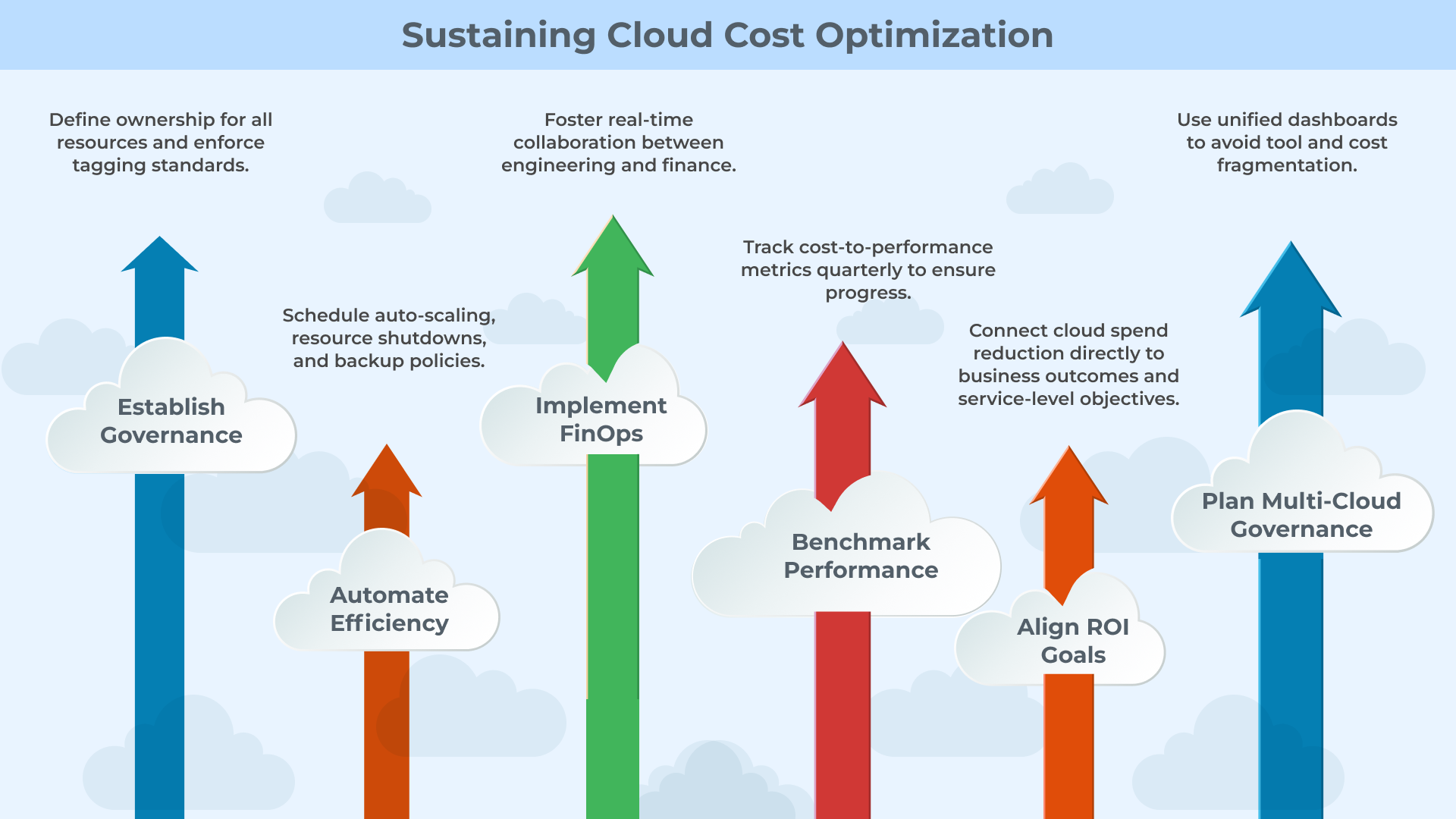
Checklist for CTOs: Sustaining Cloud Cost Optimization
-
Establish Governance
Define ownership for all resources and enforce tagging standards.
-
Automate Efficiency
Schedule auto-scaling, resource shutdowns, and backup policies.
-
Implement FinOps
Foster real-time collaboration between engineering and finance.
-
Benchmark Performance
Use unified dashboards to avoid tool and cost fragmentation.
-
Align ROI Goals
Connect cloud spend reduction directly to business outcomes and service-level objectives.
Conclusion
Sustainable cloud transformation is a matter of precision, not scale; in fact, as organizations evolve in their digital ecosystems, cloud cost optimization becomes a foundational element of operational resilience, allowing organizations to support true innovation without diminishing their efficiency. We at Telliant Systems leverage Cloud Operations best practices throughout the Cloud App Development process. We start utilizing these best practices during architectural design and retain them during performance monitoring.
We utilize automation, governance, and multi-cloud optimization, while enabling teams to understand ROI from cloud migrations as an organization, all while retaining performance, security, and scalability built into their systems. In today’s world, the true measure of cloud maturity is innovation that is cost-effective, and performance based.
Last spring, I sat in a war room with our lead developer, Maya. We had just shipped a new checkout page for a retail client. At 2 a.m., the phones rang; 300 users could not click the green “Pay Now” button because a designer had moved it two pixels left. Our classic test suite never noticed the shift. We lost sales and sleep. That night, we promised ourselves we would never rely only on brittle selectors again. This is the hard limit of traditional test automation. It is rigid, brittle, and incapable of thought. What if your tests could learn, adapt, and fix themselves? That is the promise of AI-driven QA, a shift from plain automation to intelligent testing.
Traditional automated tests use fixed rules, find an element by ID, click it, and check the result. When the user interface drifts even slightly, the test fails even though the feature still works. The failures are called flaky tests. They waste time and hide real bugs. Edge cases, rare user paths, and visual changes slip through because the scripts do not learn; they only repeat.
AI software testing adds brain power to the script. It watches past bugs, learns what a broken script looks like, and heals its own broken locators. The tests become predictive, adaptive, and self-healing. Instead of crying wolf every time a colour changes, the test asks, “Does the user still see the button in the right place?” If the answer is yes, the test passes, and life moves on.
Core AI QA Techniques
So how does this work in practice? How does a machine learn to test? It moves beyond simple scripts and uses methods that mimic how people see patterns and predict risk.
One strong use is machine learning in QA for defect prediction
Think of your version control system as a history book. Every change, every bug, every commit tells a story. An ML model reads that story. It studies past data to spot patterns. It might learn that when a developer modifies the payment module and also touches a database configuration file, there is a high chance of a checkout defect. It flags that the change set is for focused testing before it reaches QA. This shift testing from a reactive to a proactive position.
Visual validation is another area
A task that is incredibly slow and error-prone for people and hard for basic scripts. This is where Visual AI helps. A tool like Applitools Visual AI does not just read the code behind a button. It sees the button like a user. Its visual engine can check a full UI in milliseconds. So, if a CSS class changes from “btn-primary” to “btn-main,” and the button still looks the same to the user, the test passes. It fails only if the button disappears, changes colour, or moves in a way that matters. This resilience to UI drift is a game-changer for front-end checks. It eliminates thousands of false positive test failures, ensuring results accurately reflect real user impact. This is Testim.io is a powerful platform that leverages AI-driven QA working alongside your existing automated software testing tools. A public case in this space is the Medallia story. See how Medallia increased automated UI coverage and reduced manual review time with Visual AI → Medallia × Applitools
Natural Language Processing lowers another barrier
Analysts and product owners write requirements in plain English, such as “As a user, I should filter results by price and rating.” In the past, a QA engineer had to translate this into code. Now, NLP can turn that sentence into a draft test case with clear steps. It does not replace the QA engineer. It boosts them. They spend less time on translation and more time on strong scenarios and edge cases.
Technical Workflow Integration
For AI in DevOps to work, it cannot live in a separate silo. It must sit inside your CI/CD pipeline. This is where theory turns into daily value.
Let’s say, for example, the goal is to shift testing far left, so that it’s virtually invisible. When a developer pushes to GitHub, an action can start an intelligent suite. But instead of running every test for hours, AI algorithms perform test impact analysis. They analyze the code changes and intelligently select only 10% of tests that are most relevant to what was modified. This slashes feedback time from hours to minutes, telling the developer in near-real time if their change broke something.
Additionally, when you run the same intelligent checks as a Jenkins stage. A self-healing trigger during UI runs can auto-update locators/selectors, ensuring the build stays green without manual fixes. This is also where self-healing test scripts make a big difference. In a traditional setup, a failed build due to a changed locator, like a missing “btn-primary” class, means a developer gets ping, context-switches, and investigation, only to find it’s a false alarm. It’s a massive waste of time and momentum.
With self-healing AI, the test automation framework itself can recognize the failure. It will then dynamically search the DOM for a new, valid locator for that “Submit” button, perhaps now finding it by its ID or even its visual properties. It updates its own script and retries the test. If it passes, the build continues, and the developer is never interrupted. The script fixes itself overnight, and the team only wakes up to genuine, critical bugs.
Real-world case, self-healing in practice: See how Passportal trained self-healing tests with mabl to handle frequent UI changes in a dynamic site → Passportal × mabl .
Recommended Tools for AI-Drive QA Services
You do not need to build all of this from scratch. A mature set of tools makes intelligent testing accessible now. If you want to handle visual testing first, Testim.io is a powerful platform that leverages machine learning to make test authoring and maintenance vastly more efficient.
If your team has deep data skills and a unique data set, open-source frameworks like TensorFlow or PyTorch can power custom AI-driven QA models. These models can predict failure hotspots using your history and context.Teams also use Mabl for auto-healing journeys and keep Selenium while adding AI plugins like Healenium to stabilize selectors without rewriting existing tests.
Metrics for Success
How do you measure the impact of this transformation? It’s not about lines of code written, but about business outcomes delivered.
- The first metric is the defect detection rate. Are you finding more bugs before production, especially serious ones? A solid AI software testing rollout should raise this number.
- Next, track flaky failures. How much time are you saving by avoiding false alarms? Fewer flakes mean higher productivity and better morale.
- Finally, measure regression cycle time. How long does it take to get a confident “all clear” before a release? With smart selection and parallel runs, teams often cut this time by over 50%. That helps release speed and time to market.
Challenges
This approach has hurdles. Data quality is the biggest one. Machine learning in QA needs clean history. Your models are only as good as your bug and code data. If tickets are messy or incomplete, accurate prediction is hard.
You also need a plan for model drift. The app you ship today will be different in six months. As the product changes, models trained on old behavior lose accuracy. Set a retraining schedule. Update models with fresh data. Keep them current so they stay useful. Treat AI-driven QA as an ongoing program, not a one-time project.
The move to intelligent testing is here. The tools are ready. The return is clear. You get higher quality, faster releases, and less time spent on maintenance. It is time to stop only running tests and start building a quality system that learns and grows with your application.
If your current software development testing & automation setup feels brittle, our team can integrate these methods into your pipeline. Explore our Quality Assurance Services and also review our Automation Testing Services to see how we can help you build smarter, not harder.
App modernization keeps your teams moving without weekend deploys or audit fire drills. At 11 p.m., a CTO at a bank called me, “Our COBOL ledger still posts every transaction, yet our new mobile app times out before it can read a balance.” That call showed the gap between a reliable core and a modern edge. I have led programs where a core platform ran on an aging stack, releases were slow, and fixes felt risky. One client’s billing app relied on an unsupported framework, and another team was unable to expose clean APIs due to a lack of supporting tools. Both were still “working,” but both had become a drag on delivery and security. The aim is simple: protect the business while you move the right parts forward at a steady pace. You want fewer incidents, faster releases, and costs that are easy to explain.
When I plan, I anchor on outcomes: safer releases, stronger security, better scale, and less toil. That lens keeps decisions grounded when trade-offs appear. Your plan should focus on safe speed, not shiny tools. It starts by knowing when the old stack is holding you back, and that’s where we begin.
Identifying App Modernization Triggers
You don’t begin legacy system migration on a hunch. You begin when evidence stacks up. The signals show up in daily work.
- Unsupported languages or frameworks, such as VB6, Silverlight, or libraries with no security patches, force waivers and block audits.
- Build chains break on minor upgrades. The OS image is past support, CI or CD doesn’t fit the app’s shape, observability is thin, and incidents take longer.
- A single monolith requires weekend deploys and manual rollbacks. Compliance findings keep landing around logging, retention, or encryption.
- Hiring becomes more challenging due to scarce skills, and the risk of release increases with each change.
- Tooling mismatch blocks modern practice; containers, serverless, or infrastructure as code won’t run cleanly on the legacy stack.
If you can point to three or more with concrete examples, it is time to act. Rank systems by risk and value and write the one-page document that opens the budget and focuses the work. And you can do that with intent rather than urgency, which is exactly what’s next.
Technical Modernization Approaches
There is not one right path for every system. You choose based on risk, deadline, and code health, then you explain the choice in plain terms so everyone can understand and support it.
- Replatforming legacy apps: with light changes. Keep core logic, rightsized infrastructure, and adopt a managed database, object storage, and a managed queue. Use cloud migration playbooks to set guardrails for assess, mobilize, and migrate phases.
- Refactoring into services: Peel capabilities from a monolith behind a stable interface and grow into a microservices migration where boundaries match teams.Expedia Group moved to a microservices-driven architecture on AWS and cut manual touch in partner payments from 17 percent to 0.06 percent, a clear signal that targeted refactors pay off.
- Rewriting for blocked stacks: When code is unsafe or untestable, build a greenfield slice, run it next to the old one, prove parity, and cut over with feature flags.
- API layer wrapping: Put a clean facade in front of legacy logic. Movestable REST or GraphQL APIs now, while deeper work proceeds in parallel.
To align leaders and teams, map choices to the AWS 7 Rs so your software modernization strategy is staged and clear to everyone. AWS Documentation: Select the move that minimizes risk and restores delivery, then define the destination it will land on, utilizing containers, events, and guardrails ahead.
App Modernization: Architecture & Tooling Choices
Once you have picked a path, you need a target that is boring to operate in a good way. Package services into containers, run them on Kubernetes, and standardize build and deploy so rollouts and rollbacks are predictable. Use event-driven patterns where decoupling helps. Queues or streams let producers and consumers scale on their own, reduce cascading failures, and keep back pressure manageable. Keep synchronous calls only where they are truly needed.
Use serverless for short-lived, spiky tasks such as API glue, schedulers, and ingestion bursts. For steady high throughput or long-lived connections, containers keep things simpler. Add essentials from day one. Infrastructure as code. CI and CD with automated checks. Feature flags for safety, along with observability across logs, metrics, and traces.
A real-world anchor, ASOS scaled peak shopping on Azure, handling 167 million requests in twenty-four hours on Black Friday at about 3,500 requests a second with a 48 millisecond average response time. That is the payoff for clean boundaries, right-sized services, and managed platforms.
If your team wants vendor guardrails, study AWS Cloud Migration guidance and review Microsoft’s Azure App Modernization guidance for modernizing .NET, Java, Linux, and SQL workloads.
For stakeholders who need partner support, Telliant’s Application Modernization Services and software project rescue services show approach and triage models you can adopt. Once the runtime is predictable and secure, the hardest work remains the records you must carry forward, and now to the data.
Common Pitfalls App Modernization
- Skipping a dependency map, hidden cron jobs, unpinned versions, and mystery services surface at the worst time. Pull SBOMs, list schedules, and confirm licenses early.
- Carrying security debt forward and transferring issues to new homes creates future incidents. Scan dependencies and images, move secrets to a vault, and fix patterns during sprints.
- Latency shocks after refactoring, network hops add up. Budget calls per request, cache wisely, and move heavy work to workers. Avoid chatty service graphs that punish p99 tails.
Key Considerations for Data Migration
1. Plan data as its own track: Data is where timelines slip if you treat it as an afterthought. Plan it as its own track. For transactional systems, change data capture (CDC) is often the safest route. CDC streams insert, updates, and deletes from the legacy database into the target store so you can cut over with little downtime. For analytics-heavy needs, ELT is cleaner: land raw data first, then transform in place using the new platform’s tools.
2. Schema mapping needs care: Stabilize contracts for downstream systems and version changes. Add data quality checks to catch format drift early —this is a key part of data modernization. Build masked, production-like samples so performance tests are honest. Decide how you will treat history: full rebuild, selective backfill, or a read-only window on the old store while you finish backfills.
3. Plan cutover like a release: Shadow traffic validates reads on the new system. Route all writes for a record to one source of truth at a time. Switch, verify, and keep a bounce-back step if signals turn red. If you want supported options to keep targets in sync during cutover, visit Azure SQL Database CDC and AWS Database Migration Service’s ongoing replication. When schemas align and cutover is planned, you still need proof under traffic and failure; tests make this real.
Testing & Validation in Legacy Application Modernization
Modernization works when users barely notice, except that features arrive faster:
First, automated regression testing the business rule and API levels. If tax rounding worked a certain way before, tests enforce it, so finance does not get surprises. Second, performance tests under the new architecture with realistic traffic shapes. Tune autoscaling, connection pools, and timeouts using numbers, not hope. Third, safe rollout, smoke tests, small canaries, then progressive traffic shifts.
Set clear SLOs before any cutover:
For a public API, that might be 99.9 percent availability and p99 latency under 250 milliseconds for the top endpoints. Track those in one place so engineers and leaders see the same truth. Add synthetic checks from multiple regions to catch issues before customers do. Write a rollback plan and rehearse it. A runbook with exact steps, data gates, and owner names turns a risky night into a controlled routine.
Feature flags keep changes dark until you switch them on:
Start with a tiny slice of traffic and widen as numbers hold. Blue green or canary releases protect users while you learn. Chaos tests in non-production prove retries, timeouts, and back pressure work under stress. Confirm dashboards are steady for a full business cycle before wider rollout.
For a concise primer on modernization patterns, see Telliant’s 6 Key Strategies for Application Modernization is a useful primer to share across teams.
Enterprise technology teams are now expected to deliver production-ready applications at a speed that traditional development cycles can’t sustain. Agile sprints seem to be shrinking, market demand is rising, and the gap between business needs and engineering capacity is widening.
Low-code and no-code platforms have shifted from departmental prototyping tools into the industrial-level components of a modern software delivery ecosystem. When architected correctly, these platforms integrate with CI/CD pipelines (e.g., Jenkins, GitHub Actions), align with microservices-based backends, comply with security frameworks like SOC 2, GDPR, and ISO 27001, and reduce lead time from business case to production deployment.
For today’s CTOs, the strategic challenge isn’t merely adopting low-code or no-code platforms but embedding them into a hybrid development architecture without compromising scalability, compliance, or maintainability.
What Are Low-Code and No-Code Platforms?
Low-code platforms
To clarify, low-code platforms allow developers to build applications with the help of visual interfaces with less hand-coding. They offer maximum flexibility to extend capabilities using various custom codes where it feels necessary, making them perfect for complex enterprise environments.
Unlike the pure no-code tools, low-code platforms support the custom code injection (JavaScript, C#, or Java ) for having more edge-case logic, which allows software engineering teams to incorporate:
- REST and GraphQL APIs (documented with OpenAPI/Swagger)
- Message queues like Kafka or RabbitMQ for event-driven architecture
- Custom data pipelines built on tools like Apache NiFi or Airflow
Deployment is usually cloud-native, often containerized, and orchestrated by Kubernetes to scale horizontally. Now this makes the low-code extremely suited to the B2B portals, integration hubs, and workflow-heavy internal systems where the extensibility and SLA compliance are much more critical.
No-code platforms
No-code platform takes away the code entirely, allowing non-technical users, analysts, operations managers, and others to configure workflows on their own and then bring apps into action with drag-and-drop tools.
While both of them have their own distinctive features that make them truly unique, the core distinction lies in the customization and audience. Low-code, such as OutSystems, Mendix, Microsoft Power Apps, and Appia, deals with IT teams that need scalability, integration links, and pure authorization. In comparison, no-code solutions such as Bubble, Airtable, and Glide offer an instant deployment of the departmental apps with fewer IT interruptions.
Modern platforms commonly include:
- Visual IDEs with drag-and-drop UI builders
- Reusable components and templates
- Pre-built integrations for CRMs, databases, and SaaS tools
- Workflow automation engines
- APIs and scripting for extensibility (mostly in low-code)
Enterprise-grade no-code adoption requires:
- Governance layers to control data access and prevent shadow IT
- Integration middleware (e.g., Zapier, Workato, or native webhooks) for cross-platform data sync
- Authentication via SAML, OAuth 2.0, or SCIM to ensure compliance with identity standards
- Audit trails to maintain SOC 2 and ISO 27001 readiness
Enterprise-Grade Benefits of Low-Code/No-Code Adoption for Rapid Application Development (RAD)
For technical leaders, the appeal of the low-code platforms isn’t limited to faster delivery; it’s about optimizing engineering resources, incorporating seamlessly into the current infrastructure, and reducing operational risk without compromising compliance or scalability.
1. Accelerated Delivery Cycles Without Sacrificing Quality
An enterprise-ready low-code platform can diminish the lead time from commitment to production by incorporating it directly into CI/CD pipelines such as Jenkins, Azure DevOps, and GitHub Actions. What once took nearly two months can now be delivered within three to six weeks with the help of automation, containerized builds, and controlled release management.
2. Optimized Developer Utilization
By offloading the CRUD-heavy UI, form management, and workflow automation to the low-code tools, the engineering teams can focus more on the high-end infrastructure, distributed systems, data leaks, and real-time analytics.
3. Reduction of Backlog and Shadow IT
Assessed no-code adoption lets the business units deploy the internal solutions under IT’s security umbrella. This reduces the risk of unsanctioned SaaS usage while still enabling agile departmental innovation.
4. Integration Alignment with Enterprise Systems
Modern platforms are equipped with standard native connectors for the ERP (SAP), CRM (Salesforce, Dynamics 365), and other cloud data warehouses (Snowflake, BigQuery).
For the systems without native connectors, REST / GraphQL endpoints or event streaming via Kafka help to incorporate without having middleware.
5. Cost Efficiency Through Hybrid Development
- Reduced OPEX: Small-scale delivery teams with faster cycles and low infrastructure, which gives a decent provisioning cost.
- Licensing ROI: Consolidating multiple tools into a single low-code platform can reduce the software sprawl.
- TCO Visibility: The enterprise-grade assistance integrates with the low-code workloads, ensuring that the performance SLAs and cost tracking are met.
When to Consider Low-Code/No-Code for Rapid Application Development (RAD)
Rapid Application Development is more focused on fast prototyping, iterative delivery, and feedback, which comes directly from an ongoing user. It works optimally well when the responsiveness and the replication outweigh the perfection on the initial release.Ideal use cases include:
1. Internal Operations Tools
From getting approval for the apps to managing the asset dashboard, internal tools can be quickly made using low-code platforms and maintained without any infrastructure overhead.
2. Customer and Partner Portals
Building a customer onboarding portal via OutSystems with Azure AD B2C integration, backed by a PostgreSQL data store, deployed in a Kubernetes cluster behind an API Gateway, with real-time event publishing to Kafka for downstream analytics.
3. Proof-of-Concepts and MVPs
Product teams validating new features or markets can use no-code tools for functional prototypes, gathering user feedback before investing in scalable engineering.
4. Workflow Automation and Integrations
Automating data movement across tools (e.g., from Salesforce to SAP to Outlook) using visual workflow builders reduces manual effort and speeds process modernization.
Best Practices for Successful Low-Code/No-Code Adoption
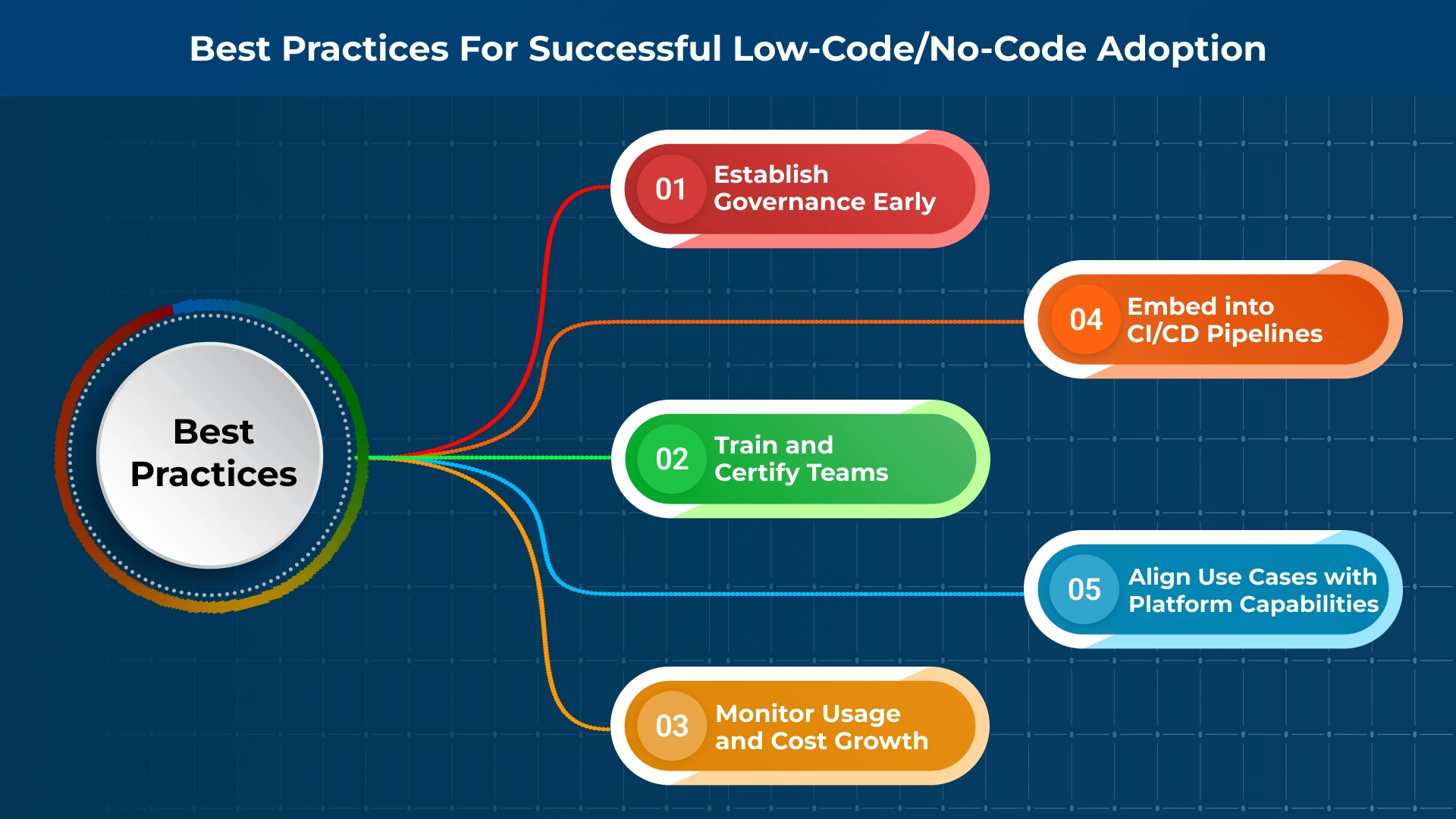
1. Align Use Cases with Platform Capabilities
Map platform strengths to workload profiles:
- Low-Code: Integration-heavy, extensibility required, high-volume transactions.
- No-Code: Lightweight workflows, departmental apps, rapid POCs.
2. Establish Governance Early
- Define RBAC/ABAC policies.
- Apply version control (Git) for low-code assets.
- Maintain audit logs for compliance (SOC 2, ISO 27001).
3. Train and Certify Teams
Enable citizen developers while enforcing secure coding practices. Provide certifications for both IT staff and business users.
4. Embed into CI/CD Pipelines
- Integrate with automated testing suites (Selenium, Postman).
- Enable containerized deployments (Docker, Kubernetes).
- Use Infrastructure as Code (Terraform, Pulumi) for environment consistency.
5. Monitor Usage and Cost Growth
- Track API call volumes and concurrency limits.
- Audit licensing usage quarterly to prevent unexpected cost spikes.
Challenges and Limitations of Low-Code No-Code Platforms
Even mature low-code and no-code platforms come with certain limitations that an enterprise team must acknowledge and address right away.
1. Vendor Lock-In
Proprietary data models and scripting languages can make migration difficult. Evaluate the long-term flexibility of the platform and the availability of export tools or open standards.
2. Scalability and Performance Limits
For applications requiring low latency or complex data processing, platform performance can become a constraint. Load testing and API limits should be understood up front.
3. Security and Compliance Risks
Allowing non-developers to build apps introduces security and compliance risk. Without strict controls, you risk data leakage, audit failure, or compliance violations.
Why This Distinction Matters for Technical Leaders
For CTOs and CIOs, the decision between low-code and no-code is not about who makes the app, but about how the app integrates into the current enterprise infrastructure.
A low-code deployment can be more of a microservice with a larger service mesh, interact with the core APIs, and maintain CI/CD compatibility with traditional development.
A no-code app, while it may be faster to deploy, still needs architectural isolation via VPCs, API sensing, and middleware to avoid any potential threats and risks.
How Telliant Systems Brings the Solution
With the level of expertise in enterprise DevOps, security frameworks, and cloud architecture, we enable the low-code and no-code adoption, which delivers speed without compromising control. Here at Telliant Systems, we work closely with the CTOs and the CIOs to incorporate these platforms into a modern, cloud-native architecture, which ensures:
- Seamless integration with your API, data, and identity layers.
- Governance controls are used to maintain compliance and security posture.
- Performance optimization to meet SLA and scalability targets.
Conclusion
At Telliant Systems, we help CTOs and software leaders embed these platforms into their software delivery ecosystems. From platform evaluation and governance frameworks to enterprise-grade implementation and developer enablement, we ensure low-code solutions integrate seamlessly into your architectural blueprint, delivering speed without compromising control.
One-size-fits-all software often fails to support complex business needs. The need for is clear for businesses hoping to compete in rapidly changing landscape with increasingly specialized concerns. Users demand unique workflows, and organizations that can meet this demand fare better than those relying on cookie-cutter solutions.
In this article, we’ll explore when and why custom solutions make sense, what the software development process looks like, and how to get it right the first time.
Why Custom Software?
Software should support the unique was your company does business, not fight it. Off-the-shelf tools can work in the short-term, but as you grow, you’ll quickly discover that an ability to adapt and compete on your own terms becomes crucial to your success.
Flexibility and Scalability
Adding new features, adjusting business logic, or scaling to handle more traffic are things custom software allows you to do with ease. With custom software, you no longer have to deal with things like
- Waiting on vendors to release updates
- Awkward workarounds to fit someone else’s model
- Calling an off-location specialist to handle outages and bugs
Integration with Legacy Systems and Other Tools
No business’s platform is without its quirks. Bridging the gap between legacy data stores, third party APIs, and new modules can be tough. Custom software allows you to
- Preserve investments in current systems
- Reduce manual data entry and duplication
- Enable smoother, more unified workflows
Compliance Alignment and Privacy
When you’re working under tight compliance requirements like HIPAA, GDPR, or SOC 2, owning the software and the data is a huge advantage. You control the access, meaning you can
- Implement custom access controls and audit logs
- Ensure data residency and encryption requirements are met
- Proactively design around compliance
Tailoring Solutions for Diverse Industries
Industry needs are not one-size-fits-all. Non-custom solutions will never be able to address concerns across all market spaces. Healthcare companies have different pain points than finance companies, and logistics, retail, and supply-chain organizations have different pain points from those.
-
Healthcare
HIPAA compliance, patient engagement, and secure EHR (Electronic Health Record) access are issues specific to the healthcare industry. Software built to handle generic concerns might not allow you control over these things to the degree you require.
In particular, HIPAA (Health Insurance Portability and Accountability Act) sets the standard for handling protected health information (PHI), and failing to meet it can mean serious legal and financial consequences.
-
Finance
The finance world runs on real-time insights and bulletproof accuracy. Custom software gives financial teams the speed, security, and control they need to stay competitive. Real-time data processing, regulatory reporting, and fraud detection are specific finance-related concerns that might not be properly handled by out-of-the-box solutions.
-
Logistics, Retail, and Others
From inventory management to route optimization, to customer experience, there are a multitude of ways custom software supports the various needs of businesses both big and small. It streamlines operations and delivers better outcomes by allowing you to design software around your customers, not forcing your customers to bend to what your software dictates.
Custom Software Development Lifecycle (SDLC)
A strong approach to software development sets the tone for the overall success of your platform and deployments. You need thoughtful planning at each stage of the lifecycle to ensure this.

-
Discovery and requirements gathering
Building custom software starts long before you write any code, in fact, it starts before your design team even begins to think about what to build. Before you can do any of that, you need to figure out what your users actually want, and what the scope and requirements of those needs are.
- Stakeholder interviews to surface goals, pain points, and success metrics
- Process mapping to understand how things work already
- Prioritization of features, integrations, and compliance needs
- Technical review of existing systems and data sources
-
Agile delivery and prototyping
Once you’ve figured out what users want, you need to build it in a repeatable, testable, and iterable way. This usually means adopting an Agile mindset and utilizing Continuous Integration techniques.
- Sprints focused on building and releasing small, usable features
- Prototypes to validate ideas with users before scaling up
- Collaborative reviews between devs, designers, and stakeholders
- Frequent testing and refinementto catch issues early and adapt quickly
-
Ongoing support and evolution
Building custom software doesn’t stop after you launch it. You need to continuously monitor your system, not just to catch bugs, security threats, and outages, but to begin to think about what to build next. Your ongoing maintenance should include
- Bug fixes and performance tuning
- Feature updates and enhancements based on real-world use
- Monitoring and security updates to keep the system healthy
- Scalability planning as your team or user base grows
-
Choosing the Right Partner
Figuring out how to manage all this yourself can feel daunting, especially for companies building their first custom solution. It can help to have a partner who can collaborate and strategize with you on the implementation, answer questions, and ensure a smooth and secure deploy.
Choosing the right custom software partner isn’t just about writing code – it’s about partnering with someone who understands your business and its goals, and who has the right domain expertise to handle your specific use cases. You also want clear communication, and access to the best developers with full-stack technical capability.
Conclusion
When your workflows are unique, your data is sensitive, or your industry demands more than a one-size-fits-all solution, custom software development becomes a necessity. That’s where Telliant Systems can help.
We focus on strategy-first thinking, deep domain expertise, and full-lifecycle delivery to build tailored software solutions that solve real problems. If you’re looking for a partner to help you build smarter, faster, more impactful software, Telliant is here.
What is “software project rescue”? It sounds pretty serious, and sometimes, it can be. Budgeting issues, unexpected technical debt, unrealistic expectations or poorly outlined requirements all of these can be reasons that projects stall.
But stalling doesn’t necessarily mean failing: it’s possible to save a project after a rough start or unforeseen hiccup. Doing so can sometimes require outside help, and it’s crucial that you choose the right partner to get you back on track.
In this article we’ll talk about “project rescue partners” and how to choose the right partner for your project.
Understanding Software Project Rescue
Software project rescue means coming to the aid of a project that is failing to meet expectations or benchmarks. It could mean getting the project back on schedule if it’s falling behind, or redefining expectations to better align with user needs.
Why Software Projects Fail?
Setting a software project up for success means carefully planning during the early stages. It’s primarily lack of clear planning that leads to stalling and failure,
However there are other ways that a project can fail:
- Unclear requirements
- Inexperienced teams
- Existing technical debt
- Communication gaps
- Unrealistic expectations
Why Do you Need a Software Project Rescue Partner?
A software rescue partner can help you not only fix issues that have arisen in your current project, but also prepare to address similar issues in the future, so the situation doesn’t happen again. A rescue partner has specialized skills and methodologies – useful if your team is made up of generalists, or if you’re venturing into a new technical space.
Rescue partners also offer objective analysis and unbiased opinions: they aren’t emotionally or financially invested in your project, and so often have a more clear-eyed take on what’s going wrong. Finally, software partners have experience in both technical and the business aspects of a project, and have most likely addressed issues similar to yours in the past.
Benefits of Engaging an Experienced Rescue Partner
You might be tempted to try and resolve issues yourself, or think that attempting to do so will save you money. However, wading into problems alone often only leads to further trouble, and you end up spending more in the long run.
Here’s what an experienced rescue partner can bring to the table:
-
Rapid Assessment and Diagnosis
Expert teams quickly identify core issues, often spotting things you or your team may have overlooked. Sometimes, simply being too familiar with the product causes us to miss things that are obvious to an objective outsider.
-
Comprehensive Recovery Planning
Once the issues have been pinpointed, a partner can help you come up with a plan aligning strategy with business goals and prioritizing critical issues.
-
Technical Expertise with Business Insight
Teams who understand both code and business objectives are at a distinct advantage over those who don’t. If your team is stronger in one area and weak in the other, consider bringing on a partner to address this imbalance. You may also need to look for a partner who can provide both.
-
Sustainable, Long-Term Solutions
The plan your rescue partner implements will move beyond quick fixes, implementing practices like CI/CD, agile methods, and transparent communication.
-
Post-Rescue Support
Maintenance and monitoring are crucial for future stability. The right partner will help you establish these systems and may be able to provide ongoing support, or even planning for the next project.
Challenges When Choosing a Rescue Partner
Not every software partner is created equal – and not every outside team is right for your company. Make sure you identify your needs and goals before beginning your search. Having a clear understanding of what you expect to get out of a partnership will ensure you pick the right one.
-
Identifying Expertise
Perhaps the most critical step in selecting a partner is evaluating technical and domain-specific experience. Ask for a portfolio of previous work or clients. Discuss their preferred tech stack and make sure it aligns with yours. Ask about their development practices – how do they ensure code quality? Do they use best practices like peer review, automated testing, continuous integration, and agile development?
-
Alignment with Business Goals
Avoid technical solutions that don’t address your business needs. Again, this is where having a clear understanding of your own needs is crucial. Once you’ve assessed that the solutions offered by your partner do align, make sure those goals are SMART (Specific, Measurable, Achievable, Relevant, Time-Bound) and spend time mapping every proposed feature directly to a business goal.
For Example:
Feature Business Goal - Add 1-click checkout
- Increase conversion rate
- Improve admin dashboard
- Reduce manual data work
- Integrate Stripe
- Enable faster monetization
-
Effective Communication
Ensure your partner can bridge the gap between developers and stakeholders. Establish clear communication channels and designate points of contact. Err on the side of written communication methods for clarity and traceability. Set expectations up front and promote active listening and confirmation. You can also use visual tools like dashboards and charts.
-
Maintaining Momentum
Ongoing challenges might threaten to derail recovery progress. Your business partner should be able to break work into measurable chunks, and help you set and stick to realistic goals. They should know how to keep your backlog prioritized and groomed, and help you run retrospectives and course correct if need be.
Overcoming Challenges with the Right Approach
The good news is, selecting the right partner is easy with the right approach. As long as you do due diligence and establish clear communication from day one, the process should be smooth and beneficial.
Some things to keep in mind during the selection step of your recovery process:
- Assess your partner’s past successes
- Seek case studies and client feedback
- Create and share a plan, and ask for regular updates
- Ask how they combine technical fixes with stakeholder management
- Choose partners who offer post-rescue maintenance and long-term support
Telliant Systems’ Approach to Software Project Rescue
Telliant Systems knows how to step in and take the reins when a project is on the rocks. We have a proven framework to assess, stabilize and revitalize projects, and our experienced teams understand your unique challenges. We’ve been revitalizing high-stakes projects across multiple industries for over a decade, by providing customized solutions aligned with business objectives.
If you’re facing a stalled project, take action! Choosing the right partner to help rescue your project can mean the difference between an epic failure and stratospheric launch.
Data security matters now more than ever in software development. More data is being stored, transferred, and utilized by apps than ever before, attackers are better and faster than ever, cloud and third-party APIs make up a large part of most codebases, and nearly all companies – no matter how tech-adjacent – now have some kind of online presence.
With so much surface area, and with devs producing code faster than ever, security breaches are bound to happen. Baking security into your code and development lifecycle is critical to stay ahead of the curve. In this article, we’ll look at how to build in data security, best practices and techniques, and privacy and regulatory concerns.
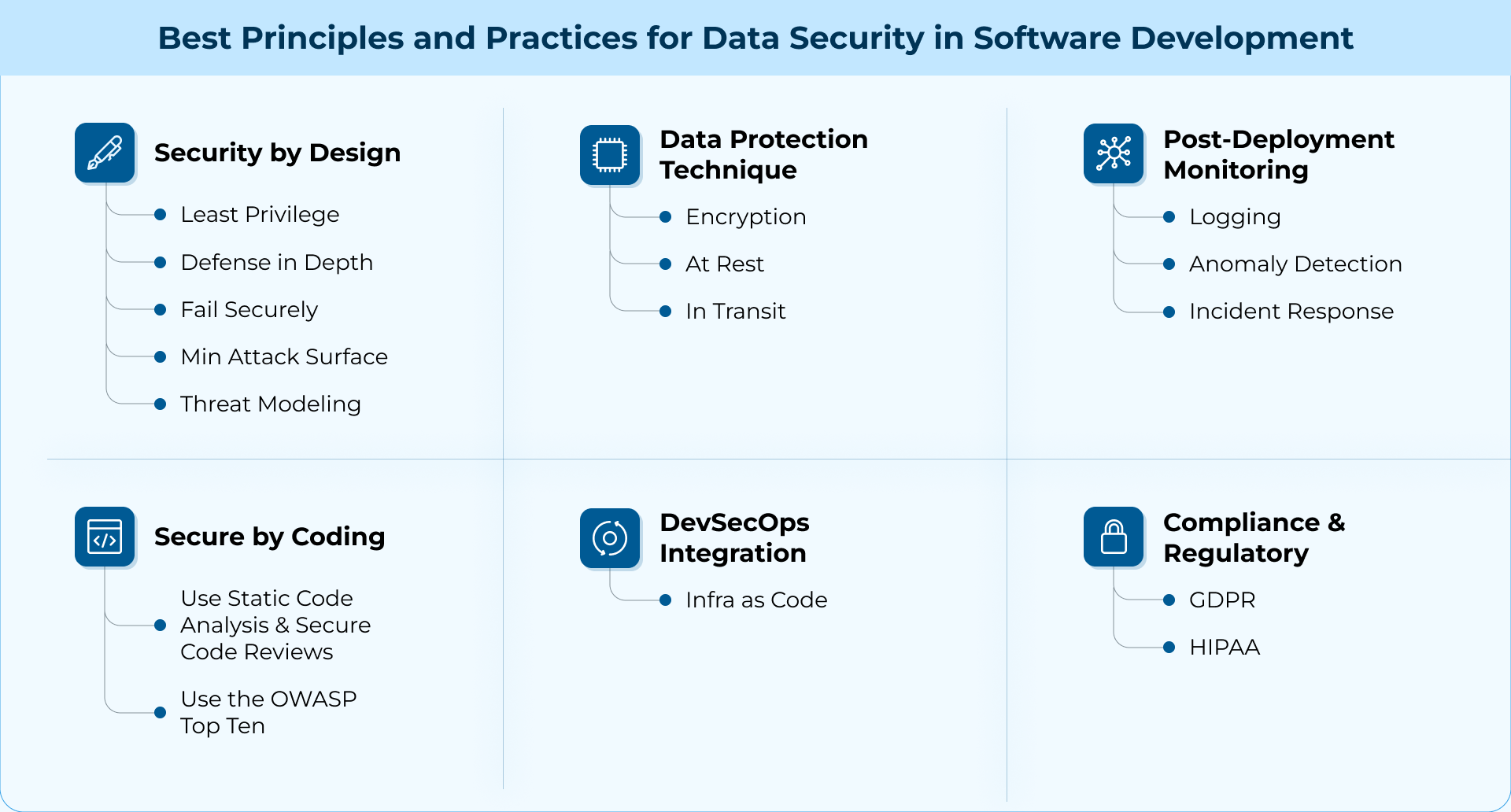
Best Principles and Practices for Data Security in Software Development
1. Security by Design
The most secure software has security wired in by default – not tacked on after the fact. Threat modeling and risk assessment should be done early in the Software Development Lifecycle (SDLC) to ensure adherence to best practices and principles.
Here are the principles your business should strive to achieve:
-
Least Privilege
Every component of the system – whether that’s the user, a module, a process – should have access to only the minimum it needs to do its job. This limits the blast radius in case of a compromise.
-
Defense in Depth
A single layer of security isn’t enough: you need layers of input validation, firewalls, encryption, monitoring, so that if one fails, the others are there for backup.
-
Fail Securely
Don’t return detailed error messages that allow attackers to guess credentials or ever share credentials in failstates.
-
Minimize Attack Surface
Every API, endpoint, login, and connection is a potential security breach. Only expose what is absolutely necessary and never make the default state an insecure one.
-
Threat Modeling
Think like an attacker – and have your devs think like attackers when they write code. And don’t just do this once, do it for every new module you build.
2. Secure by Coding
There are some core best practices you can implement to ensure that the code you’re writing is secure. Let’s take a look at a couple of those practices.
-
Use the OWASP Top Ten
The OWASP Top Ten is a security vulnerabilities list maintained by the Open Worldwide Application Security Project. It’s regularly updated with the most commonly seen and most critical security risks faced by software applications.
Checking this list before and during development is a good idea to stay on top of changing requirements. Here is a quick rundown of the current (as of 2021) list:
- Broken Access Control
- Cryptographic Failures
- Injection
- Insecure Design
- Security Misconfiguration
- Vulnerable and Outdated Components
- Identification and Authentication Failures
- Software and Data Integrity Failures
- Security Logging and Monitoring Failures
- Server-Side Request Forgery (SSRF)
-
Use Static Code Analysis and Secure Code Reviews
Static code analysis is the process of analyzing code without running it. Usually, this is done by a tool that scans your code for risky patterns. This is different from running a test suite, which actually exercises your code paths – it just looks for things like hardcoded credentials, SQL queries that use direct user input, or functions that disable SSL checks.
Code reviews are a similar process, but performed by a human. Every pull request opened against a repository should be checked by a human pair of eyes, ideally a pair of eyes familiar with the codebase and with security best practices.
3. DevSecOps Integration
CI/CD (Continuous Integration/Development) allows you to iterate on and ship code quickly – but it’s important to make sure that that speed doesn’t come at the cost of your app’s security. Luckily, DevOps is one place where security can be truly automated and baked right into the development process.
Processes like dependency scanning, Static Application Security Testing (SAST), secret detection, Infrastructure as Code (IaC) scanning, and container image scanning are all automated things that can catch issues before deployment.
- Infrastructure as Code
Infrastructure as Code is a smart new way to spin up apps on cloud services and platforms like AWS. Rather than logging in and clicking around to create instances through the UI, you can write config files that spin up all the necessary services for you.
This is a major security improvement, because it’s repeatable, scannable (the infrastructure code itself can be scanned for implementation issues), requires no auth or login, and allows for version control.
4. Data Protection Techniques
Let’s talk about two primary data protection techniques that every app needs to manage to maintain security at the most basic level: encryption (at rest and in transit) and secret management/access control.
-
Encryption
Encryption means scrambling data so it’s unreadable (either by humans, or by outside processes.) There are two moments when data encryption occurs: at rest (i.e. while the data is static) and in transit (i.e. when it’s being sent across the network.)
-
At Rest
All data should be encrypted when it’s stored – in an S3 bucket, in your database, on a hard drive, etc. That way, if a bad actor gains access to the data, it’s still safe. Some common examples of how to encrypt data at rest are:
- Database storage encryption (e.g., AWS RDS encryption)
- Disk-level encryption (e.g., LUKS on Linux, BitLocker on Windows)
- Encrypted object storage (e.g., S3 server-side encryption)
-
In Transit
Once the data leaves its storage location and makes its way across the network, it needs a different form of encryption in case it’s intercepted. A few ways you can do this to prevent things like Man-in-the-Middle attacks are:
- HTTPS for web traffic
- TLS for internal service-to-service communication
- VPNs or SSH for secure network tunnels
5. Compliance and Regulatory Considerations
In the last ten years, the world has become more security-savvy and privacy-aware. Users expect secure services now, and data breaches are massive blows not just to a business’s back end, but to their brand and credibility. Governments have implemented compliance and industry regulations that need to be strictly followed.
-
HIPAA
The Health Insurance Portability and Accountability Act is the primary regulation applying to US-based healthcare providers and insurance companies. It requires data confidentiality (ensuring personal health data is only available to authorized users), data integrity, audit controls, access controls, encryption, and Business Associate Agreements (BAAs) with third parties.
-
GDPR
The General Data Protection Regulation applies to EU countries, and to any company that handles the data of EU residents. It requires explicit user consent, right to access and erase data, minimization of data collection, and breach notification.
6. Post-Deployment Monitoring
During the post-deployment phase of development, you need to be thinking about logging, anomaly detection, and incident response.
-
Logging
Using a centralized logging system to track system events will make tracking down the root cause of a breach faster and easier (and will allow you to prevent future breaches.) Without logging, your devs are flying blind in the event of a data breach.
Platforms like ELK, Datadog, and AWS CloudWatch can support your logging efforts. You should make sure that logs include timestamps, user IDs, and context – and make all logs tamper-resistant.
-
Anomaly Detection
Anomaly detection allows you to detect irregular patterns quickly – sometimes alerting you to a breach before it even happens. Examples of unusual or suspicious behavior might be:
- A user logging in from two countries 30 minutes apart
- A spike in 500 errors on an API that’s usually quiet
- A database query pulling more rows than usual
-
Incident Response
You need a structured, documented, and repeatable plan for responding to problems when they arise. Prepare this plan during the planning phase of development – don’t wait until you’re in the middle of a data breach to start figuring it out!
Conclusion
As attack surfaces grow and software gets more interconnected, the cost of neglecting security rises fast. It isn’t just a backend concern or something you tag on at the end of a sprint. It’s a mindset — one that needs to be present from planning to deployment to post-launch.
The good news is, building secure software isn’t about perfection — it’s about consistency, awareness, and making smart choices. The software product development teams that treat security as part of their core development culture, not just a checkbox, are the ones best positioned to build trust, protect users, and weather whatever comes next.
Choosing the right software development methodology is crucial. From the structured nature of Waterfall to the adaptability of Agile, each methodology comes with its own strengths and challenges. With so many options available, how can you determine the best approach for your specific project needs?
In this article, we’ll navigate this challenge with practical advice to help you make the right decision. Whether you’re building an MVP for a personal project, or developing a full-blown enterprise software suite, understanding the strengths and weaknesses of each methodology will empower you to select the right approach.
What Is a Software Development Methodology?
A software development methodology is a structured framework for approaching development. It is not the same as a list of software requirements. Requirements tell you what to build. A methodology tells you how to build it. It outlines a roadmap for you to follow from the start of the project to the end.
The methodology you choose will impact decisions affecting budget, timeline, communication and the project’s overall quality.
Top 7 Software Development Methodologies
There are many different ways to approach development—not all of them are documented. At the end of the day, a methodology is flexible and changeable, and some are not formalized. There are 5 methodologies that are very common in this industry, so we’ll outline those below.
1. Waterfall
The Waterfall methodology is a linear, sequential approach where each phase must be completed before moving to the next. It’s gotten a bad rap in recent years, as many smaller teams (and even some larger institutions) find that rapid iteration and greater flexibility are crucial to smooth development. It’s best suited for projects with well-defined requirements.
2. Agile
Agile is a flexible, iterative methodology that emphasizes collaboration, customer feedback, and continuous improvement through frequent releases. While agile software development is popular among startups and smaller teams, managing it in larger organizations or projects with unclear requirements can be challenging.
3. Scrum
Scrum is not really a methodology in itself—rather, it is a framework for implementing Agile philosophies. It aims to break down the dev process into short, manageable chunks called Sprints, and it delegates tasks to team members who take on roles such as Scrum Master and Product Owner.
4. Lean
Lean comes from the manufacturing world and is focused on eliminating waste and optimizing resources. In manufacturing, these are literal physical resources: in software, the resources are time, data storage, performance, etc.
5. Feature-Driven Development (FDD)
Rather than a full methodology on its own, FDD is a tenet of Agile philosophy. It relies on user feedback and incremental release of small features to meet user needs. It is focused on short sprints and building only what is required by users.
6. Rapid Application Development (RAD)
Rapid Application Development (RAD) focuses on rapidly building functional prototypes to gather user feedback early and continuously. Like Agile, it emphasizes user involvement, but it prioritizes flexibility over extensive upfront planning.
7. Rational Unified Process
Rational Unified Process combines elements from several methodologies, making it a very popular approach in 2025. It divides the software development life cycle (SDLC) into four phases: inception, elaboration, construction, and transition. At each phase business modeling, analysis, design, implementation, testing, and deployment are cycled. This results in a highly complex but very modular development process.

Factors to Consider When Choosing a Software Development Methodology
Before you decide on a software methodology for your next project, consider your needs, and the limitations, and scope of your requirements and team.
- Clarity and complexity of requirements. Projects with very clear and simple requirements do very well under the Waterfall methodology. For software projects with less solid specs, consider Agile.
- Team size and expertise. Very large teams may do well to try implementing Lean strategies. Smaller teams may find agile software development gives them more leeway to operate independently.
- Time constraints.Projects on a tight deadline may find that Scrum or Agile principles allow them to rapidly deliver features as they are ready. For projects with very rigid long-term deadlines, try Waterfall.
- Budget. If resource allocation is tight, Lean may be the methodology for your team. Organizations with money to burn can afford to try a more rigid approach like Waterfall.
Conclusion
Choosing the right software development methodology for your project will depend on a variety of factors, including project requirements, team size, deadlines, and budget. Always remember that no methodology is “one-size-fits-all,” so it’s essential to weigh these factors carefully to determine the best approach.
Consider scheduling a meeting with our experts today to guide you in the decision-making process.
The number of data breaches in the healthcare sector has been growing steadily since 2010. In 2023, the United States saw its highest number of data breaches to date, with 745 separate incidents, and in 2024, 491 cases resulted in the loss of over 500 million records. This surge underscores the increasing need for robust data security measures.
The costs of these breaches are massive: according to a report from the HHS Office for Civil Rights, breaches in the healthcare sector affected almost 170 million individual Americans in 2024. The average financial cost of a single data breach in the US in 2024 was around 9.4 million dollars.
The Growing Threat Landscape in Healthcare – The Need for Data Security
As healthcare technology has advanced, it has brought better and more cost-effective care to its customers. However, it has also made the healthcare industry one of the largest targets for cyber-attacks. Healthcare records are particularly sensitive, and confidential patient data is extremely valuable.
The majority of healthcare data breaches occur through hacking or IT incidents. Software vulnerabilities, data security failures, and human error lead to unauthorized access to networks and servers. As more patients access their records via phone apps and web browsers, data pipelines expose and exploit more weak spots. Innovations in data collection, as well as aggressive collection by third-party vendors, increase the volume and speed at which records are shared.
Most Common Causes of Healthcare Data Security Vulnerabilities
The seven most common causes of breaches to healthcare data systems are:
- Use Of Outdated Systems
- Email Scams
- Breaches Of Employee or Contractor Devices
- Unsecured Wireless Networks
- Weak Passwords
- Insufficient Training in Data Security
- Failing To Encrypt Data in Transit

Core Innovations in Healthcare Data Security
Fortunately, innovations are also happening in data security. Proper data encryption and MFA (Multi-Factor Authentication) go a long way in securing employee and customer data. Antivirus applications can detect and block thousands of viruses and malicious attacks. Enhanced data backup and recovery allow data to be recovered after an attack. Proper system monitoring by IT allows the full network to be known and all endpoints inspected for threats.
These methods are not revolutionary. The primary issue affecting healthcare data is that security measures are not within most organizations’ reach. The issue is ensuring adequate training for healthcare employees and providing proper resources for the security and IT teams responsible for managing data to properly implement these methods.
Building Cyber Resilience Through Technology Integration
Data Security measures and implementations must be planned upfront and integrated robustly when developing custom healthcare software. Fortunately, the best and most effective software tools to strengthen a healthcare org’s security strategy are often the most widely used and easily implemented:
- Data encryption
- Network firewalls
- Incident-response planning
- MFA
- Cloud Security
Here are two examples of successful healthcare software with advanced security features that teams might consider when looking for security to integrate into their system.
SolarWinds
SolarWinds’ suite of security tools is specifically designed for healthcare and includes a range of features such as user activity monitoring, network monitoring, firewall security management, log analysis, file integrity monitoring, bot detection, and protection from DDoS attacks.
Their Security Event Manager (SEM) tool deploys in minutes, providing lean IT teams with the tools to respond to critical threats and intrusions. It also simplifies HIPAA compliance.
Greenway Health
Greenway offers industry-leading expertise on healthcare cybersecurity, as well as HIPAA-compliant solutions for data protection. Their cloud-based Electronic Health Records (EHR) are secured behind firewalls, intrusion detection systems, proactive vulnerability scanning, and robust backups.
Their services undergo regular certification, inspection, and third-party review.
Why Partnering with Experts is Important
Healthcare IT teams often operate with limited resources. That’s why it’s important to find software security partners with industry experience and expertise to bolster their efforts.
A solid data security plan should include monitoring, threat detection, recovery, and backup at every point in the data pipeline. Your software partner should be able to provide tailored support specific to your network and work with you to create a solution that fits your budget and needs.
The Role of AI
As Generative AI becomes more prevalent, cyber-attacks become smarter and harder to detect and squash. Fortunately, AI security methods are also improving. AI security solutions will undoubtedly become necessary to fully protect customer data in the future.
Security Operations Centers (SOCs) can train AI models to recognize cyber threats like malware, ransomware, and unusual network activity. These models often uncover threats traditional detection systems overlook, particularly AI-generated attacks.
AI can enhance data analysis and anomaly detection in security information and event management (SIEM) systems. By studying historical data, AI establishes a baseline for normal network behavior, allowing it to detect anomalies that indicate potential security incidents.
A Healthcare Data Security Checklist
Keep your customers and employees secure by ensuring you implement the right procedures. Get a downloadable version of this list here.
1. Encrypt Everything
- Protect patient data with strong encryption (AES-256, TLS 1.2/1.3).
- Ensure data is encrypted at rest and in transit—no exceptions.
- Use secure key management so encryption does its job.
2. Control Who Gets In
- Set up role-based access control (RBAC)—only the right people should see sensitive info.
- Use multi-factor authentication (MFA)
- Regularly audit and update who has access. People change roles, but their permissions shouldn’t linger.
3. Secure Networks & Devices
- Use firewalls and intrusion detection/prevention systems (IDS/IPS) to block attacks before they start.
- Protect endpoints with antivirus, endpoint detection (EDR), and extended detection (XDR).
- Segment networks so attackers can’t move freely if they get in.
4. Secure Networks & Devices
- Back up everything regularly and encrypt those backups too.
- Store backups securely offsite or in the cloud—not just on local servers.
- Test your disaster recovery plan so you’re not scrambling during a breach.
5. Stay Compliant & Audit Everything
- Follow HIPAA, GDPR, or any other regulations that apply to your organization.
- Perform regular security risk assessments to catch vulnerabilities early.
- Keep detailed logs of system access and activity for compliance tracking.
6. Train Your Team
- Provide ongoing cybersecurity training—not just a one-time course.
- Teach staff to recognize phishing emails, social engineering attacks, and data handling risks.
- Set clear policies for accessing, sharing, and storing patient data.
7. Detect & Respond to Threats Fast
- Use Security Information and Event Management (SIEM) to detect suspicious activity.
- Have a structured incident response plan ready—know who does what when a breach happens.
- Run security drills so teams react quickly under pressure.
8. Vet Third-Party Vendors
- Check that vendors follow the same security standards as you do.
- Ensure Business Associate Agreements (BAAs) are in place for compliance.
- Only integrate third-party tools if they meet strict security requirements.
9. Lock Down Physical Access
- Restrict who can enter server rooms and sensitive areas.
- Use security badges, biometric authentication, and video surveillance.
- Shred paper records and securely wipe digital files before disposal.
10. Stay Ahead with Continuous Monitoring
- Implement real-time security monitoring to catch threats before they spread.
- Regularly update and patch software, systems, and medical devices.
- Conduct penetration testing and vulnerability assessments—because attackers are constantly evolving.
Staying Ahead in Healthcare Data Security
Cybersecurity moves at breakneck speed—keeping up with changes is paramount to protecting your data and maintaining your customers’ trust. Need a customized security strategy? Check out our healthcare offerings to make yours bulletproof.
Imagine for a moment that you’re building a house. Now, imagine trying to build that house without any blueprints. Sounds like a nightmare, right? How would you even do it? You wouldn’t know where to begin, and if you did get anywhere, you’d most likely end up with the walls in the wrong places, plumbing that doesn’t connect, and electrical systems that don’t work.
Trying to build software without requirements is like building a house without blueprints. You could probably do it. But why?
Understanding Software Requirements: What are they?
Software requirements are building blocks that define a piece of software’s functionality, features, and constraints. They are key to ensuring the end product will meet user needs and stakeholder expectations. They provide clear direction and focus for the software development team and designers and help avoid misunderstandings and costly rework.
Additionally, software requirements assist with quality assurance and development efficiency. When requirements are clear, engineers spend less time wondering how or what to build, and more time just building it. Well-written requirements allow for thorough testing and validation, improving overall product quality./p>
Why are Requirements Essential?
Without software requirements—or without clear requirements, developers can end up building something that in no way matches what stakeholders had in mind for the product. Or stakeholders can envision something that doesn’t match user needs. Or designers can design something that engineers are unable to build.
Requirements align all parties involved along a single course of action and keep them on that path for the project’s duration.
The Challenges in Understanding Software Requirements
Understanding software requirements can be a challenge. Yes, they give you a map that outlines how to proceed, but misunderstanding even one part of that map can lead you down the wrong path. There are a few reasons that software requirements might be challenging to understand:
- Ambiguity or vagueness
- Changing requirements
- Miscommunication
- Conflicting requirements
- Feasibility vs. Desires
- Incompleteness
- Poor documentation of existing systems
Types of Software Requirements
To ensure that you don’t encounter any of the pitfalls of creating clear software requirements, it can be helpful to know the types of requirements and the differences between them.
Functional Requirements
These outline the technical specifications for the project. What should the thing do? Functional requirements can include everything from user authentication, data processing and storage, business logic, APIs needed, notifications, how the user interface looks, etc.
Non-Functional Requirements
NNon-functional requirements describe how the system should operate. This means everything from performance to scalability, to accessibility of the UI, to availability and downtime, to maintainability, to security.
Domain Requirements
Domain requirements deal with compliance with legal and industry regulations. They are specific to the sector the software serves. Failure to meet domain requirements can result in compliance violations, security risks, or software that doesn’t align with industry needs.
Documenting Requirements
TThe primary way software requirements are documented is in an SRS (Software Requirements Specification.) Creating an SRS helps ensure that devs, designers, stakeholders, and testers have a clear and shared understanding of what is being built.

The steps in outlining an SRS can be boiled down to the following:
- Define the purpose of the document
- Identify stakeholders
- Use clear and structured formatting
- Write functional requirements
- Write non-functional requirements
- Include visuals where necessary
- Specify criteria for acceptance
- Manage changes and version control
- Get stakeholder approval
- Maintain and update as needed
Evolving Nature of Requirements
One thing stakeholder learn very quickly about software development is that requirements are constantly evolving. New features will be added. Existing features will be modified. Compliance with regulations will change. Users will make new demands or use features in surprising or unintended ways. Data might show that what you’ve built isn’t what was needed.
All these things should be prepared for ahead of time. Keeping an open and flexible approach to development (using the Agile method, for example) will allow you to meet and address these changes as they come up.
Conclusion
A well-constructed software requirements specification (SRS) is the blueprint for software development, the same as a set of blueprints for building a house. It creates a clear, aligned, and efficient set of instructions to follow. With the innate structuring of an SRS, with its clear use of visuals and incorporation of stakeholder feedback, teams can reduce misunderstandings, prevent costly mistakes, and deliver high-quality software.