

- Who We Are
- Who We Help

FinTech
Healthcare
-
- What We Do
Microsoft Azure Solutions
Maintenance
Strategy
Project Rescue
MVP Development
Project Types
-
- How We Work
- Resources
- Careers


.NET is a cross-platform, open-source developer platform providing languages, editors, and libraries to build applications for the web, mobile, desktop, games, and the internet of things. The most recent iteration of .NET is .NET 8, which proceeds .NET 7 and will be supported for three years.
.NET 8 has some exciting new developments that make intelligent app design easier and more efficient. Let’s dive in and explore some of those features now.
What is an intelligent app?
First, let’s define what we mean by an “intelligent app”. Intelligent apps use user data from interactions and other sources to make predictions and suggestions based on previous behavior. In this way, they can deliver tailored and adaptive experiences to their users.
Examples of intelligent apps include Tik Tok and YouTube, whose algorithms serve users content based on previous actions taken within the app, ensuring users only see content that is relevant to them or that they will find engaging.

What’s New? Key Features in .Net 8
Here’s a brief overview of several fresh features now accessible on .NET 8.
- .NET Aspire: Pre-configured toolkit for cloud native applications that can be tracked. It encompasses a carefully selected array of elements optimized for cloud-native environments, integrating telemetry, resilience, configuration, and health checks as standard features. Paired with an intuitive yet powerful local development setup, .NET Aspire simplifies the process of identifying, obtaining, and setting up crucial dependencies for cloud-native applications from day one through day 100.
- AI pattern and practices templates: .NET 8 makes adding AI to your applications a breeze. It provides built-in AI tools directly in the .NET software development kit (SDK) and allows you to easily use other AI services. Microsoft have partnered with a range of internal and external collaborators, including Azure OpenAI, Azure Cognitive Search, Milvus, Qdrant, and Microsoft Teams, to ensure that .NET developers can seamlessly access a diverse array of AI models, services, and platforms via their respective SDKs.
- Improved garbage collection: This improved version allows you to adjust memory limits dynamically for cloud-native applications, especially those running on Kubernetes.
To utilize this functionality, simply invoke the RefreshMemoryLimit() API.
GC.RefreshMemoryLimit();Refresh GC settings pertaining to the memory limit.
AppContext.SetData("GCHeapHardLimit",(ulong)100*1_024*1_024);GC.RefreshMemoryLimit(); - JSON serialization and deserialization: .NET 8 offers some enhancements to JSON serialization and deserialization compared to previous versions. The System.Text.Json source generator has been improved to bring its capabilities closer to the traditional reflection-based serializer when building apps for Native AOT (Ahead-of-Time) compilation.
- Time Abstraction Functionalities: .NET 8 introduces a new way to control time in your tests, making them more reliable and easier to write. This feature is called time abstraction.
- Create custom timers: Define how timers behave in your tests.
- Get local or UTC time: Access the current time (local or Coordinated Universal Time) during your tests.
- Measure performance: Obtain timestamps to measure how long parts of your code take to execute.
- Cryptography features: Now, you can compress files from a directory using a stream without the need for caching, enabling direct memory management of the compression result. These APIs are particularly valuable in scenarios where disk space is constrained, as they bypass intermediate disk operations.
- Code generation enhancements:
- Refinements in Profile-guided optimization (PGO)
- Improved containerized application performance in cloud-native settings
- Performance enhancements tailored for Arm64 architecture
- Enhanced SIMD for better parallelization
- JIT optimizations for accelerated code generation
- Blazor enhancements: Blazor in .NET 8 is even more flexible! You can now mix and match client-side and server-side rendering within the same application. Some of the benefits are faster page loads and more interactive elements, control over performance and data updates and smooth user experience.
- .NET MAUI: This simplifies development by offering a unified project system and codebase for creating WinUI, Mac Catalyst, iOS, and Android applications. Additionally, the experimental Native AOT now extends support to target platforms resembling iOS. It also gives you tools to develop cross-platform, .net mobile and desktop applications.
- #C 12 feature: With C# 12, coding becomes more efficient and easier. You can easily craft primary constructors in any class or struct using a clean and concise syntax. There is no need of repetitive boilerplate code for initializing fields and properties.
The rise of video technology like TikTok and Instagram Reels in recent years has many businesses scrambling to figure out how best to incorporate video into their web applications and marketing efforts. There’s no doubt that video is an effective selling tool and has the potential to reach billions of new users every day.
What is Video Technology?
This will depend on what type of software you’re building. Is it consumer-facing software with a social angle? Allowing users to shoot video directly in your app and share it with other users might be an excellent way to incorporate video.

Or is your app business-facing? If so, embedding tutorial videos from a third-party platform such as YouTube or including in-house tutorial videos for onboarding and teaching users to accomplish specific tasks might be a helpful feature.
If your software handles scheduling and communication, adding video chat to your offerings might be a great way to let users take advantage of this tech.
Drawbacks of Video Technology
While video is hot right now and it is tempting to want to jump on the trend so you don’t get left behind, keep in mind that video takes up a lot of bandwidth, and has the potential to introduce technical issues to your platform. Laggy video, slow network connections, and buffering issues are all things that will immediately turn users away from your app and toward the next best thing.
The good news is, these days there are so many existing video platforms out there, it’s not necessary to custom build your own video tech. Utilize an API from a trusted video platform like YouTube or Tik Tok to get the benefits of video technology while letting an experienced third-party handle the risks.
What kind of ROI would I likely expect from video integration?
The integration of any visual content—especially videos—has been proven again and again to drive significant conversion from browsers into users. Video is appealing to today’s short attention spans, and it’s engaging, pulling users in and helping them to connect with your brand.
With a clear CTA, strategic planning, and some A/B testing, you can expect to see click-through rates as high as 65% in an email marketing campaign that might usually only yield a CTR of 2-3%.
Who should consider this type of technology?

All businesses can consider video technology. It keeps eyeballs on your site, increases traffic, and allows users to feel emotionally engaged with your content and your company. Taking video tech one step further and offering users the ability to create and upload their own videos to your site or app is another good way to boost engagement and create passionate brand ambassadors.
Agile development has been a buzzword for years now. The benefits of adopting this approach to software product development have become evident as more and more companies have implemented agile methodologies into their development strategies.
Agile development in 2023 has coalesced into a well-defined set of standards and practices. There are now names for at least six different agile approaches, each with its own benefits and drawbacks.
Current State of Agile Adoption
Agile adoption is high in 2023—many companies are now seeing the benefits of this development approach. Let’s take a quick look at the six top agile models popular today.
Scrum
Scrum, the most recognizable form of agile development, breaks down projects into small tasks, which are then worked on by separate teams in a flexible priority order under iterations called “sprints.”
Kanban
Kanban organizes tasks into named columns (using physical organization tools or software.) Columns might be ToDo, In Progress, Done, etc. This pushes teams to commit to small, limited tasks at one time.
Extreme Programming (XP)
XP is similar to Scrum, focusing on short sprints and multiple iterations. Where it differs is in its focus on high-quality code facilitated by pair programming and continuous feedback (both from humans and automated systems.)
Scaled-Agile Framework (SAFe)
Scaled Agile Framework is the most popular method for enterprise companies to scale their products. It seeks to provide a set of guides and practices to streamline scaling and allow multiple teams to share methodologies and tools.
Scrum of Scrums (SoS)/ Scrum at Scale (S@S)
Scrum of Scrums focuses on building a scaled network of Scrum teams to move products efficiently through two lifecycles: the Scrum master cycle and the product manager cycle. This is the second most popular agile scaling model after SAFe.
Spotify
Recently, Spotify has gained attention for its eponymous agile model, in which companies are organized into Squads, Tribes, Chapters, Guilds, Trios, and Alliances. Each team has a specific set of tasks to perform, and each team provides checks and balances to the other teams.
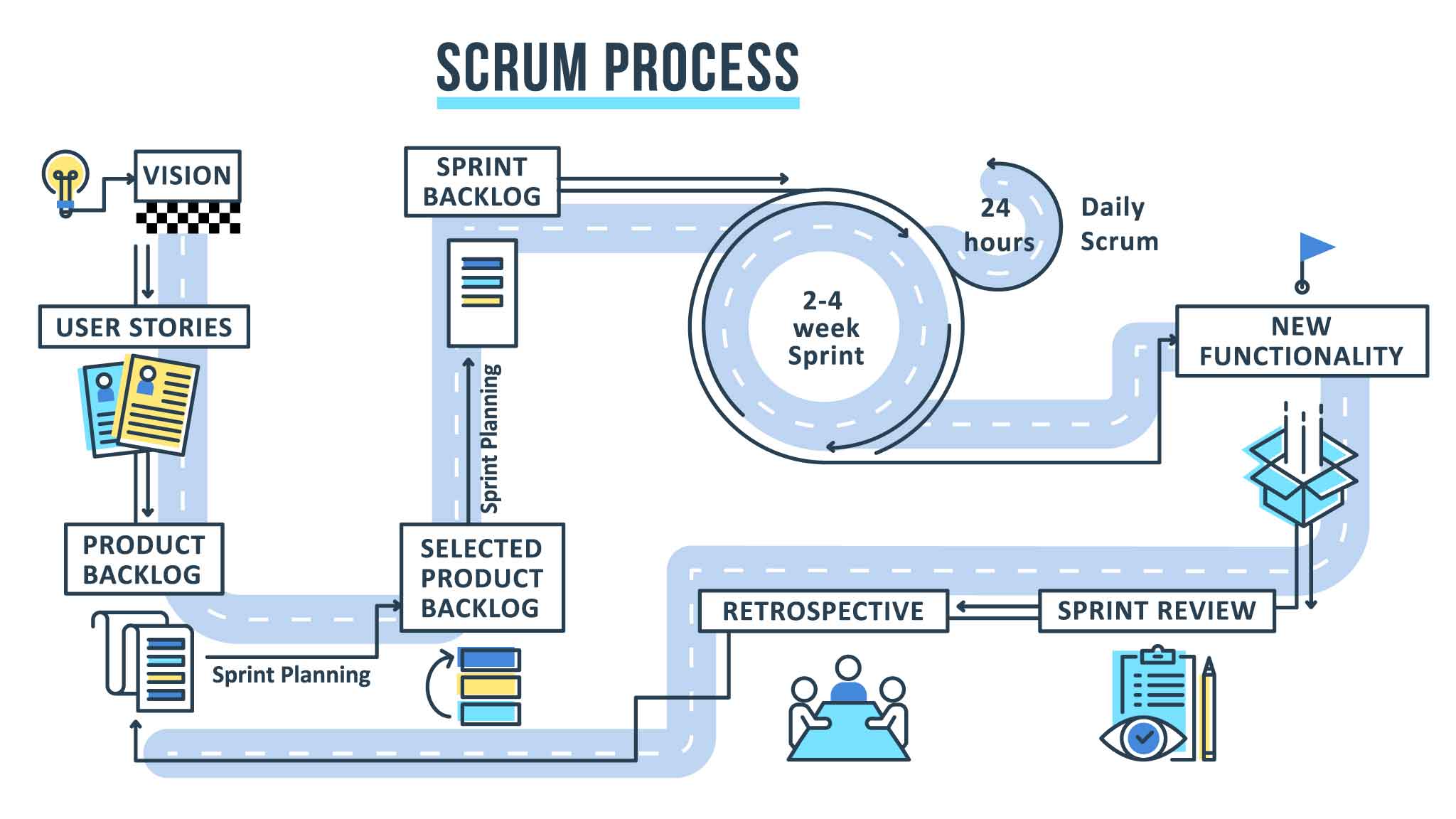
Benefits of Using Agile Modeling for your software development project
The benefits of agile are well known now. Agile software development helps companies deliver superior products by promoting the ideas of rapid iteration, user feedback, automation, communication, and flexibility. By accelerating the delivery of MVP products, software testing those products, and collecting user feedback, agile teams can quickly respond to market trends, detect issues in their software early on, and strive for continuous improvement of their product.
Which Agile PM Approaches Fit Your Digital Transformation and Projects?
The right agile approach for one team may not be suitable for another. The easiest way to begin to adopt agile principles is to involve stakeholders in a conversation about the product and begin to outline project requirements.
From there, establish clear and concise communication channels between teams and stakeholders. Set milestones and deadlines. When first starting out, it’s a good idea to allow individual teams to pursue their own agile methodologies. Remember, flexibility is key!
Collaboration is essential to the success of any software project. Principles like Agile and Continuous Integration/Continuous Delivery strive to make collaboration more straightforward, and teams and enterprise organizations are beginning to embrace Agile and a whole set of frameworks that make seamless collaboration possible; this is where choosing the most appropriate collaboration tools for your software product development project is essential.
With the rise of COVID in 2019, tools for collaboration became even more present and necessary in the workplace. As employees began to work remotely, the need for effortless communication, both in-person and remote, became increasingly apparent.
Why Do Software Dev Teams Need Collaboration Tools?
Collaboration tools provide many benefits to software dev teams and the other teams and larger organizations they must work with.
- Increased productivity – streamlined communication leads to fewer misunderstandings and setbacks that halt productivity.
- Shared skills and perspectives – new ideas can emerge from partnerships that may not have been otherwise explored.
- Better employee motivation – employees will be happier and more excited to come to work, knowing they get to work alongside their peers.
- Financial savings – increased productivity necessarily leads to financial gain.
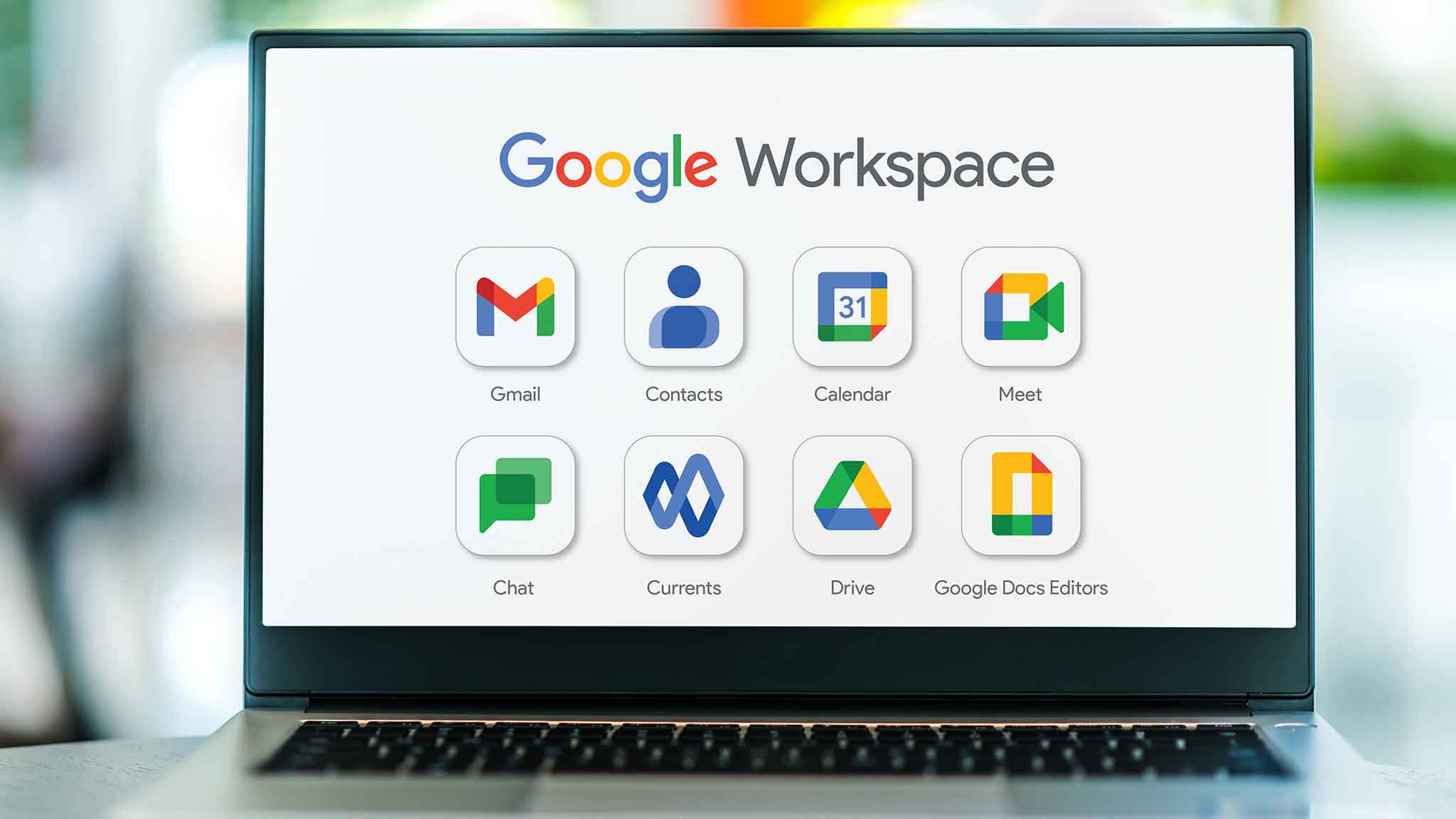
Best Collaboration Tools for Software Development
Now that we’ve understood the benefits and reasons for improving collaboration at the team and company level let’s look at some of the collaboration tools you can use to facilitate better teamwork across groups at your organization.
| GITHUB | SLACK | GOOGLE DRIVE / GOOGLE DOCS |
|---|---|---|
|
|
|
|
|
|
|

How Do You Promote Team Collaboration?
Before you dive into using these tools, it’s important to understand that tools and tech will not improve collaboration if an environment that facilitates collaboration has not been established within the organization.
Every employee should be encouraged to communicate both their ideas and their concerns. There should be clear and established routes for communication, and employees should be onboarded to these routes when they join a team. Additionally, a judgment-free, idea-sharing culture should be nurtured by employees at all levels of the company.
The concept of a “tech stack” has shifted with the advent of SaaS technologies that make coding your own solutions to common problems a thing of the past. These days, there’s pretty much an API for everything, and your tech stack will be a combination of storage solutions, languages and frameworks, and third-party APIs that leverage existing solutions, and potentially a SaaS application integrated into your workflow.
What is a SaaS tech stack?
A tech stack is the collection of software and technologies that you use to build out your SaaS application. Prior to the ubiquity of SaaS solutions, tech stacks like MEAN (Mongo Express Angular Node) or LAMP (Linux Apache MySQL PHP) were the norm.
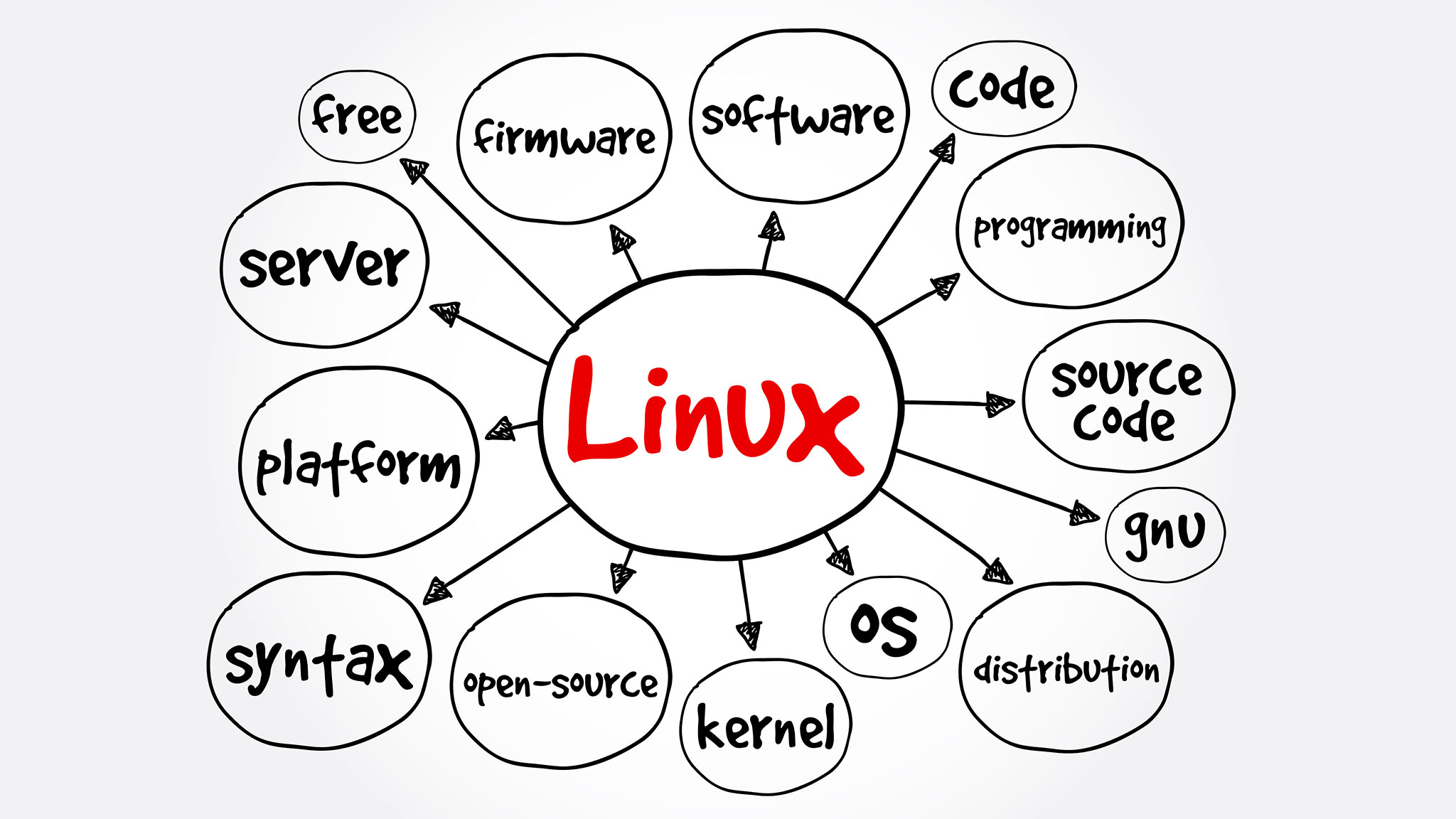
These days, a tech stack will still include database software like MySQL or Mongo, and frontend frameworks like Angular, but it may also include third-party APIs to handle everything from authentication, to geolocation, to localization and even data storage.
Key components of the SaaS tech stack
A SaaS tech stack can be divided into a few main components: the front-end technologies used to build out the user-facing portion of the app, the backend technologies used to route requests and manage data, the secrets manager used to store sensitive information, and APIs leveraged to solve common problems.
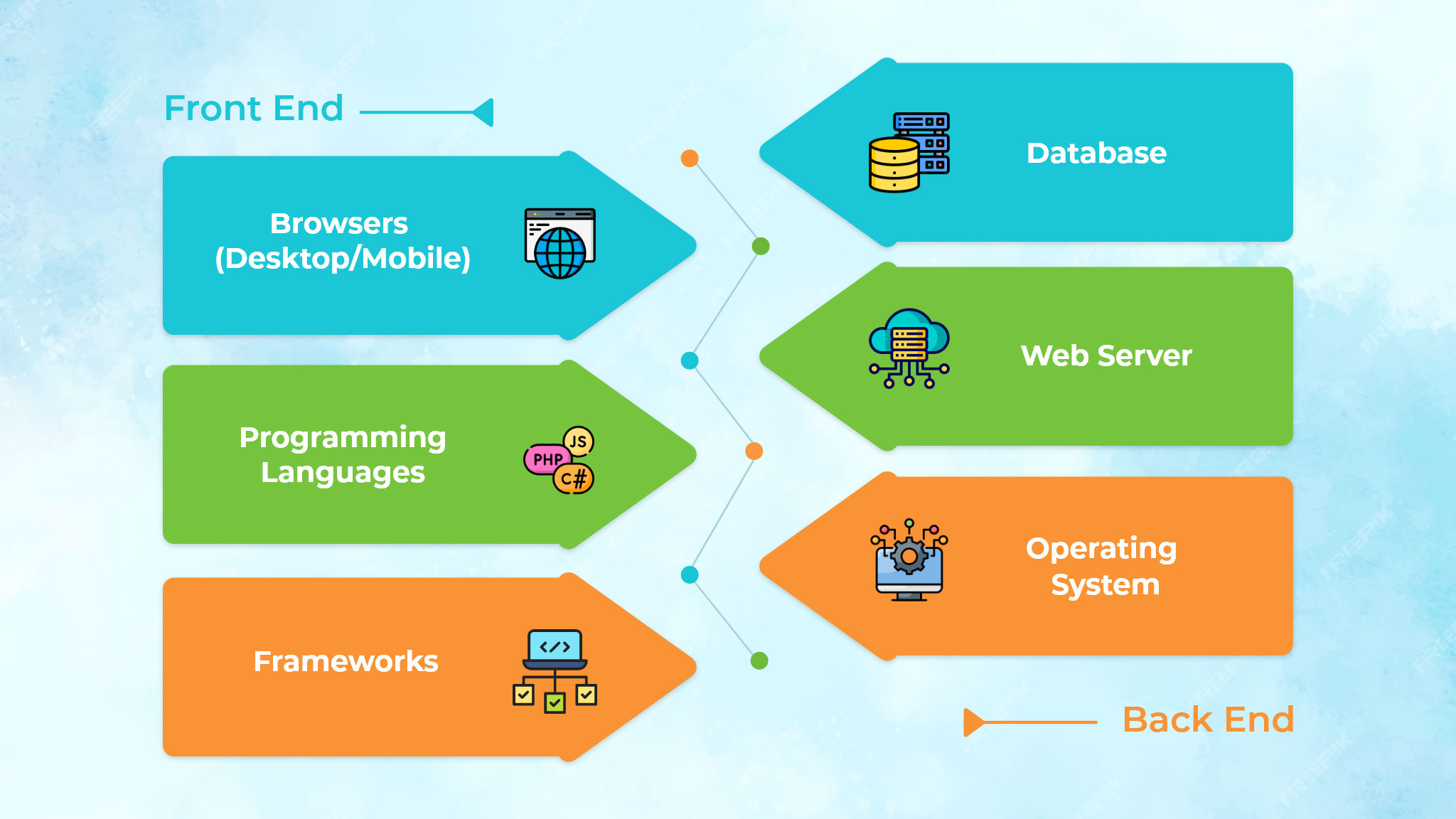
Popular/Key tech stack used for SaaS applications.
Popular tech includes Javascript and its various frameworks (React, Vue, Angular) for the front end, Python and its various frameworks (Django, Flask) for the server, Postgres or MySQL for the database, and a collection of internal APIs, AWS Lambda functions, or third-party solutions.
These days, online database solutions like Airtable are starting to replace traditional databases, and static site builders like Gatsby are becoming common on the front end. GraphQL, a querying language that allows you to tie all of these disparate APIs, technologies, and functions together, is fast becoming a key component of SaaS-based tech stacks.
Why is it crucial to choose the right tech stack?
Ideally, your tech stack should be flexible enough that removing and replacing parts of it is not a headache. This is what microservices architecture is all about. Each part of the stack manages its own discreet portion, and can be changed without affecting the rest of the stack.
In practice, however, this is rarely true. So it pays to put in the time upfront to assess your specific needs and choose the tech stack that most makes sense for your project.

Unique Features of SAAS
SaaS offers anyone the ability to take advantage of powerful data storage, networking, and computing resources. There is no restriction on geolocation—anyone can access these online technologies. This allows even the smallest businesses to harness the power of cloud infrastructure.
SaaS is highly flexible and pairs well with an agile approach to software product development. When teams embrace the microservice architecture and bring that type of decentralized, interconnected approach to their human organization, development becomes fast and highly scalable.
SaaS applications have a number of unique features that make them different from traditional on-premises software. These features include:
- Multi-tenancy: SaaS applications are designed to be used by multiple customers (tenants) at the same time on a single instance of the software. This is achieved through a multi-tenancy architecture, which allows each tenant to have their own isolated data and configuration settings.
- Automated provisioning: SaaS applications are typically provisioned automatically, meaning that users can start using them immediately without having to install or configure any software on their own devices.
- Subscription-based billing: SaaS applications are typically billed on a subscription basis, which means that customers pay a monthly or annual fee to access the software. This eliminates the upfront costs associated with traditional on-premises software.
- High availability: SaaS applications are typically hosted in the cloud, which means that they are highly available and accessible from anywhere with an internet connection.
- Elastic infrastructure: SaaS applications can scale up or down as needed to meet the changing demands of their users. This eliminates the need for customers to overprovision hardware or software.
- Data security: SaaS providers typically invest heavily in data security to protect their customers’ data. This includes measures such as encryption, access control, and intrusion detection and prevention.
- Application security: SaaS providers also invest in application security to protect their software from vulnerabilities. This includes measures such as penetration testing and security patching.
- Open integration protocols: SaaS applications typically support open integration protocols, which makes it easy to integrate them with other software systems. This allows customers to create a custom-tailored IT environment that meets their specific needs.
- Accelerated feature delivery: SaaS providers can typically deliver new features and updates to their customers more quickly than on-premises software vendors. This is because SaaS applications are hosted in the cloud and can be updated centrally without impacting individual customers.
API Management is the process by which an enterprise uses, creates, controls, or oversees application programming interfaces (APIs.) It refers to a set of standards or rules intended to govern the use of APIs within a company, and to ensure that the APIs are well-maintained and meet the needs of users.
In its simplest form, an API (application programming interface) is a piece of software that connects two other pieces of software. As microservices have become increasingly prevalent as an architectural solution for software companies, API management has become critical in ensuring a smooth user experience.
Companies might rely on hundreds of APIs, both internally and externally, to run their business. APIs do everything from integrating PayPal into a payments solution, to using Google to authenticate users, to sharing user data between two in-house backend.
Rules of API Management
API management strategy can be broken down into 5 areas: design, documentation, analytics, access, and uptime. Successful management of each area contributes to a robust and usable API solution.
Design
Good API management starts at the design phase. Meet with developers to determine their needs and the scope of the project before beginning but consider the requirements of all stakeholders. Build with an agile mindset, starting with the minimum viable product and ensuring that each layer of the API is extensible and scalable.
Documentation
Write clear, concise, easily accessible documentation. Make it easy for people to create things using your API. Create communication protocols and automate help solutions wherever possible to reduce friction for those using your API for the first time.
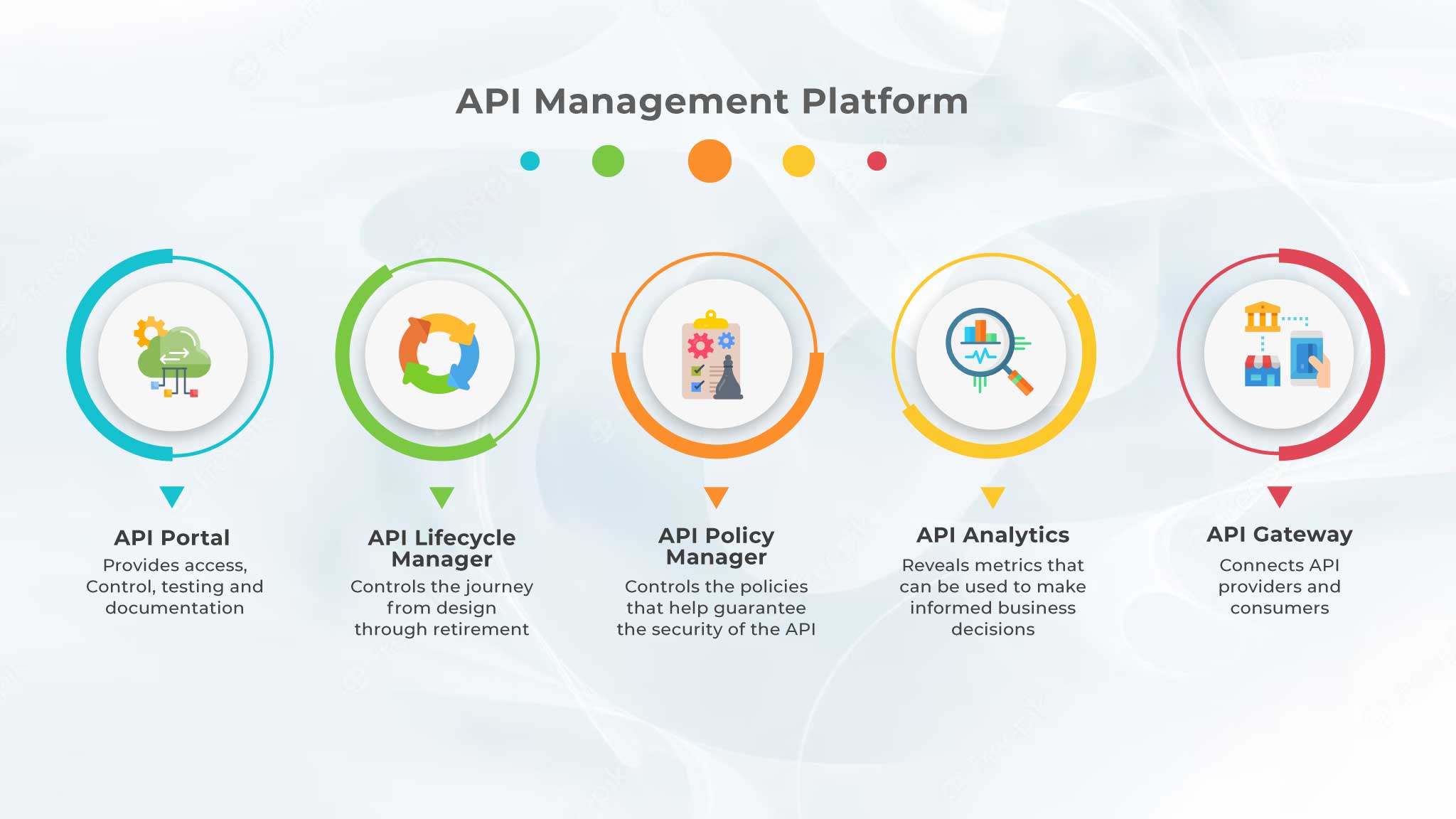
Analytics
Set up monitoring on your endpoints from the beginning. Consider what data will need to be collected and what metrics should be tracked during the design phase.
Access
All architectures that utilize your API should be able to access support and get help. This includes in-house users, cloud users, and public users. Your documentation is a key component of ensuring access for all levels of users.
Uptime
It goes without saying that high uptime is crucial for any API used across a number of applications or enterprises. An outage at Github basically constitutes a national emergency these days.
API Management Tools and Platforms
There are a number of solutions geared toward helping companies manage their APIs. The Akana API Management Platform, Mulesoft API Management, and Broadcom Layer7 API Management are a few of the top competitors in the space.
In general, an API management tool should support every phase of the API lifecycle, from design to uptime. It should offer enterprise-grade security, monitoring, and should be easily integrated with well-known testing tools.
API Monetization
Monetizing your APIs can provide an additional revenue stream—as long as your APIs are well-managed. Opening up your APIs to outside developers means you have to be rigorous about your standards and deliver a consistent, high-quality experience to your users.
There are several API monetization models: Pay-per-use, Subscription, Freemium, Pay-per-transaction, Revenue share, Pay for ad-free content, and Paid partner. See this article for an in-depth explanation of each model.
Remember, choosing the right monetization strategy depends on understanding your target audience, the API’s value, and the competitive landscape. Flexibility in pricing plans and providing clear documentation are essential to attract and retain customers. Regularly review and adapt your pricing strategy based on customer feedback and market trends to maximize monetization potential.
The term “edge computing” is becoming increasingly prevalent as more and more IoT devices, smartphones, tablets, and other devices come online in remote locations. So what is “edge computing” exactly, why is it important to understand its benefits and drawbacks, and when should you consider edge in software architecture.
What is Edge Computing?
Edge computing is the process of analyzing and processing data as close to the source device as possible or at the “edge” of the network. Until recently, the prevailing data transfer model involved moving data from network devices back to a central data warehouse for processing and analysis.
However, as devices come online in places that are very far removed from the central data center or HQ, this practice becomes less tenable due to network latency and bandwidth issues.
How Does Edge Computing Work?
Edge computing moves the bulk of the data processing responsibility closer to the device that needs the data. This might mean utilizing a device’s local storage to hold onto files that would otherwise be sent to a server or using the device itself to manage data analysis. Or it could mean extending the central network by building more hubs in locations closer to places where devices are being used.
Benefits of Edge Computing
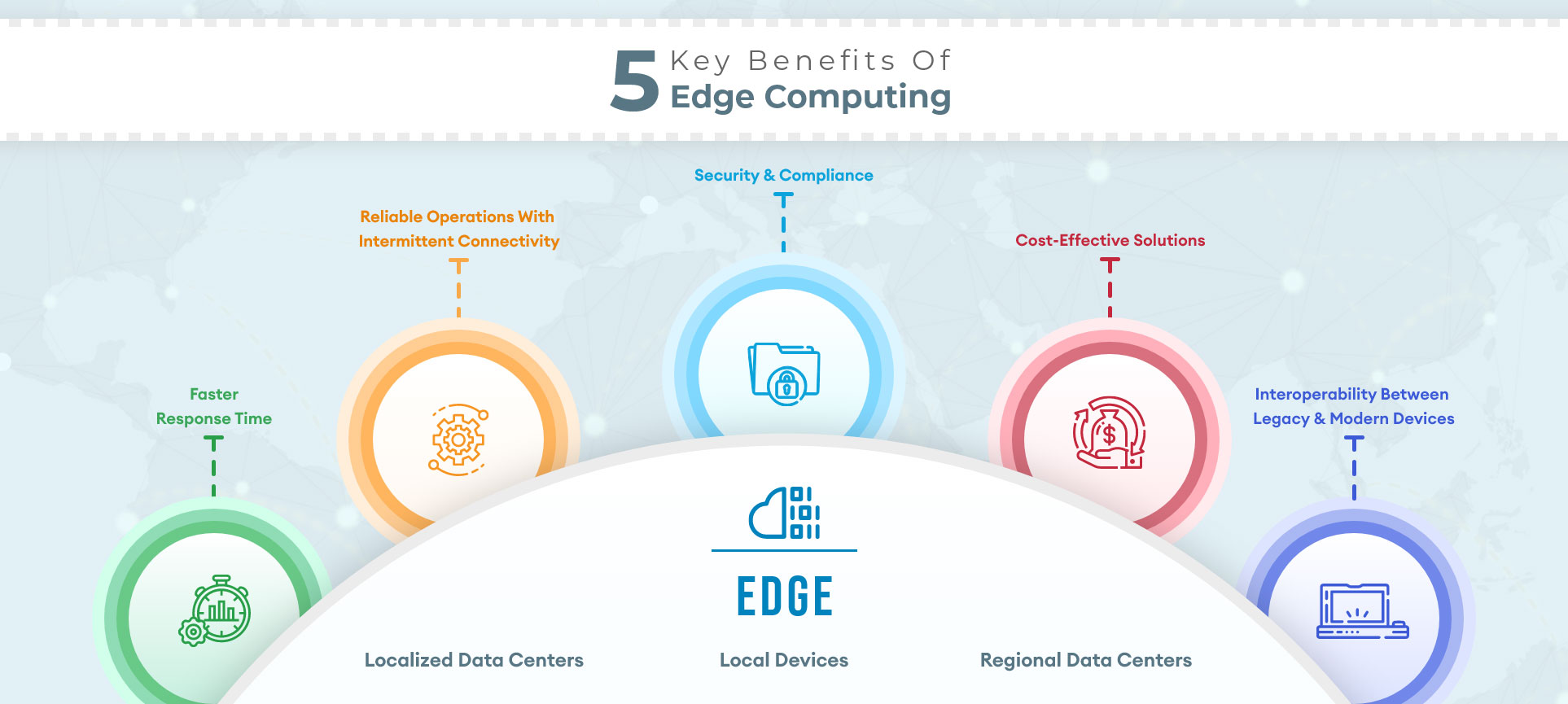
The primary benefit of edge computing is improved response times, as data does not need to travel to a data center for processing. Additional benefits include optimizing bandwidth, as only the most important data is transferred between devices and central data hubs, and a reduced security risk footprint, as less unencrypted data, is sent over the network.
Edge vs Cloud Computing
Cloud computing is the practice of using many remote servers spread across the network to store, analyze, and manage data. Edge computing is not a replacement or competitor for cloud computing rather, companies are beginning to understand how edge computing and cloud computing can coexist.
The best-case scenario will see companies selectively using edge computing for certain kinds of data processing and pushing other tasks to the cloud. For instance, time-sensitive and real-time processing tasks may be performed at the edge, while processes requiring analytics and machine learning algorithms (which run more efficiently in hyper-scale data centers) might stay in the cloud.
What is IoT, and What Are Edge Devices?
IoT, or the “Internet of Things” describes the network of physical objects with sensors, processing abilities, and other technologies that allow them to manage and exchange data with other devices on the network. “Smart” devices are a good example of the “Internet of Things.”
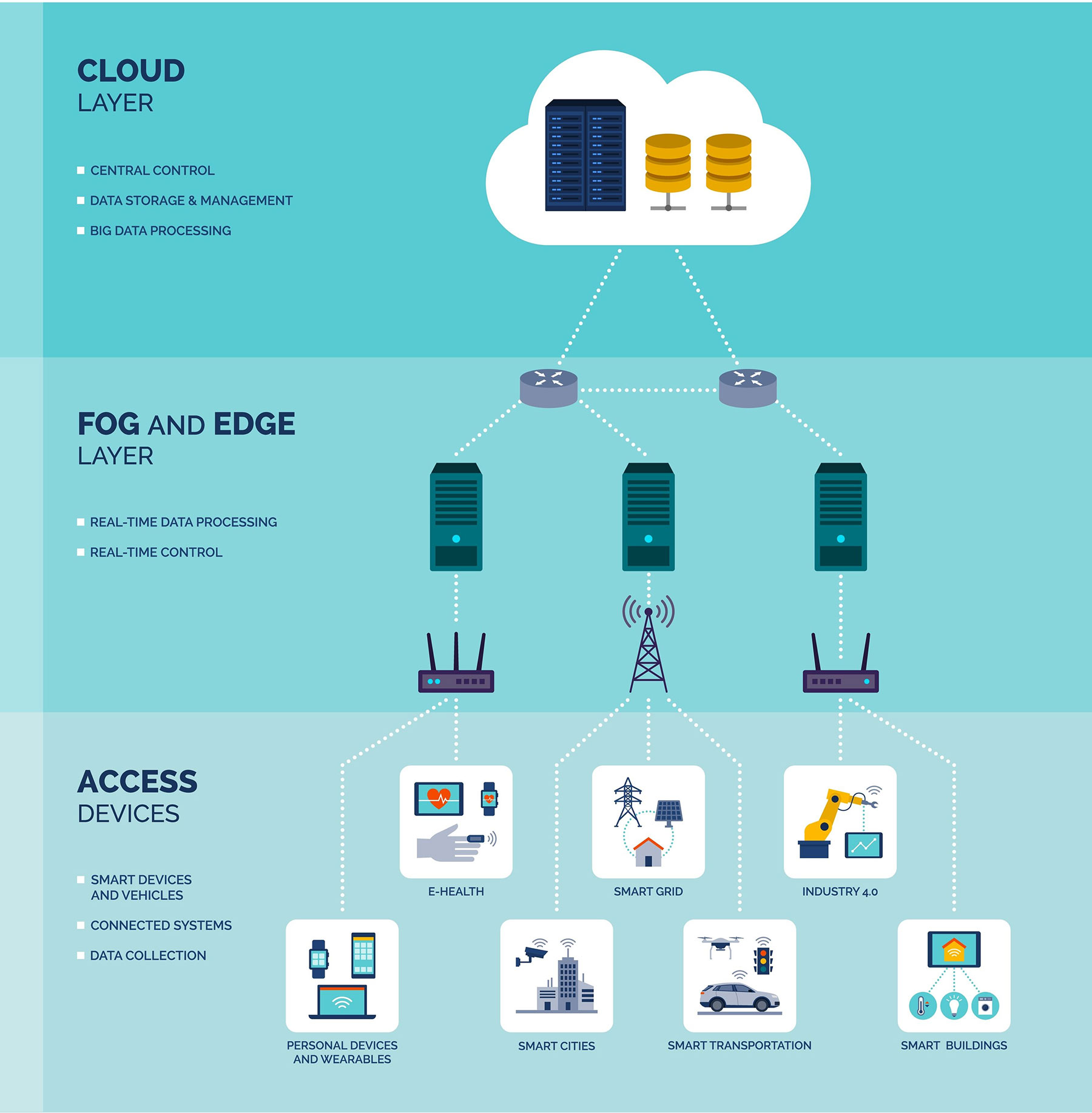
Frequently, these devices need to handle data processing and analysis rather quickly—for example, automated machines on manufacturing floors and in hospitals. It isn’t practical for these devices to continuously send and receive network requests. For that reason, IoT devices are also usually “edge devices.” They manage their own data processing and analysis.
Challenges of Edge Computing
While there are many benefits of edge computing, there are also inherent challenges and risks. Although edge computing reduces the network security risk by requiring fewer unencrypted network requests to be sent, pushing data processing to edge devices does make those devices more vulnerable to attack.
Additionally, the sensors and processors in edge devices must be properly maintained in order for the devices to function. Rather than maintaining a single processing unit in a data center, edge computing requires many units to be maintained at the edge of the network, often in remote locations.
Once you have taken these challenges into consideration, hopefully, you will be ready to incorporate edge computing into your software architecture strategy.
Major Steps In Planning For A Mobile App
Are you planning to build a mobile app? Here are some major steps on how to plan, build, and monetize the next big app in the market.With over 6.3 billion smartphone users, it’s clear that there’s a demand for mobile apps. But although the market is huge, for every app you use, thousands of others never get kicked off. Some got off the ground but couldn’t appeal to their audience, while others couldn’t find ways to monetize and sustain business growth. Although several factors make your mobile app more or less likely to succeed, a good plan sets the proper foundation for success.
Why You Should Plan for Mobile App Development
Consumer and business apps have a 99.5% and 87% failure rate, respectively. The odds don’t look great, do they? But the same study showed that poor planning is the biggest reason for failure when undertaking a mobile app development project. Not just any plan, but proper planning, analysis, and clearly-defined goals.
A lot goes into this, but here are major steps to follow when planning and building a mobile app:
Understanding the Idea
The first step in your planning stage is understanding the feasibility of your app concept in the current market. It’s important to answer questions such as:
- What is my app’s purpose? You cannot gauge your app’s success without a goal. Understanding the objectives will help you determine the metrics and KPIs that you’ll track.
- What are its use cases? This helps in the software development phase.
- What will be the core functionalities before launch? This helps in prototyping, wireframing, and preparing a product roadmap.
End-User Research and Competitor Analysis
Understanding your app’s target audience is crucial to its success. A report showed that nearly 80% of mobile apps are abandoned after their first use. And the reason is that they’re not a good fit for the user. You need to understand who the users will be, their interests, needs, and the problems they face. Getting this in-depth understanding of your target audience helps you create an app tailored to their expectations and needs.
Also, there are chances that you already have competition. It’s crucial to conduct due diligence on your competitors and browse apps that are similar to yours.
How do they solve users’ problems? How do they attract their users? What are their users’ (your potential users) complaining about? Answering these questions will help you understand the gaps your app needs to fill to effectively differentiate your solution.
Design and Wireframe
The wireframe is a digital sketch of your app’s interface, layouts, and core functionalities. It is a low-fidelity mockup of the various screens in the user journey and flow.
It’s important to prioritize a simple UI when creating your mobile app design. A modern and intuitive dashboard or interface facilitates better interaction between the user and the app. Strive to create an intuitive product that users can learn quickly and use to achieve their goals with little or no instruction.
In addition, it’s important to create wireframes for iPhones, iPads, or Android phones and tablets to ensure your app can be deployed successfully on multiple devices and form factors.
Figma, InVision, and Adobe XD are good wireframing tools that are available.
Preferred Technology and Platform
Countless factors come into play when choosing your preferred platform. With Native mobile app development, your app is built with native languages like Kotlin for Android app development and Swift for iOS app Development. This not only allows you to gain access to platform-specific features but improves your app performance considerably. Since Native apps are built for one particular platform and compiled using its core APIs and programming language, they’re faster, more responsive, and provide better UI.
Cross-platform apps, on the other hand, are built with a single code base to work on multiple platforms. If you have a big budget or don’t intend to expand beyond your chosen platform, native apps are a good option. Otherwise, you can utilize cross-platform app development technologies such as Xamarin, Flutter, and React Native to speed up app development and save costs, albeit such apps may fall short in several areas when compared to native technology.
Funding for the App
App development costs differ based on what you’re trying to build, functionalities, and even the platform. Although bootstrapping is a popular choice, partnering, choosing a co-founder, raising donations, and angel investors are funding alternatives for app development. The latter takes the burden of the capital in return for an equity stake in your company.
App Development and Testing
This is the stage where the app is developed. It’s important to plan your app development approach, whether waterfall or agile. Agile app development is cost-friendly, faster, and allows for seamless collaboration between teams, making it the best choice. It can be smarter to first develop a minimum viable product (MVP) with all your app’s key functionalities that solve the users’ pain points. It’s a great way to meet the audience’s core needs while getting feedback that you can integrate into new features. Also, before releasing the MVP, you must test on the right people to get quality assurance. It’s okay to test prototypes with the team at the early stage of development. However, when you’re nearing the completion and developing robust prototypes, you should test them on a representative sample of end-users to gain the most beneficial insights.
Monetization
Before you launch your app, figure out how you’ll make money from it. One alternative is to use a freemium model, which allows users to get a taste of the software before paying for the premium version. Other app monetization strategies include email lists, in-app purchases, advertising, sponsors and partnerships.
Create a marketing strategy for your app and pre-launch hype.
This is something very important to making your app a successful one. You need to do the marketing preparations like ads, branding and pre-launch events etc.
We need to create some hype around it and the end users must be aware of the app even before it launches in the app store. Your efforts will increase exponentially in the long run if you start the marketing early.
Create a plan for app store optimization(ASO)
This will help the end user to find the app in the app stores easily. Over 60% of apps are discovered through search in the app store. There are some best practices for giving content in app stores. You can make it visually appealing, explain the app features, and mention search tags for more reachability.
App Store Optimization (ASO) is something you can plan for the final stage of the app’s development, you can design the look and feel of your app in app stores.
Ensure the app’s security
When you develop a mobile application, there are many security constraints you need to take care of. The most important thing is that the app needs a privacy policy, which will explain to the end user what all information is being collected and for what purpose it’s needed in the app. For the privacy policy generation you can get legal consulting you may need. Another key factor related to security is how you manage the data in the app. The user data is a very important asset and you should plan how the data is going to be collected, processed and stored securely.
Conclusion
Poor planning of the execution stages, lack of market research, and a lack of clearly-defined goals are why your app could fail. After planning for all these, it’s time to launch. However, your app development never stops. Maintaining and improving your app is important to ensure it meets evolving customer expectations and stays competitive.
Before you decide on a JavaScript framework for your front-end project, there are a few things to take into consideration. How complex is your project? How many developers are working on it? Do you need the flexibility to build both a web app and a mobile app? Do you need to incorporate a CMS?
In general, you should choose the JavaScript framework that is easiest to get up and running and adds the least weight to your project, while still giving you the features you need. With that said, let’s take a look at some options.
Angular
Angular, originally released in 2010, has gone through a major evolution in 2016 and is one of the best-supported and most popular JavaScript frameworks around, with great documentation and many accompanying libraries. Developing using Typescript is time saving, support for Angular CLI makes updates seamless and two-way data binding make Angular a very powerful choice for front end engineers.
One of the drawbacks of using Angular is its somewhat steep learning curve, and large package size compared to React.
React
React is one of the most popular JS tool out there today. It’s technically not a framework, but a library of UI components. It’s well-documented and has been around since 2013. There are hundreds of libraries out there that make developing with React easy, including Create React App, which will get your development environment up and running in minutes.
React makes changes to individual elements on the page through a virtual DOM. It uses JSX, a declarative HTML-like syntax that allows you to create discrete UI components . The component model makes reusing and testing code extremely easy.
Vue
Vue is another popular JavaScript framework that aims to combine the best features of Angular and React. Many people consider the Vue API to be simpler than the React API, so front end developers without much JavaScript experience might have an easier time with Vue than with React.
Vue also relies on a virtual DOM but uses HTML templates instead of JSX components as its building blocks. Vue uses Angular’s directive binding to hydrate templates with data.
Gatsby
Gatsby is a React-based framework that generates static sites and can also be used to build progressive web apps. Gatsby integrates easily with content management systems and provides pre-made building blocks for common use cases.
Under the hood, Gatsby relies on React to build, bundle and serve static HTML pages. Once as much content has been statically generated as possible, client-side React picks up where Gatsby left off, giving a Gatsby page as much power and flexibility as a traditional React PWA.
Ember
Ember is one of the older JavaScript frameworks around—it was first released in 2011, but it’s still loved by many JavaScript Engineers. It’s a template-based model that uses the Handlebars templating engine to generate HTML templates that are updated through directive-binding similar to Angular’s model.
Some of the most popular features of Ember include the Ember inspector tool and Ember Simple Auth, which abstracts away the complexity of user authentication. While not as popular as React or Vue, it’s a great option for building functional, easily maintained web apps.
Meteor
Meteor is a full-stack JavaScript framework that runs not just in the browser, but also on the server and in mobile apps. It’s a great option for getting smaller apps and proofs-of-concept up and running quickly, but can be limiting for complicated, large-scale, enterprise applications.
Isomorphic JavaScript code runs inside the browser and in a Node container, from where HTML, CSS, and assets are served. Meteor runs a MongoDB database instance, but it supports any database with a Node driver.
There are so many options for frontend frameworks out there nowadays that choosing one for your project can seem like an overwhelming task. The good news is that no matter which one you choose, you will get an improved development experience compared to vanilla JavaScript. There is no “best” JavaScript framework, there’s only the best framework for your project.