
Dec 29th, 2025
The Ultimate Guide for Custom Software Development (SDLC Process)
What is Custom Software Development?
As digital demands grow, many organizations require software that supports their specific workflows and system environments. This need has increased the focus on custom software development as a strategic solution. These solutions are developed to align with business objectives, automate domain-specific processes, and function as a strategic digital asset that evolves with the organization.
Definition of Custom Software
Custom software applications match a customer’s specific expectations. Unlike off-the-shelf products, developers do not create them for general use but tailor them for a particular business or user group.
Key Characteristics
- Tailored: Designed to match specific workflows and business logic.
- Integrated: Compatible with current and legacy systems and works efficiently.
- Scalable: Expand as the number of users, features, and demands from the rest of the system grows.
Why Companies Choose Custom Applications Over Off-the-Shelf Software
When commercially available software cannot support their specific operational requirements, integration landscape, or long-term technology strategy, companies turn to custom applications.
Custom applications, on the other hand, allow organizations to design systems that align with their business logic, integrate seamlessly with existing and legacy systems, scale according to future demand, and maintain complete control over features, security, and data.
Custom-Built Apps vs. Off-the-Shelf Apps
| Feature | Custom-Built Apps | Off-the-Shelf Apps |
|---|---|---|
|
|
|
|
|
|
|
|
|
|
|
|
|
|
|
|
|
|
|
|
|
Benefits of Custom Software
With custom software, leaders can create systems that not only expand current architectures but also easily integrate with legacy systems and facilitate future modernization. Besides, it improves the organization’s security, governance, and control over the technology landscape.
Who Benefits from Custom Software?
- CTOs and CIOs: With custom software, leaders can create systems that not only expand current architectures but also easily integrate with legacy systems and facilitate future modernization.
- CEOs and Business Executives: By enhancing business operations, custom software development enables the implementation of Strategic Initiatives and Digital Transformation.
High-Level Benefits of Custom Software
- Scalability: Custom software can expand as the organization grows, supporting higher user volumes, additional features, increased data loads, and evolving architectural needs.
- Flexibility: Because custom software is designed around specific workflows and business logic, it can be modified or extended as requirements change. Organizations can adapt the system at any stage without being constrained by vendor roadmaps.
- Automation: Custom-made software is the best way to streamline even the most complex business processes by reducing manual work, ensuring process accuracy, and increasing operational efficiency across departments.
- Innovation: Custom-built systems give companies the freedom to add new features, differentiate their products, and explore the latest technologies.
Industry challenges and trends
Software is becoming very important to modern firms for operations, consumer interactions, compliance, and innovation. However, traditional, off-the-shelf solutions have limitations due to changing market dynamics, growing data volumes, and frequent corporate strategy shifts.
Why Companies Struggle with Off-the-Shelf Solutions
- Integration and legacy system challenges: Most firms have their own internal platforms and rely on legacy systems. Off-the-shelf software cannot fully integrate with such environments, which usually results in increased manual tasks and system complexity due to process changes.
- Rising Long-term cost: The initial expenses might be small, but costs will increase with business expansion due to license fees, user-based pricing, and paid add-ons.
- Scaling Issues and Operational Challenges: As businesses grow, off-the-shelf solutions often struggle to handle increasing user numbers, higher system load, and complex data requirements. As a result, there are issues with performance, reliability, and user experience.
Rapid Change in Feature Requirements
Modern business environments require software to evolve continuously. Customer expectations change quickly, regulatory requirements are frequently updated, and emerging technologies constantly reshape digital operations. Without architectural flexibility, companies are limited in their ability to try out new ideas, change their workflows, and launch different capabilities. This reduces an organization’s agility, weakens its competitive position, and limits long-term technology viability.
Software Development Lifecycle
What is SDLC?
SDLC stands for Software Development Lifecycle. It is the name given to the stages of building and shipping a piece of software – whether that piece of software is a complete flagship product, or just a minor patch. The software development lifecycle comprises much more than just writing and deploying code. It also encompasses user analytics, assessing your existing software, planning, testing, maintenance, and gathering data once the code has shipped to determine where to focus your efforts next.
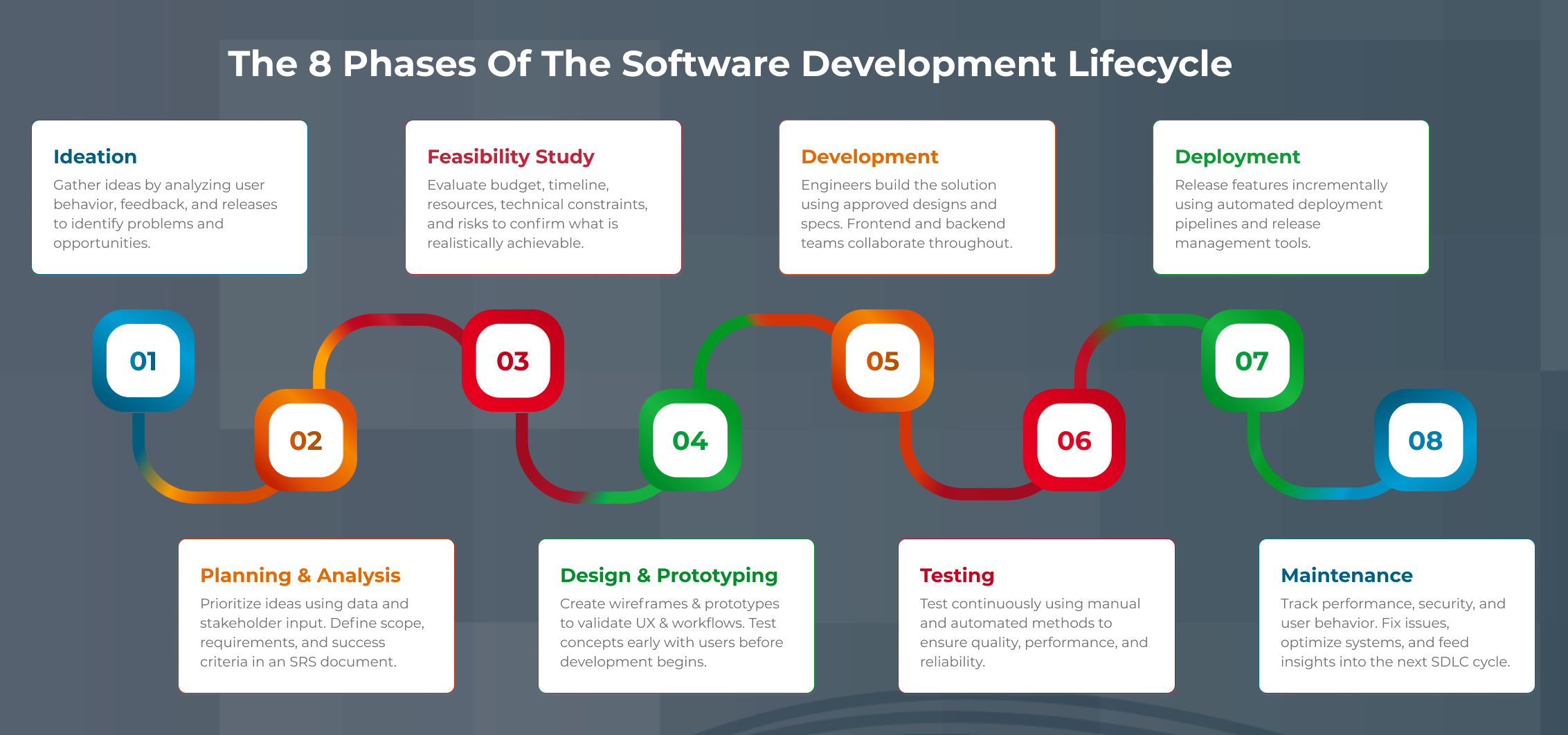
The 8 phases of the Software Development Lifecycle
1. Ideation
Although this is listed as step one, this isn’t actually where the process begins. SDLC is a cycle, and the process really begins at the end of the previous cycle, when you’re monitoring the last piece of software you launched. Observing the way users engage with the software you already have is a big part of figuring out what to build next and is a key component of the ideation step.
This is part of the process for blue-sky thinking. The ideas you come up with may not be concrete or executable, but they should all be considered valid at this stage in the game. Write everything down. This is a brainstorm. The time for whittling things down comes later.
2. Planning and Analysis
Once you’ve generated all your ideas it’s time to start narrowing them down. This is done by analyzing your current system and prioritizing your needs. Data that you’ve gathered from previous cycles, or from tracking user behavior should be used to guide your decisions. Involve all relevant stakeholders in the decision-making process.
At this point the SRS (Software Requirements Specification) document should be generated.
3. Feasibility Study
This is part of the planning process – specifically the part where resource and budget constraints are taken into consideration. You need to consider economic factors, legal concern, logistics, time frame, etc. Use the SRS document you generated in the previous step to support this step.
4. Design and Prototype
The design and prototyping phase typically skew heavily toward front-end design and user experience. You may want to build some wireframes and put them in front of real users to see if your ideas work. If you don’t have the ability to wireframe, do some data-gathering in the form of surveys, or put designs in front of users to get their reactions.
This step is crucial, because it allows you to build a simple interactive version of your product and see how users actually interact with it before you spend time coding, testing, and deploying.
5. Development
Developers and engineers will be given any specs, designs, wireframes, and documents you generated in previous steps and will begin coding the actual software. Ideally, engineers will have been involved in the process long before this point to provide insight into the limitations and feasibility of the designs.
Do not wait until this step to involve engineers! Yes, this is the step where they are most utilized, but their feedback and opinions should be solicited long before they are given specifications to code. This includes front end and back-end engineers.
6. Testing
Testing should really be considered part of the development step, as you shouldn’t wait until development is complete to begin testing. Engineers should be writing unit tests for every module of code they build, and if possible, manual testing should be happening throughout the development process. As soon as something is usable enough to test, start testing it!
Much of the testing process should be automated, and the implementation of automated testing (i.e. what automated testing tools to use, etc.) should be discussed as part of the planning and design process.
7. Deployment and Delivery
As with testing, deployment doesn’t just happen at the end of the process. Features should be deployed incrementally throughout the SDLC, using a suite of ARA (Automated Release Automation) tools. The types of ARA tools to use should be discussed during the planning process and should be continuously evaluated for their efficiency.
8. Monitoring and Maintenance
Work isn’t complete once the code is deployed. Monitoring and maintenance are an ongoing process that never ends as long as a piece of software is live. The good news is that there are plenty of automated tools to aid in this step of the process too.
Monitoring and maintenance involve not just monitoring for breaks and deploying bug fixes, but also tracking user behavior and analyzing data, monitoring performance and security, and using the data gathered from this step to plan the next launch.
Software Requirements
Best Practices for Analyzing Your Software Requirements
Before you can begin building your next piece of software, you’ll need to make a thorough audit of your current system and analyze your needs. You’ll also need to think about reconciling the needs of users with the needs of your business. This is an important part of the planning process, and there are several things you can do to set yourself up for success down the road.
Define business objectives
First of all, figure out what it is you’re hoping to achieve with this software. This sounds obvious, but funnily enough, it’s a step many businesses seem to forget about. Why are you building this software? What concrete KPIs and results do you hope to see? Will it drive higher engagement from your existing users? Attract new users?
Generate income? Determining this ahead of time will have a large impact on the direction your development goes.
What do my users need to do with my application?
The next step is aligning your business goals with the needs of your users. The best way to do this is to talk to your users! Whether that means literally talking to them, gathering data through surveys, or just analyzing user behavior via data that you’re gathering through your existing software.
Software Development Methodology
What is the best software development methodology to choose, and what are the differences?
Words like Agile, Lean, Scrum, and RAD sound like buzzwords (and these days, they kind of are), but they are also useful strategies for building software. In this article, we’re not going to dive into specifics of each type of approach but rather give a broad overview of what a software development methodology is and why it is useful.
What is software development methodology?
A software development methodology is simply an approach to building software. Most popular methodologies today closely follow the SDLC. In fact, the terms for methodologies are sometimes used interchangeably with the software development lifecycle, because methodologies like Agile were actually partially responsible for defining the SDLC as we know it today.
What are the most popular methodologies?
These days, the most popular software development methodologies are:
-
Agile Software Development
Agile software development refers to an iterative process where tasks are broken into 1–4-week sprints, continuous testing is used, and user feedback is consistently gathered. Instead of working on one large project for weeks or months, Agile breaks work into smaller features, releases them quickly, and tests with users to validate direction.
-
Lean Software Development
Lean development emphasizes reducing waste, openness, and communication. Engineers are encouraged not to commit too early to specific ideas and to identify bottlenecks as soon as possible. Teams remain open-minded throughout the cycle, considering all factors before finalizing decisions.
-
Scrum Development
Scrum is built on Agile and is considered one of the most flexible methodologies. Key roles include the Product Owner, Scrum Master, and Development Team. The Product Owner ensures the work aligns with client expectations, the Scrum Master guides the team through the Scrum process, and the Development Team executes the work. Development happens in 4-week sprints, promoting rapid iteration and frequent testing.
Do I have to choose a methodology?
While it’s not necessary to choose a specific methodology, it can be helpful to name your process so that everyone on the team is on the same page about how things will go. Choosing a popular methodology also means you’ll be part of a community that shares the methodology, and you’ll find lots of resources to answer any questions you may have about how to proceed with each stage of development.
Technology Stack
What is a software development tech stack?
A tech stack is the suite of tools, frameworks, languages, APIs, and other pieces of technology that you use to build your product. It’s called a “stack” because most engineers envision a piece of software as a “stack” of systems: operating system, database and other back-end concerns on the bottom, servers and middleware in the middle, and the front end and user-facing components on the top.
What’s the best technology stack for my application?
- MEAN (MongoDB, Express, Angular, Node)
- PERN (Postgres, Express, React, Node)
- LAMP (Linux, Apache, MySQL, PHP)
Or other combinations of these tools.
What are the significant points to consider in a Technology Stack?
1. Size and type of the project
Not all tools and frameworks are right for every project. For example, the MERN stack (MongoDB, Express, React, Node) might be perfect for startup getting a greenfield project off the ground, but totally wrong for a large organization like Facebook, where certain languages and frameworks are already prevalent.
2. Speed of development
Depending on how fast you need to move, you may want to consider different stack setups. Building your own Postgres relational database is great if you have the time, but if you don’t, you may want to use something like Airtable or Artavolo. As with everything, there are tradeoffs to consider. Airtable might get you up and running quickly but may not provide all the features or complexity you need for a big project.
3. Availability of developers
The familiarity of your existing engineers with certain tools will largely dictate what your tech stack looks like. There’s no point choosing a stack full of languages and frameworks your developers have no idea how to use. This is why it’s important to involve engineers early in the process to give their opinions on tools and technologies and the limitations these may present.
4. Cost of specialists
If a certain tool or framework is absolutely necessary, and none of your devs are familiar with it or have the bandwidth to learn it, you may need to outsource. This will impact your budget. Again, this is a key reason that it is important to involve developers in the planning process.
5. Solution flexibility and future-proofing
How will the decisions you make now affect technical debt down the road? Technical debt is the name given to the need to fix solutions later because of decisions made now. Technical debt is unavoidable – requirements change and solutions will always need to be tweaked and updated as new technology becomes available. However, you can mitigate the negative impact of technical debt by planning for it and choosing a tech stack that is scalable and flexible.
Software Testing
Software Testing Practices to Elevate Software Application
Once your tech stack is decided upon and the software is built, testing begins. Testing is an often overlooked but extremely crucial step in the SDLC and understanding the various components will ensure that your testing is rigorous and your final product robust.
What are the most essential types of software testing?
Let’s briefly look at the types of software testing, where each one fits into the SDLC, and why it’s important.
-
Unit Testing – Validates individual components, catching bugs early and reducing later costs
Unit testing happens at the developer level. Each developer writes unit tests for every component of code they create. It is part of daily development — any new change pushed for code review should include a unit test.
-
Integration Testing – Ensures different modules work together without issues
Integration testing should also happen at the developer level, though external QA can participate. Instead of testing individual components, it checks larger parts of the system to ensure new changes don’t break existing functionality and that modules interact correctly.
-
Functional Testing – Confirms core features align with requirements and function correctly
Functional testing happens at the QA level once a feature is complete. It doesn’t always need manual testers — tools like Selenium, Cypress, and Ranorex can automate much of this work.
-
User Acceptance Testing (UAT) – Allows stakeholders to verify the software meets business goals
After confirming new features work and don’t break existing ones, the software is presented to users and stakeholders to validate business expectations. Automated tools like click trackers and page trackers can support this process.
-
Performance Testing – Assesses responsiveness and stability under load
Performance testing must run at scale to identify bottlenecks or degradation under heavy load. Tools such as Apache JMeter, LoadRunner, and WebLOAD can simulate high-traffic conditions.
-
Security Testing – Identifies vulnerabilities to protect user data and ensure compliance
Security testing includes penetration testing, vulnerability scanning, Static Application Security Testing, and using white-hat hackers to uncover weaknesses that could lead to breaches.
-
Regression Testing – Checks that updates don’t break existing features
While unit and functional tests help with this, regression testing specifically ensures new features, patches, or changes don’t break existing functionality or cause unexpected behavior elsewhere in the application.
Software Deployment
What is software deployment?
Once you’ve finished testing your software, it’s ready to deploy! Deploying software refers to the process of pushing your new features out to users, whether as part of an existing application, or a whole separate product.
As with all parts of the SDLC, much of deployment these days can be automated. Tools like CircleCI allow code to be automatically tested and/or deployed as soon as it is pushed to a repository like Github. Deployment isn’t just about pushing out new changes, though: you need to be prepared in case something goes wrong, or a problem is introduced.
Database Backup and Migration Readiness
Database backup and migration is a key step when introducing changes to your database. User data is extremely valuable and must be protected in case deployment issues occur. Migration should be handled by knowledgeable backend developers with automated safe holds in place to prevent failure.
Rollback Plan and Contingency Measures
If something goes wrong during deployment or a bug is introduced, developers should be able to quickly and safely roll back to a previous deploy. This can now be automated and done at the touch of a button. Tools like CircleCI and cloud platforms like AWS handle rollbacks smoothly and should be planned into your SDLC.
Configuration and Environment Checks
Your software lives in a specific environment and requires certain configurations to run. VMs, Docker containers, environment variables, runtime engines, and other supporting technologies must stay consistent for your software to function correctly. Environment decisions should be discussed early, including whether this product will share or separate configurations and the security risks involved.
Documentation and Release Notes
Good documentation helps future-proof your software. The people who built the product may not work at your company forever, so their knowledge must be captured for future engineers. Quirks of the system, technologies used, and reasoning behind certain choices should be included so new engineers can get running quickly and contribute meaningfully. Good documentation saves significant time and money long-term.
Software Maintenance
How does software maintenance save time and reduce SDLC costs?
Once you’ve deployed your software, the maintenance begins. This is a process that will continue for the life of the software, and will be the primary way you identify bugs, release updates, and track user behavior.
-
Proactive Planning
Using maintenance insights to inform requirements, reducing future rework. One of the major benefits of good maintenance and monitoring is that it allows you to use the data you gather to plan your next iteration. No need to guess what users want: the answer is right there in their existing behavior.
-
Design Refinement
Improving design based on feedback, making systems more scalable. No product is perfect. Iteration is a major concept of software development. Staying open-minded about what improvements need to be made and how a design might change is important and knowing what those needed improvements are much easier when you are closely monitoring your system.
-
Efficient Deployments
Smoother releases with CI/CD, minimizing emergency fixes.Integrating CI/CD (Continuous Integration/Continuous Development) tools into your tech stack will not only improve deployment efficiency, but also make monitoring and maintenance easier, and facilitate easy rollbacks in case of emergencies.
Buy or Build
Should I build or buy my software?
The issues raised when considering your tech stack might push you to consider hiring outside help. There is nothing wrong with outsourcing software development. Limitations of your existing team, time and budget constraints, or simply wanting to focus internal resources on more important projects are all reasons companies choose to outsource.
How much does Software development cost?
There is no definitive answer to the question about development cost. Depending on the size and complexity of your project, constraints of your existing system, and abilities of your development team, the cost could be anywhere from a few thousand to a few hundred thousand dollars.
What is the average price of custom software?
On average, a new feature for a medium-sized system costs around $100,000. For a large system, this price could be as high as $400,000.
However, for a small startup or an MVP (Minimum Viable Product) concept, the cost could be much lower. Again, the cost will be determined by the size, scope, and complexity of your project.
Does a mobile app cost more? Are mobile apps included in the cost of a web application?
There are two primary ways to build mobile apps: native and hybrid. A native app is built for one device or OS (for example, iOS) and uses languages and frameworks specific to that device (for example, Swift.) A hybrid app can be built using tools that frontend.
A mobile app may cost more if you need a native app and your developers are not familiar with the language that supports it.
Is Testing included in the cost of software development?
Unit testing and functional testing should be included in the price of software development; however, full QA and user testing may not be. Work with your software provider to figure out what they include and what you’ll need to do yourself or source from somewhere else (there are companies that also specialize in QA and testing).
Why Hire a Custom Software Development Company?
Hiring a software product development company empowers your business to develop reliable, scalable solutions that boost efficiency and increase your competitiveness in the market. If you already have a development team, our engineers can easily integrate and support that team, and if you don’t, we can provide you with the talent you need to build robust, cost-effective software.
With reduced licensing and customization fees over time, custom software is a financially sound investment. Custom solutions allow businesses to create unique software features that set them apart from competitors using off-the-shelf solutions, improving market positioning, and providing customized user experience that can increase customer loyalty and satisfaction.
Why Telliant?
Telliant understands the advantage of custom software, and we work hand-in-hand with clients to create high-quality features tailored to your specific business goals and dictated by your needs, budget constraints, and logistical limitations. Our expertise allows us to provide you with a team of experienced developers, designers and project managers skilled in a wide range of technologies and industries.